CorelDRAW Technical Suite logo

CorelDRAW Technical Suite 2026 v27.1.0.129

  • User Rating:
    ★★★★★
    ★★★★★
    0.0 ★ 0Votes
  • Requirements:
    Windows
  • Version: 2026 v27.1.0.129
  • Latest updated: 2 weeks ago
  • License: Free Trial  
  • Publisher: Corel
  • Size: 1.5 MB
× app stores

CorelDRAW Technical Suite is a professional design and documentation solution created for producing detailed technical illustrations, engineering graphics, and visual communication materials. The suite combines multiple applications that support technical drawing, vector illustration, page layout, photo editing, 3D model visualization, and publishing workflows.

The software is designed to help professionals create accurate technical documentation with precise specifications. It provides tools for developing detailed illustrations, transforming 2D and 3D source files into visual content, and preparing technical communications for review and publication.

CorelDRAW Technical Suite includes several applications designed for different stages of the design process. Corel DESIGNER focuses on technical illustration and drafting, while CorelDRAW provides vector graphics and page layout capabilities. Users can also work with Corel PHOTO-PAINT for photo editing, Corel Font Manager for font organization, and CorelDRAW Web for browser-based vector design. The inclusion of XVL Studio Corel Edition allows users to incorporate 3D views and models into technical illustrations, helping add context to complex projects. This makes the suite suitable for industries that require clear visual documentation, product illustrations, and detailed design communication.

With support for modern Windows systems and professional hardware configurations, CorelDRAW Technical Suite is aimed at engineers, technical illustrators, designers, and organizations that need a complete environment for creating and publishing technical graphics.

Features of CorelDRAW Technical Suite

  • Professional technical illustration and documentation tools
  • Precise vector design capabilities
  • Supports 2D and 3D source file workflows
  • Includes Corel DESIGNER for technical design and illustration
  • Includes CorelDRAW for vector graphics and page layouts
  • Includes XVL Studio Corel Edition for 3D model visualization
  • Includes Corel PHOTO-PAINT for image editing and digital painting
  • Includes CorelDRAW Web for browser-based vector design
  • Includes Corel Font Manager for font organization
  • Supports technical communication creation and publishing
  • Provides integrated workflows between included applications

Interface and Usability

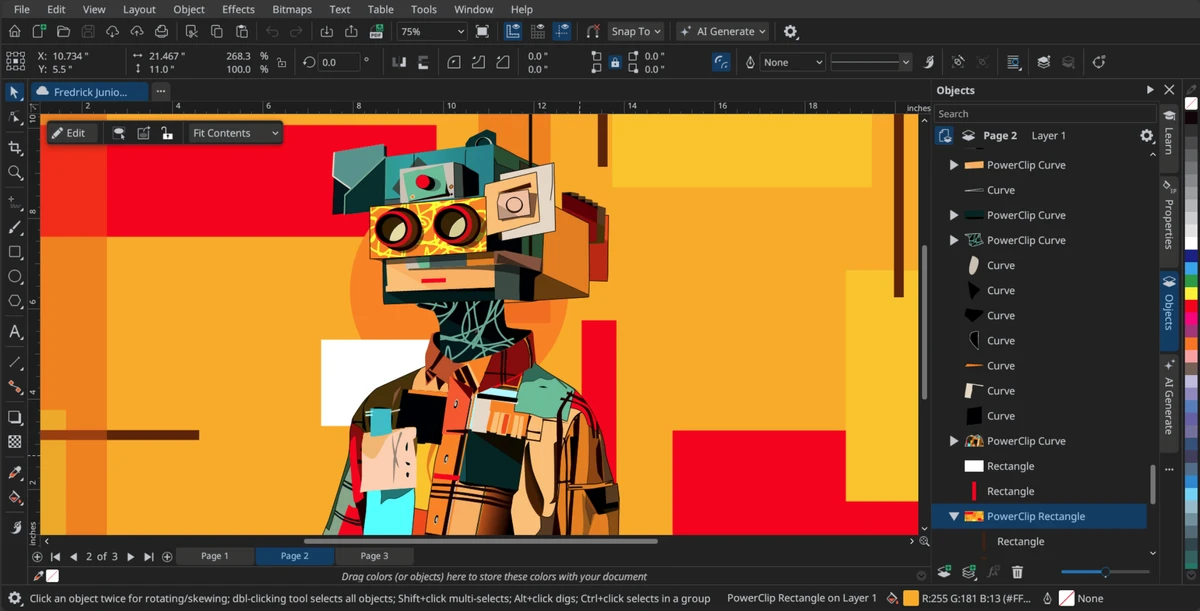
CorelDRAW Technical Suite provides a professional workspace designed around technical design workflows. The suite combines multiple specialized applications, allowing users to move between illustration, layout, photo editing, and documentation tasks within the same ecosystem. The integration between applications helps streamline projects that require multiple types of visual content. For example, users can combine technical drawings, photos, vector graphics, and 3D views when creating detailed documentation.

The software provides extensive design controls for professionals who need accuracy and flexibility. However, the number of included applications and advanced technical features may require time for new users to learn, especially those unfamiliar with professional design software.

Who Should Use CorelDRAW Technical Suite?

  • Technical illustrators creating detailed documentation
  • Engineers producing visual product information
  • Designers working with technical graphics
  • Companies creating manuals, instructions, and documentation
  • Professionals combining 2D illustrations with 3D models
  • Organizations requiring professional publishing workflows

Conclusion

CorelDRAW Technical Suite is a comprehensive solution for professionals who need to create accurate technical illustrations, documentation, and visual communication materials. By combining technical drawing, vector graphics, photo editing, and 3D visualization tools, the suite provides a complete workflow for complex design projects.

Pros & Cons

✓

Pros

  • Complete suite for technical illustration and documentation
  • Includes multiple professional design applications
  • Supports both 2D and 3D visual workflows
  • Provides vector graphics and photo editing tools
  • Includes browser-based design access through CorelDRAW Web
  • Suitable for professional technical communication projects
✕

Cons

  • Requires powerful hardware for optimal performance
  • Designed for professional users rather than casual graphics editing
  • Requires internet connection for installation and authentication

Frequently Asked Questions

What is CorelDRAW Technical Suite used for?

CorelDRAW Technical Suite is used for creating technical illustrations, documentation, product graphics, and professional visual communication materials.

What applications are included in CorelDRAW Technical Suite?

The suite includes Corel DESIGNER, CorelDRAW, XVL Studio Corel Edition, Corel PHOTO-PAINT, CorelDRAW Web, and Corel Font Manager.

Can CorelDRAW Technical Suite work with 3D models?

Yes. The suite includes XVL Studio Corel Edition, which allows users to add 3D views and models to technical illustrations.

What is Corel DESIGNER used for?

Corel DESIGNER is included for technical design and illustration, helping users create accurate technical graphics and documentation.

Does CorelDRAW Technical Suite include photo editing tools?

Yes. The suite includes Corel PHOTO-PAINT, which provides photo editing and digital painting features.

What are the system requirements for CorelDRAW Technical Suite?

CorelDRAW Technical Suite requires Windows 10 (version 21H2 or later) or Windows 11, 64-bit, with at least 8 GB RAM, 5.5 GB available storage space, and compatible Intel or AMD processors.

Recommended apps [Freeware]:
  • Tails 7.9.1 Tails logo a privacy-focused live operating system that enables anonymous browsing and secure communication
  • WD Drive Utilities 2.1.6.511 WD Drive Utilities logo Manage, diagnose, and optimize Western Digital external hard drives with WD Drive Utilities for Windows
  • Quick CPU 6.6.0 Quick CPU logo Monitor core parking, turbo boost, frequency scaling, and system power in real time
  • Google Chrome 150.0.7871.125 Google Chrome logo fast, secure, and stable web browser with sandboxing, tab isolation, and a minimal interface for modern web applications
  • Vovsoft IP Scanner 1.1 Vovsoft IP Scanner logo Discover network devices, scan IP ranges, and analyze open ports with a fast multi-threaded IP scanner for LAN and WAN environments.
  • MultiPack Visual C++ Installer 4.2 MultiPack Visual C++ Installer logo Install required Microsoft Visual C++ runtimes quickly to fix application and game compatibility issues on Windows systems.
Recommended apps [Shareware]:
  • GetFLV 32.2606.25 GetFLV logo combines video downloading, conversion, audio extraction, and basic editing tools in one Windows application
  • RecoveryTools zMigrator 26.6 RecoveryTools zMigrator logo Migrate Zimbra emails, contacts, and calendars to multiple formats
  • HelpNDoc 10.7.0.400 HelpNDoc logo Create CHM help files, PDFs, Word docs, and web documentation easily with HelpNDoc’s all-in-one editor and compiler
  • FlexiPDF 2025.420.0626 FlexiPDF logo Windows PDF editor for editing text, images, OCR scanning, and converting PDFs into Word and other formats
  • FoneLab Android Data Recovery 3.1.56 FoneLab Android Data Recovery logo Recover deleted Android contacts, messages, photos, videos, documents, and more from phones, SD cards, and SIM cards.
  • UFS Explorer Professional Recovery 10.21.1 UFS Explorer Professional Recovery logo Professional data recovery software with RAID reconstruction, file system analysis, and advanced recovery tools for complex storage devices.