


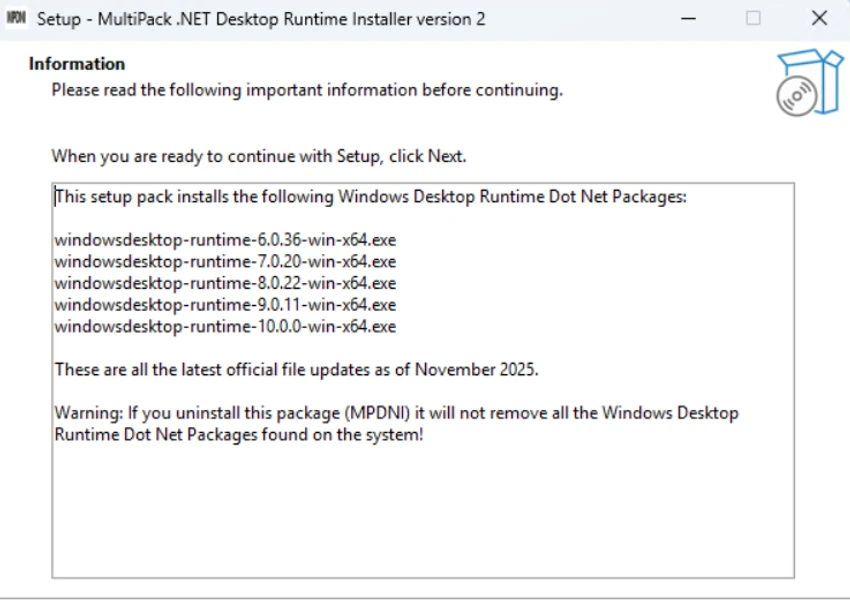

MultiPack .NET Windows Desktop Installer (MPDNI) is a bundled installer designed to simplify the process of installing Microsoft .NET Windows Desktop Runtime packages on Windows systems. Many desktop applications built with .NET require specific runtime versions to run correctly, and having the appropriate components installed can improve compatibility and access to platform updates.
Instead of downloading and installing each .NET Desktop Runtime version separately, MPDNI combines multiple runtime packages into a single installer. This approach helps users quickly prepare their systems with several supported .NET Desktop Runtime versions without manually searching for individual downloads.
The package includes Windows Desktop Runtime versions from .NET 6 through .NET 10, providing support for applications built on different generations of the platform. The included runtimes are provided as x64 packages and are designed for Windows desktop applications that depend on Microsoft’s .NET runtime environment.
MPDNI uses a simple graphical installer interface, making the installation process more convenient for users who need multiple runtime versions installed at once. It is particularly useful after a fresh Windows installation, during system setup, or when troubleshooting applications that require missing .NET Desktop Runtime components. Supporting Windows 10 and newer systems, MultiPack .NET Windows Desktop Installer provides a practical way to manage essential .NET desktop dependencies through one streamlined installation package.
Features of MultiPack .NET Windows Desktop Installer
- Installs multiple Microsoft .NET Windows Desktop Runtime packages
- Includes .NET Desktop Runtime versions 6 through 10
- Simplifies installation of required .NET components
- Uses a graphical packaged installer interface
- Helps improve application compatibility
- Supports Windows 10 and newer systems
- Includes x64 Windows Desktop Runtime packages
- Useful for system setup and software troubleshooting
Included .NET Desktop Runtime packages:
- Windows Desktop Runtime 6.0.36 (x64)
- Windows Desktop Runtime 7.0.20 (x64)
- Windows Desktop Runtime 8.0.28 (x64)
- Windows Desktop Runtime 9.0.17 (x64)
- Windows Desktop Runtime 10.0.9 (x64)
Interface and Usability
MultiPack .NET Windows Desktop Installer focuses on making runtime installation easier through a single graphical package. Instead of requiring users to identify and download separate .NET Desktop Runtime versions, the tool provides a combined installation approach.
The simplified workflow is useful for users setting up new Windows installations or resolving software compatibility problems caused by missing .NET components. The application does not require advanced configuration, making it accessible for users who simply need the necessary runtime packages installed. Its bundled design is especially convenient for technicians and advanced users who regularly prepare multiple Windows systems with required software dependencies.
Who Should Use MultiPack .NET Windows Desktop Installer?
- Windows users installing required application dependencies
- Users encountering missing .NET runtime errors
- IT technicians preparing Windows systems
- Developers testing desktop applications across .NET versions
- Users setting up a fresh Windows installation
Conclusion
MultiPack .NET Windows Desktop Installer provides a convenient solution for installing multiple Microsoft .NET Desktop Runtime packages through one bundled installer. By combining .NET 6, 7, 8, 9, and 10 desktop runtimes, it reduces the effort required to prepare a Windows system for applications that depend on different .NET versions.


