


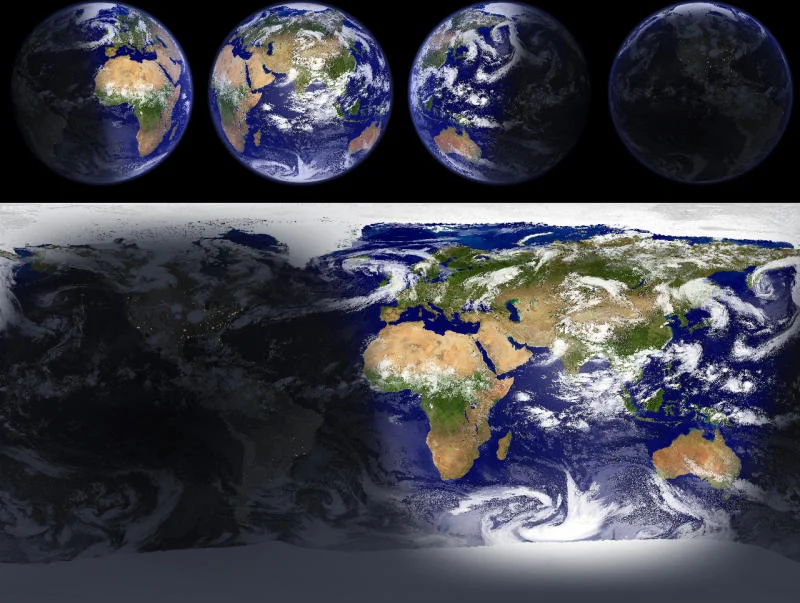

EarthView is a dynamic desktop wallpaper and screensaver application designed to bring your desktop to life. It showcases real-time views of Earth, complete with day and night cycles, atmospheric effects, urban lighting, weather updates, and more.
Overview
EarthView transforms your desktop into a window to the world. With high-resolution, colorful images for virtually any screen size—even beyond 4K—this software lets you observe our planet from multiple perspectives. Users can explore different map types, seasonal changes, city lights, clouds, and weather information. The program also supports local time displays for over 140,000 cities worldwide and allows full customization of views, making it suitable for both casual users and professionals seeking dynamic desktop aesthetics.
Key Features of EarthView
- High detail views of Earth, from 10 km resolution
- Day and night cycles with realistic shadows
- Atmospheric effects, clouds, and weather updates
- Urban areas and city lights display
- Multiple view system for simultaneous perspectives
- Background and overlay images for logos or ads
- Seasonal maps showing vegetation, snow, and ocean ice
- Local time display for over 140,000 cities worldwide
- Wallpaper and screensaver support
- Multiple monitor support with different views
- Multiple profiles for customized setups
- Silent installation and uninstallation for mass deployment
User Experience
Installing EarthView is straightforward, and the program immediately impresses with its stunning visuals. The high-resolution maps are crisp even on large screens, and switching between globe and map views is smooth. Users can tweak nearly every parameter, from cloud coverage to seasonal effects, giving a fully personalized experience. The real-time weather updates and local time display for thousands of cities add practical functionality. Overall, the software runs efficiently without noticeable performance issues, even on multi-monitor setups.
Overall Rating
Based on image quality, customization options, and system performance, EarthView earns a 4.7/5. While the free version is impressive, access to higher-resolution maps in the paid version enhances its value.
Who Should Use EarthView?
- Desktop enthusiasts seeking dynamic, high-resolution wallpapers
- Professionals who want live weather and local time displays on their desktops
- Users with multi-monitor setups who enjoy fully customizable visual displays
- Companies and institutions looking for silent deployment across multiple systems
Conclusion & Recommendation
EarthView is more than just a screensaver—it's an interactive window to our planet. With incredible attention to detail, high-resolution images, and versatile customization options, it elevates any desktop environment. For anyone looking to enhance their workspace with visually stunning, informative displays, EarthView is a must-try. Explore your world from your desktop and enjoy the beauty of Earth every day.


