Prime95 logo

Prime95 31.06 Build 1

  • User Rating:
    ★★★★★
    ★★★★★
    0.0 0Votes
  • Requirements:
    Windows
  • Version: 31.06 Build 1
  • Latest updated: 5 days ago
  • License: Freeware  
  • Publisher: Mersenne Prime Search
  • Size: 9 MB
× app stores

Prime95 is a lightweight yet extremely powerful utility designed for two main purposes: searching for Mersenne prime numbers and stress testing CPU stability. While its mathematical function is part of the Great Internet Mersenne Prime Search (GIMPS) project, most users rely on Prime95 as a hardware stress-testing tool to verify system stability, especially during overclocking or performance tuning. It is widely regarded as one of the most reliable tools for pushing CPUs to their maximum load and detecting system instability.

Features of Prime95

  • CPU stress testing via Torture Test modes
  • Small FFTs test for maximum CPU load
  • Large FFTs test for combined CPU and memory stress
  • Blend mode for balanced system testing
  • Multi-core and multi-thread support
  • Automatic workload distribution across CPU threads
  • Error detection for instability and hardware faults
  • Integration with GIMPS (Great Internet Mersenne Prime Search)
  • Optional online PrimeNet server connectivity
  • Manual offline operation support
  • Long-duration stability testing (burn-in testing)
  • Lightweight application with minimal system overhead
  • Real-time monitoring of computational errors

User Experience

During my experience with Prime95, the software proved to be one of the most effective tools for fully loading a CPU and testing system stability. Unlike typical benchmarking tools that simulate workloads, Prime95 applies sustained mathematical computations that consistently push all CPU cores to their maximum capacity.

The Torture Test modes are straightforward and highly effective. Small FFTs rapidly stress the CPU itself, making it ideal for identifying overheating or voltage instability in overclocked systems. Large FFTs extend the workload to memory, while Blend mode provides a more balanced system-wide stress test. One of the most valuable aspects of Prime95 is its ability to detect instability quickly. Even minor hardware issues or insufficient cooling can result in errors within minutes of testing. This makes it especially useful for validating new hardware configurations or tuning performance settings.

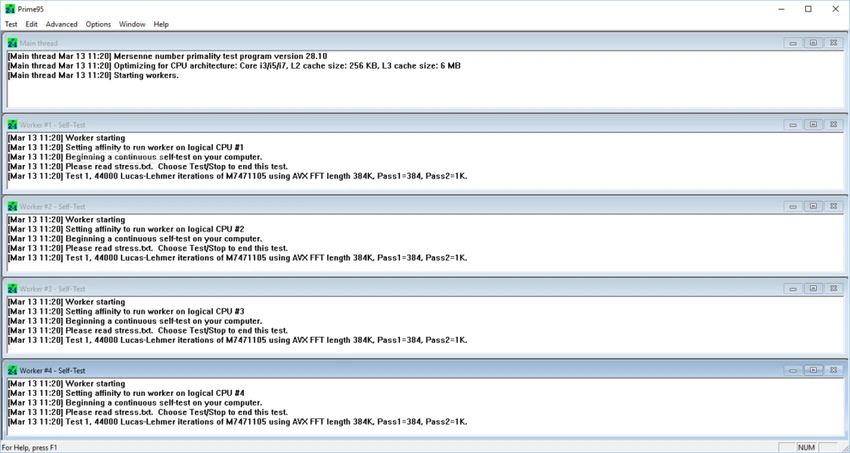
Despite its technical nature, the interface remains minimal and functional. There are no unnecessary visual elements, which keeps the focus entirely on performance and accuracy. The tool is often used overnight for long-term stability testing, ensuring systems can handle extended workloads without crashing or producing computational errors.

Who Should Use Prime95?

  • Overclocking enthusiasts
  • PC builders testing system stability
  • Hardware reviewers and technicians
  • Gamers verifying system reliability
  • Users diagnosing CPU or memory instability
  • Advanced users tuning performance settings

Conclusion

Prime95 remains a benchmark standard for CPU stress testing and system stability validation. Its combination of computational accuracy and extreme workload generation makes it a highly reliable tool for anyone serious about hardware performance.

Pros & Cons

Pros

  • Extremely effective CPU stress testing tool
  • Detects system instability quickly and reliably
  • Supports multi-core and multi-threaded CPUs
  • Lightweight and efficient
  • Multiple testing modes for different stress levels
  • Widely trusted in overclocking and hardware communities
  • Useful for long-term stability validation

Cons

  • Outdated and minimal user interface
  • Can generate extremely high CPU temperatures
  • Not suitable for casual users without monitoring tools
  • Primarily focused on stress testing, not general benchmarking

Frequently Asked Questions

What is Prime95 used for?

Prime95 is used for CPU stress testing and for participating in the search for Mersenne prime numbers.

Is Prime95 safe for my computer?

Yes, but it can generate very high CPU temperatures, so proper cooling and monitoring are recommended.

What is a Torture Test in Prime95?

It is a stress test mode that fully loads the CPU to check system stability and detect errors.

Can Prime95 detect hardware instability?

Yes. It can reveal CPU, memory, or cooling issues by generating computational errors under load.

Do I need internet to use Prime95?

No. It can run offline, but internet is required for participation in the GIMPS project.

Is Prime95 only for overclockers?

No. It is also used for general hardware testing, system validation, and troubleshooting.

Does Prime95 support multi-core CPUs?

Yes. It fully supports modern multi-core and multi-threaded processors.

Recommended apps [Freeware]:
  • SoundSwitch 7.1.0 / 7.1.1 Beta 1 SoundSwitch logo a lightweight Windows tool that lets you switch audio devices instantly using customizable hotkeys
  • FluentCleaner 26.06.04 FluentCleaner logo a lightweight Windows cleaning tool designed to remove unnecessary files using a modern, minimal WinUI 3 interface
  • WinScript 2.20.1 WinScript logo customize Windows with debloat, privacy, performance tweaks, and one-click app installation scripts
  • Speccy 1.34.084 Speccy logo provides detailed PC hardware information, temperature monitoring, and system reports for Windows users
  • Revo Registry Cleaner 2.2.1 Revo Registry Cleaner logo Clean, monitor, tune, and back up the Windows Registry with Revo Registry Cleaner for improved system maintenance
  • Urban VPN 5.2.1 Urban VPN logo virtual private network tool designed to help users protect their identity and privacy while browsing the internet
Recommended apps [Shareware]:
  • WinRAR 7.22 WinRAR logo Windows tool for compressing, decompressing, and managing RAR, ZIP, and many other archive formats.
  • Send Anywhere 24.6.0 Send Anywhere logo free cross-platform file-sharing tool that transfers files of any size without registration.
  • MediaHuman YouTube to MP3 Converter 3.9.21 MediaHuman YouTube to MP3 Converter logo downloads audio from YouTube, SoundCloud, and other platforms in high-quality MP3 format
  • TweakNow Gallery 1.3.1 TweakNow Gallery logo a fast Windows photo viewer and organizer with slideshow and built-in image conversion tools
  • SQL Backup Master 8.5.1102.0 SQL Backup Master logo SQL Server backups with cloud storage, encryption, scheduling, and recovery features
  • Duplicate Finder 2026 v418 Duplicate Finder logo remove duplicate photos and videos by scanning files using MD5 hashing for accurate results.