ExamDiff Pro logo

ExamDiff Pro 17.0.1.2

  • User Rating:
    ★★★★★
    ★★★★★
    0.0 0Votes
  • Requirements:
    Windows
  • Version: 17.0.1.2
  • Latest updated: 1 day ago
  • License: Free Trial  
  • Publisher: PrestoSoft
  • Size: 23.4 MB
×

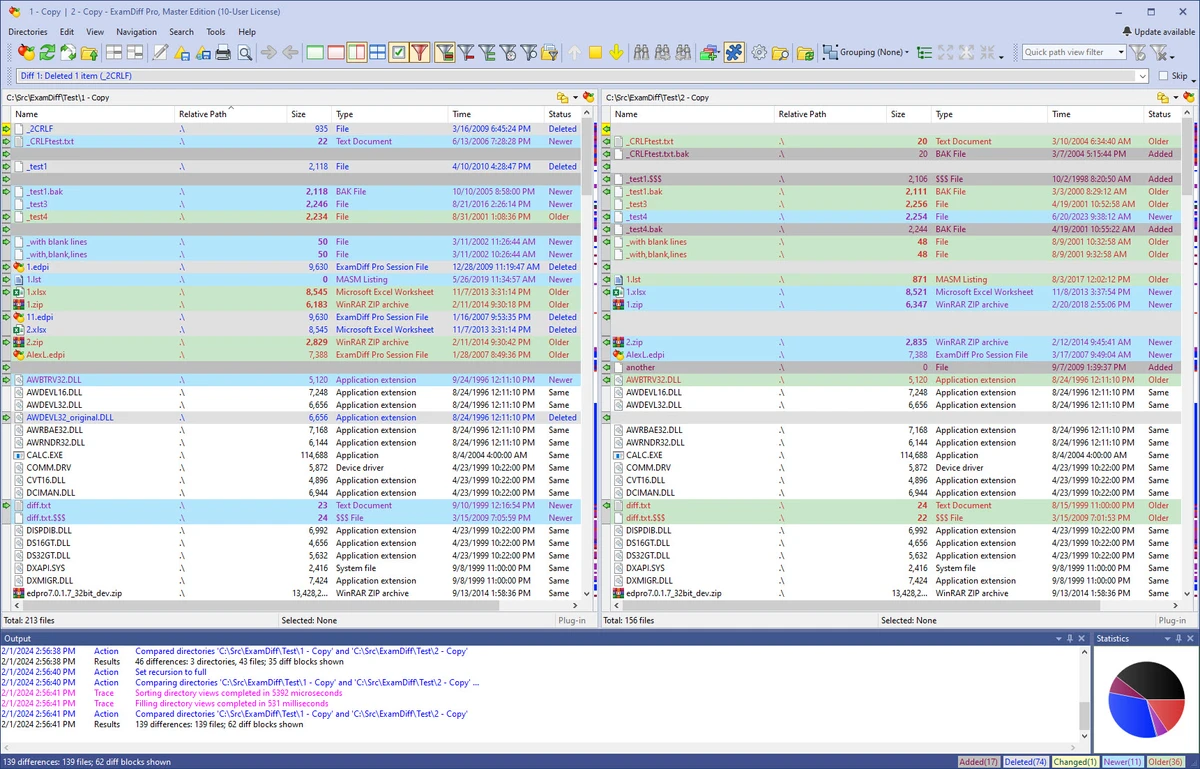
ExamDiff Pro is a Windows-based file and directory comparison utility designed to help users quickly identify differences between files, folders, and even complex data formats. It is commonly used for software development, document comparison, and system file synchronization. The software focuses on clarity and usability, offering visual diff views, merging capabilities, and support for a wide range of file types, from source code to Office documents and archives.

Overview

ExamDiff Pro is built to simplify the process of tracking changes across different versions of files and directories. It provides both two-way and three-way comparison tools, making it suitable for version control workflows and collaborative development environments. Beyond code, it extends its functionality to documents, compressed archives, and remote files, offering flexibility for technical users as well as general PC users. Its focus is on improving visibility into file differences and enabling efficient merging and synchronization.

Features of ExamDiff Pro

  • File and folder comparison with visual difference highlighting
  • Two-way and three-way diff and merge support
  • Code review and change tracking tools for developers
  • HTML and printable difference reports
  • FTP plug-in for comparing local files with remote servers
  • Ability to ignore code comments for cleaner source comparisons
  • Syntax highlighting for programming languages
  • Binary comparison for executable files (DLLs, EXEs)
  • Directory synchronization and snapshot creation
  • Drag-and-drop support for files and folders
  • Windows Explorer shell integration for quick access
  • Support for comparing Office documents via plug-ins (Word, Excel, PDF)
  • Built-in text editor with synchronized word wrap

User Experience

Using ExamDiff Pro feels focused and efficient, especially when working with large codebases or multiple file versions. The interface emphasizes side-by-side comparison, making it easy to spot differences at a glance. For developers, features like syntax highlighting and comment filtering reduce noise during code reviews. The merge tools are practical for resolving differences between file versions without switching between multiple applications.

Conclusion

ExamDiff Pro is a reliable and feature-rich tool for anyone who needs precise file comparison and merging capabilities on Windows. Its strength lies in its flexibility, supporting everything from code reviews to document and folder synchronization.

Pros & Cons

Pros

    • Strong file and folder comparison features
    • Supports two-way and three-way merge workflows
    • Useful for developers, testers, and writers
    • FTP and remote comparison support
    • Integration with Windows Explorer for quick access
    • Supports many file types including code, documents, and binaries

Cons

    • Interface may feel technical for casual users
    • No built-in rating or community score provided in the data
    • Advanced features may require learning for first-time users

Frequently Asked Questions

What is ExamDiff Pro used for?

ExamDiff Pro is used to compare files and folders, track changes, and merge differences between versions.

Can it compare source code?

Yes, it includes syntax highlighting and tools designed specifically for code comparison and review.

Does it support document comparison?

Yes, through plug-ins it can compare Word, Excel, and PDF documents.

Can it compare folders and directories?

Yes, it includes directory comparison and synchronization features.

Recommended apps [Freeware]:
  • StaxRip 2.52.4 StaxRip logo powerful Windows GUI for video/audio encoding using FFmpeg, x265, AviSynth+, VapourSynth, and more.
  • All in One Runtimes 2.5.0 All in One Runtimes logo Package essential Windows runtime environment packages to improve software compatibility and system stability.
  • WSCC - Windows System Control Center 10.0.3.8 WSCC - Windows System Control Center logo Windows utility manager that installs, organizes, and runs Sysinternals and system tools from one central interface
  • Garmin Express 7.29.0.0 Garmin Express logo manage Garmin GPS devices with map updates, backups, software updates, and device registration
  • CS Easy Unlocker 1.1.5.0 CS Easy Unlocker logo unlock restricted folders and fix “Access Denied” errors with a simple one-click tool.
  • Valentina Studio 17.5 Valentina Studio logo manage SQL and NoSQL databases with schema design, queries, reports, and cross-platform support.
Recommended apps [Shareware]:
  • Sidify Spotify Music Converter 2026 Sidify Spotify Music Converter logo convert Spotify songs, playlists, and podcasts to MP3, AAC, FLAC, and WAV formats.
  • Adobe Premiere Pro 2026 Adobe Premiere Pro logo professional 4K video editor with advanced audio, color, and motion graphics tools.
  • Syncovery 12.0.5.29 Syncovery logo fast backup and file synchronization tool with real-time sync, versioning, and advanced automation features
  • Any video Converter 9.2.3 Any video Converter logo video conversion tool that supports multiple formats, editing features, and device-ready output profiles
  • Total Excel Converter 7.1.0.126 Total Excel Converter logo convert Excel, ODS, CSV, DBF, and more into PDF, DOC, HTML, SQL, and other formats on Windows.
  • Automatic PDF Processor 2.3.2 Automatic PDF Processor logo Automate PDF processing, renaming, printing, data extraction, and document organization on Windows.