Rapid CSS logo

Rapid CSS 2025 v18.7.0.277

  • User Rating:
    ★★★★★
    ★★★★★
    0.0 ★ 0Votes
  • Requirements:
    Windows
  • Version: 2025 v18.7.0.277
  • Latest updated: 2 weeks ago
  • License: Free Trial  
  • Publisher: Blumentals
  • Size: 102 MB
× app stores

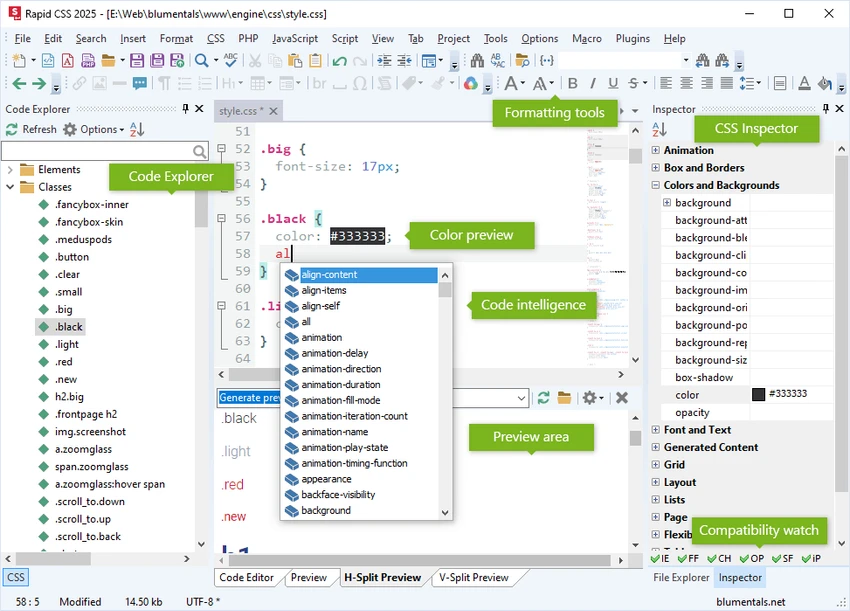
Rapid CSS is a Windows-based code editor developed to simplify the creation, editing, and maintenance of modern CSS-based websites. Designed for web designers and front-end developers, it combines a lightweight interface with advanced coding tools that help improve productivity without the complexity of a full-scale IDE. In addition to CSS, the editor supports HTML, LESS, SASS, JavaScript, PHP, XML, ASP, Perl, and other web technologies, making it suitable for managing complete front-end projects. It provides intelligent code completion, syntax highlighting, reusable code snippets, integrated validation, and built-in browser preview to assist throughout the development process. The software also includes FTP, SFTP, and FTPS connectivity for editing files directly on remote servers, advanced search and replace with regular expressions, mobile web development tools, and specialized CSS assistants for tasks such as vendor prefixing, shadows, fonts, and compatibility checks. With support for HTML5 and CSS3 standards, Rapid CSS offers an efficient environment for developing responsive and standards-compliant websites on Windows.

Features of Rapid CSS

  • Lightweight editor with fast startup
  • Supports CSS, HTML, LESS, SASS, JavaScript, PHP, XML, ASP, Perl, and more
  • Intelligent code completion, navigation, and suggestions
  • Syntax highlighting for multiple web languages
  • HTML5 and CSS3 support
  • Code snippet library and reusable templates
  • Direct FTP, SFTP, and FTPS editing and publishing
  • Mobile web development tools with media queries and viewport assistant
  • Screen-size preview for responsive design
  • Built-in multi-browser preview
  • Split-screen preview mode
  • Advanced search and replace with regular expression support
  • CSS compatibility watch
  • Prefixer, shadow assistant, box assistant, and web font assistant
  • Advanced color picker with project color management
  • Integrated spell checker
  • CSS checker
  • W3 HTML and CSS validator
  • XRay inspection tool
  • Compatible with Windows 10 and Windows 11

Interface and Usability

Rapid CSS features a clean and responsive interface that emphasizes efficient CSS editing while keeping commonly used tools within easy reach. Code completion, syntax highlighting, browser preview, validation, and CSS assistants are integrated directly into the workspace, allowing developers to edit and test styles without constantly switching applications. Responsive design tools such as screen-size previews and media query support help streamline mobile web development, while direct FTP connectivity simplifies updating websites hosted on remote servers.

Who Should Use Rapid CSS?

  • Front-end web developers
  • CSS developers
  • Web designers
  • HTML and CSS beginners
  • Freelance website developers
  • UI developers
  • Professionals maintaining responsive websites

Conclusion

Rapid CSS provides a focused development environment for creating and maintaining modern CSS-based websites. Its combination of intelligent coding assistance, browser preview, responsive design tools, validation features, and direct server connectivity makes it well suited for web designers and front-end developers who want a lightweight yet capable editor. Users looking for a dedicated CSS editing solution with support for modern web standards and streamlined workflows may find Rapid CSS a practical choice for daily website development.

Pros & Cons

✓

Pros

  • Fast and lightweight performance
  • Comprehensive CSS editing tools
  • Supports HTML5, CSS3, LESS, and SASS
  • Built-in browser preview and responsive design tools
  • Intelligent code completion and syntax highlighting
  • Direct FTP, SFTP, and FTPS support
  • Integrated CSS validation and compatibility checking
  • Advanced color management and CSS assistants
✕

Cons

  • Primarily focused on front-end web development

Frequently Asked Questions

What languages does Rapid CSS support?

Rapid CSS supports CSS, HTML, LESS, SASS, JavaScript, PHP, XML, ASP, Perl, and several other web-related languages through syntax highlighting and editing features.

Can Rapid CSS preview websites before publishing?

Yes. The software includes a built-in multi-browser preview, split-screen mode, screen-size testing, and XRay tools to help users review web pages during development.

Does Rapid CSS support responsive web design?

Yes. It includes tools for media queries, viewport assistance, and screen-size previews to help developers create responsive websites for different devices.

Can I edit website files directly on a server?

Yes. Rapid CSS supports FTP, SFTP, and FTPS connections, allowing users to edit and publish files directly to remote web servers.

Does Rapid CSS include validation tools?

Yes. The editor provides a CSS checker, W3 HTML and CSS validation, and a spell checker to help identify common coding and content issues.

What operating systems are supported by Rapid CSS?

According to the provided system requirements, Rapid CSS is compatible with Windows 10 and Windows 11.

Recommended apps [Freeware]:
  • Awesome Miner 11.5.5 Awesome Miner logo manage Bitcoin, Litecoin and Ethereum mining, monitor rigs, switch pools, and optimize profitability
  • TimVer 0.12.0 TimVer logo open-source Windows system information tool that provides detailed OS version, build, compatibility, and system data beyond standard Winver
  • Adobe Acrobat Reader DC 2026.001.21691 Adobe Acrobat Reader DC logo trusted PDF viewer for reading, printing, and annotating PDFs with strong security and cloud sync support
  • Artweaver 8.1.6.4131 Artweaver logo a beginner-friendly painting tool for digital drawing, sketching, and basic image creation on Window
  • MiniTool Partition Wizard 13.9 MiniTool Partition Wizard logo manages disk partitions with resizing, cloning, recovery, OS migration, and storage tools
  • MuseScore 4.7.4 MuseScore logo Create, edit, print, and share professional sheet music with free notation tools, MIDI support, and cross-platform compatibility.
Recommended apps [Shareware]:
  • Any video Converter 9.2.3 Any video Converter logo video conversion tool that supports multiple formats, editing features, and device-ready output profiles
  • Mountain Duck 5.3.1.29526 Mountain Duck logo mounts cloud storage and servers as local drives with smart sync, offline access, and seamless file integration
  • ON1 Effects 2026.4 ON1 Effects logo AI-powered photo effects, creative filters, presets, LUTs, and masking tools for stunning image enhancements
  • Neevia Document Converter Pro 7.7.0.292 Neevia Document Converter Pro logo Convert over 300 document formats to PDF, PDF/A, and image files
  • pdfFactory Pro 9.31 pdfFactory Pro logo creates, combines, previews, and prints PDFs easily with advanced tools like bookmarks, email export, and job control
  • System Mechanic Pro 26.5.0.227 System Mechanic Pro logo Optimize Windows performance with System Mechanic Pro using system cleanup, repair, disk recovery, and security tools