MediaCoder logo

MediaCoder 0.8.68

  • User Rating:
    ★★★★★
    ★★★★★
    0.0 ★ 0Votes
  • Requirements:
    Windows
  • Version: 0.8.68
  • Latest updated: 3 weeks ago
  • License: Freeware  
  • Publisher: Yi-Chun Huang
  • Size: 91 MB
× app stores

MediaCoder is a free universal media transcoder designed to combine a wide range of audio and video codecs and tools into a single application. It works as an all-in-one solution for users who need to convert media files between different formats while maintaining control over the transcoding process.

The software includes regularly updated codecs and tools, supported by a flexible and extendable architecture that allows it to handle various media conversion tasks. MediaCoder supports popular audio and video formats and provides options for adjusting transcoding parameters according to user requirements.

With features such as multi-threaded processing, job-level parallelization, and high-performance transcoding, MediaCoder is built for users who need efficient media conversion. It also includes simplified interface options for popular mobile devices, making it easier to prepare media files for platforms such as PSP, iPhone, and iPod.

Key Features of MediaCoder

  • Audio and video format conversion between many popular media formats.
  • Multi-threaded transcoding for improved processing performance.
  • Job-level parallelization to handle multiple transcoding tasks efficiently.
  • High-performance and high-quality conversion capabilities.
  • Flexible transcoding controls for adjusting conversion parameters.
  • Simplified device-oriented interface for mobile devices such as PSP, iPhone, and iPod.
  • Standalone operation without relying on system codecs or splitters.
  • Regular codec and tool updates through its extendable architecture.

Interface and Usability

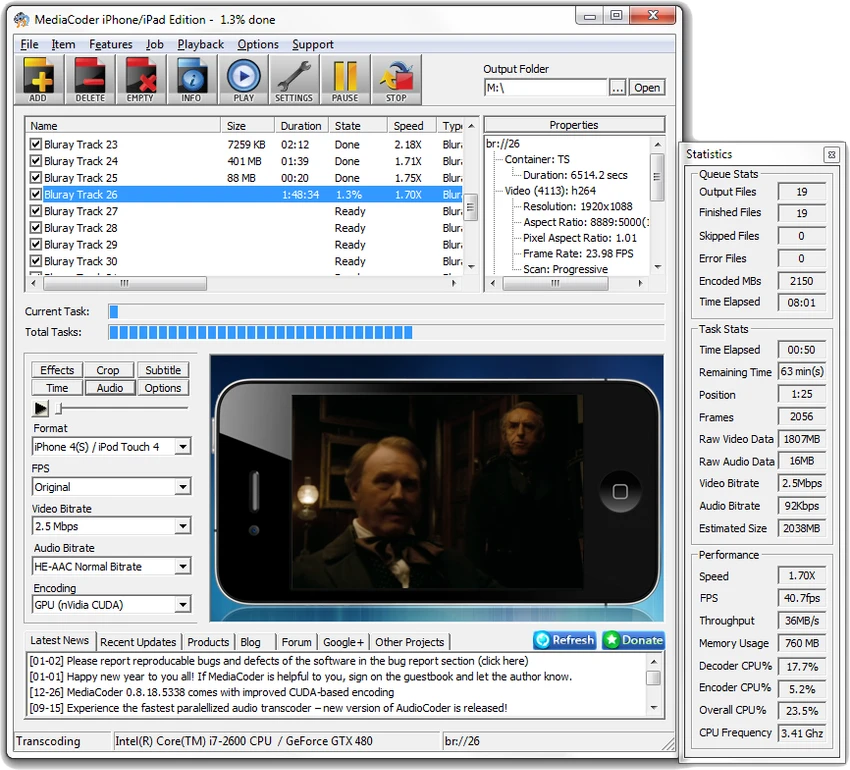
MediaCoder provides a feature-focused interface designed around media conversion workflows. The software offers access to a wide range of transcoding options, allowing users to adjust parameters based on their specific needs.

For users who want simple conversions, MediaCoder provides simplified options for popular devices. More experienced users can take advantage of its detailed control over transcoding settings. This makes the software suitable for both basic format conversion and more advanced media processing tasks. Because MediaCoder includes many codecs, tools, and configuration options, beginners may need some time to understand the available settings. However, users familiar with video encoding and media formats will find its flexibility useful.

Who Should Use MediaCoder?

MediaCoder is suitable for users who frequently convert audio and video files between different formats. It can be useful for content creators, media enthusiasts, and users who need more control over encoding settings than basic video converters provide. The software is also a good option for users who want a standalone transcoding solution that does not depend on system codecs or additional media components.

Conclusion

MediaCoder is a versatile media transcoding tool that provides a broad range of conversion options for audio and video files. Its combination of codec support, performance-focused processing, and detailed configuration controls makes it a powerful choice for users who need more than a basic media converter.

The software is best suited for users who want flexibility and control over the transcoding process, whether they are converting files for different formats, devices, or playback requirements. While the extensive options may require some learning, MediaCoder offers a capable toolkit for managing multimedia conversions.

Pros & Cons

✓

Pros

  • Supports many audio and video formats.
  • Combines multiple codecs and media tools in one application.
  • Provides advanced transcoding controls.
  • Uses multi-threaded processing for improved performance.
  • Works as a standalone application without system codec dependencies.
  • Includes device-focused conversion options.
✕

Cons

  • Advanced settings may be difficult for beginners.
  • The 32-bit version has been discontinued.

Frequently Asked Questions

What is MediaCoder used for?

MediaCoder is used for converting audio and video files between different formats. It combines multiple codecs and media processing tools to provide a complete transcoding solution.

Which media formats does MediaCoder support?

MediaCoder supports conversion between many popular audio and video formats. The software integrates various codecs and tools to handle different types of media files.

Is MediaCoder free?

Yes. MediaCoder is available as a free universal media transcoder.

Does MediaCoder require additional codecs to work?

No. MediaCoder is designed as a standalone application and does not depend on system codecs or splitters for operation.

Does MediaCoder support faster video conversion?

MediaCoder includes multi-threaded transcoding and job-level parallelization features, which are designed to improve processing efficiency during media conversion.

Can MediaCoder convert videos for mobile devices?

Yes. MediaCoder includes simplified user interface options for popular mobile devices, including PSP, iPhone, and iPod, helping users prepare media files for those platforms.

Recommended apps [Freeware]:
  • Mozilla Firefox 152.0.6 Mozilla Firefox logo Browse the web securely and quickly with Mozilla Firefox, a customizable browser with strong privacy and add-on support
  • Cryptomator 1.19.3 Cryptomator logo open-source client-side encryption tool that secures cloud files with AES encryption while remaining compatible with any cloud provider
  • ShareX 21.0.0 ShareX logo a free Windows tool for screenshots, screen recording, annotation, and instant file sharing with cloud support
  • Patch My PC 5.4.5.0 Patch My PC logo Keep installed applications updated automatically with silent updates, software scanning, scheduling, and easy patch management.
  • Qmmp 2.3.3 Qmmp logo Free cross-platform audio player with broad format support, multiple audio outputs, and a classic interface for efficient music playback.
  • MemoryCleaner 2.0.1 MemoryCleaner logo Free utility that helps clean physical and standby memory with one click or automatic scheduling to improve memory management.
Recommended apps [Shareware]:
  • Quick Heal AntiVirus Pro 26.1.0.2 Quick Heal AntiVirus Pro logo real-time malware protection, ransomware defense, and email security
  • Coolutils Print Maestro 4.2.0.0 Coolutils Print Maestro logo print folder contents, export directory trees, and generate detailed file reports quickly
  • Total Commander 11.58 Total Commander logo a dual-pane Windows file manager with advanced search, FTP support, archive tools, and synchronization features
  • IntraWEB 16.2.2 IntraWEB logo web development framework for creating interactive web applications using a Windows application-style approach
  • Diffchecker 7.1.5 Diffchecker logo offline tool for comparing text, images, PDFs, spreadsheets, and folders securely on Windows
  • HelpNDoc 10.7.0.400 HelpNDoc logo Create CHM help files, PDFs, Word docs, and web documentation easily with HelpNDoc’s all-in-one editor and compiler