


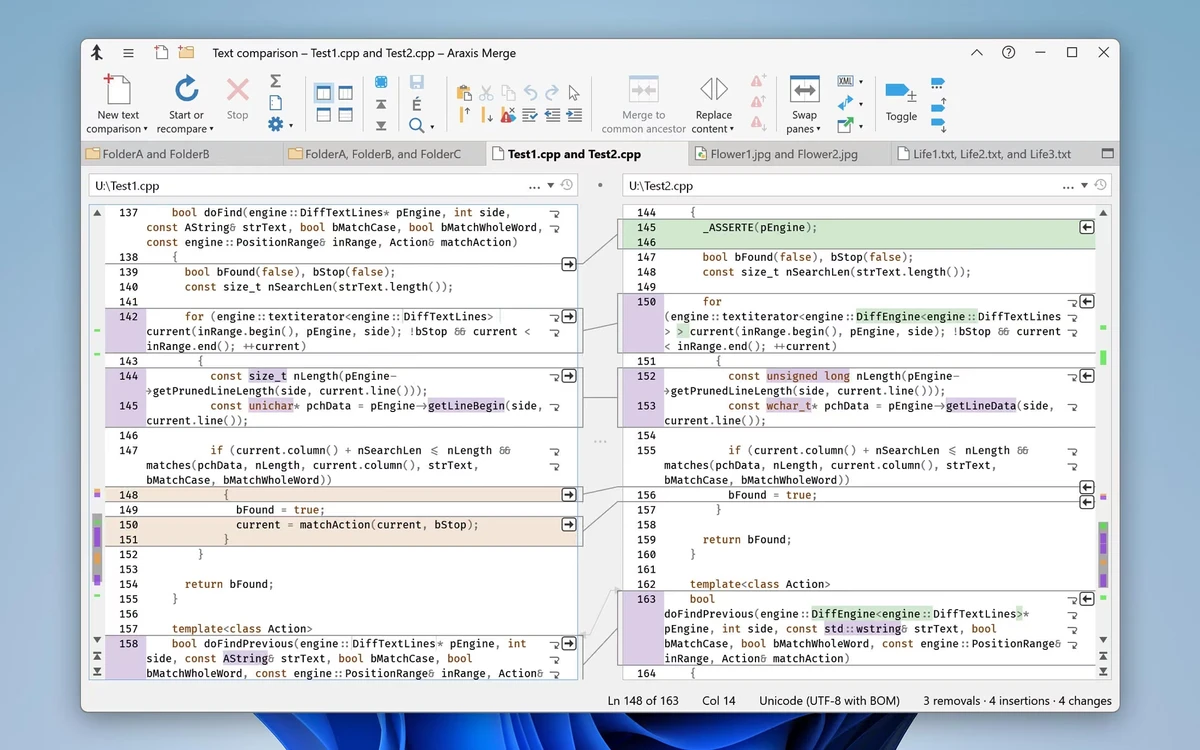

Araxis Merge is a professional-grade comparison and merging tool designed for users who need to analyze differences between files, folders, and entire directory structures. It supports text, source code, images, PDFs, and binary files, making it a versatile solution for developers, legal professionals, and quality assurance teams. During my experience with it, I found that it excels in precision, clarity, and workflow integration, especially in version-controlled environments.
Key Features of Araxis Merge
- Side-by-side file comparison with color-coded differences
- Three-way merge support (Professional Edition)
- Folder hierarchy comparison and synchronization
- Visual merge interface with point-and-click editing
- Supports text files, source code, XML, HTML, and more
- Extracts text from Office documents, PDFs, and RTF files
- Image comparison with pixel-level difference detection
- Binary file comparison at byte level
- Ignoring whitespace, line endings, and regex-based patterns
- HTML, XML, and diff report generation
- Integration with Git, Mercurial, Subversion, and Perforce
- FTP plugin for remote file comparison and synchronization
- Time Machine integration for version history access
- Archive support (ZIP, TAR, etc.)
- Automation API and command-line interface
- Supports folder-to-folder synchronization workflows
- Customizable UI (fonts, colors, layout orientation)
User Experience
After using Araxis Merge, I found it to be one of the most detailed and precise comparison tools available. The visual side-by-side layout makes it easy to understand even complex differences in code or documents. Changes are highlighted clearly, and linking lines between panes help track modifications intuitively. One of the most powerful aspects is its three-way merge capability, which is especially useful in collaborative development environments. It allows changes from multiple sources to be integrated into a common base version with minimal confusion.
The folder comparison feature is equally impressive. Instead of focusing only on individual files, Araxis Merge can analyze entire directory structures, making it ideal for release validation or deployment verification. Integration with version control systems like Git and Subversion enhances its usability in professional workflows. Being able to compare repository states directly saves time and reduces manual effort. Although the interface is feature-rich and highly functional, it may feel overwhelming for casual users. However, for technical professionals, the layout is logical and optimized for productivity.
Who Should Use Araxis Merge?
- Software developers working with version control systems
- Code reviewers and QA engineers
- Legal and publishing professionals comparing document revisions
- DevOps and release management teams
- Web developers synchronizing deployments
- IT professionals managing folder structures and backups
Conclusion
Araxis Merge is a top-tier file and code comparison tool built for professionals who need accuracy, clarity, and control over version differences. Whether you're managing source code, legal documents, or entire directory structures, it provides the precision and workflow integration required in demanding environments. If you work regularly with file differences or version control systems, Araxis Merge is one of the most capable tools available.


