Send Anywhere logo

Send Anywhere 24.6.0

  • User Rating:
    ★★★★★
    ★★★★★
    0.0 0Votes
  • Requirements:
    Windows
  • Version: 24.6.0
  • Latest updated: 1 day ago
  • License: Freemium  
  • Publisher: Estmob Inc
  • Size: 124 MB
×

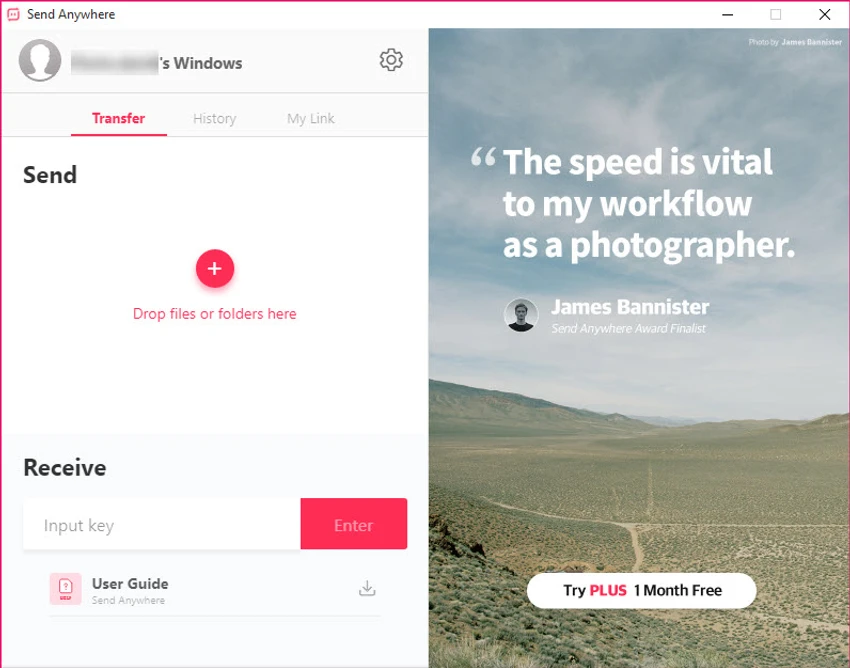
Send Anywhere is a cross-platform file-sharing solution that allows users to transfer files directly between devices without requiring account registration. Designed for simplicity and speed, the software enables file transfers using a unique six-digit code, making it easy to send and receive data across different platforms and locations. Whether you need to share documents, photos, videos, or large files, Send Anywhere offers a straightforward method for transferring content between computers and mobile devices without the complexity often associated with traditional file-sharing services.

Features of Send Anywhere

  • Cross-platform file sharing between supported devices
  • Transfer files of any size
  • No account registration required
  • Simple six-digit code system for sending and receiving files
  • Direct file transfer process
  • Fast and efficient file delivery
  • Automatically selects the optimal transfer path based on network conditions
  • Suitable for sharing files worldwide
  • Free to use

User Experience

After using Send Anywhere, the most noticeable advantage is its simplicity. Unlike many file-sharing platforms that require account creation, email verification, or cloud storage setup, Send Anywhere focuses on getting files from one device to another with minimal effort. The six-digit code system is particularly user-friendly. Sending a file generates a code that the recipient enters to begin the transfer. This approach removes unnecessary steps and makes the process accessible even for less technical users.

Conclusion

Send Anywhere provides a refreshingly simple approach to file sharing. By eliminating mandatory registration and using an intuitive code-based transfer system, it makes sending files between devices fast and accessible. Its support for large files and cross-platform compatibility further strengthen its usefulness for everyday users and professionals alike.

Pros & Cons

Pros

    • No registration or account creation required
    • Free to use
    • Simple six-digit transfer code system
    • Supports cross-platform file sharing
    • Can transfer files of any size
    • Easy setup and minimal learning curve
    • Optimizes transfer routes automatically
    • Suitable for worldwide file transfers

Cons

    • Transfer performance depends on network quality
    • Primarily focused on file sharing rather than collaboration features
    • Requires recipients to enter a transfer code
    • Advanced file management features are limited

Frequently Asked Questions

What is Send Anywhere used for?

Send Anywhere is a file-sharing application that allows users to transfer files directly between devices using a simple six-digit code.

Is Send Anywhere free?

Yes. Send Anywhere is available as a free file-sharing solution.

Do I need to create an account to use Send Anywhere?

No. One of the application's key advantages is that file transfers can be performed without creating an account.

Can Send Anywhere transfer large files?

Yes. The software is designed to support file transfers regardless of file size.

How does Send Anywhere work?

The sender generates a six-digit code, and the recipient enters that code to receive the file transfer.

Is Send Anywhere cross-platform?

Yes. Send Anywhere supports file sharing across multiple platforms, allowing users to transfer files between different devices and operating systems.

Recommended apps [Freeware]:
  • Trillian 6.6 Build 15 Trillian logo all-in-one chat software designed to simplify online communication
  • IObit Driver Booster 13.4.0.234 IObit Driver Booster logo updates outdated drivers automatically to boost system stability and gaming performance.
  • StaxRip 2.52.4 StaxRip logo powerful Windows GUI for video/audio encoding using FFmpeg, x265, AviSynth+, VapourSynth, and more.
  • All in One Runtimes 2.5.0 All in One Runtimes logo Package essential Windows runtime environment packages to improve software compatibility and system stability.
  • Winhance 26.06.12 Winhance logo Windows optimization tool to debloat apps, tweak settings, and customize Windows 10/11
  • Easy Gamer Utility 1.3.106 Easy Gamer Utility logo a Windows tool that optimizes gaming performance, clears cache, and fixes common game issues.
Recommended apps [Shareware]:
  • Quick Heal AntiVirus Pro 26.1.0.2 Quick Heal AntiVirus Pro logo real-time malware protection, ransomware defense, and email security
  • Wondershare Filmora 15.3.20.18660 Wondershare Filmora logo a powerful, user-friendly video editor with effects, transitions, and 4K support.
  • Adobe After Effects 2026 Adobe After Effects logo advanced motion graphics, visual effects, compositing, and animation tools for creators.
  • Topaz Photo 1.6.1 Topaz Photo logo advanced AI to sharpen photos, remove noise, and enhance image quality with ease
  • Syncovery 12.0.5.29 Syncovery logo fast backup and file synchronization tool with real-time sync, versioning, and advanced automation features
  • Bandizip 7.44 Bandizip logo Fast and intuitive file compression software supporting ZIP, RAR, 7Z, and more with high-speed archiving features