


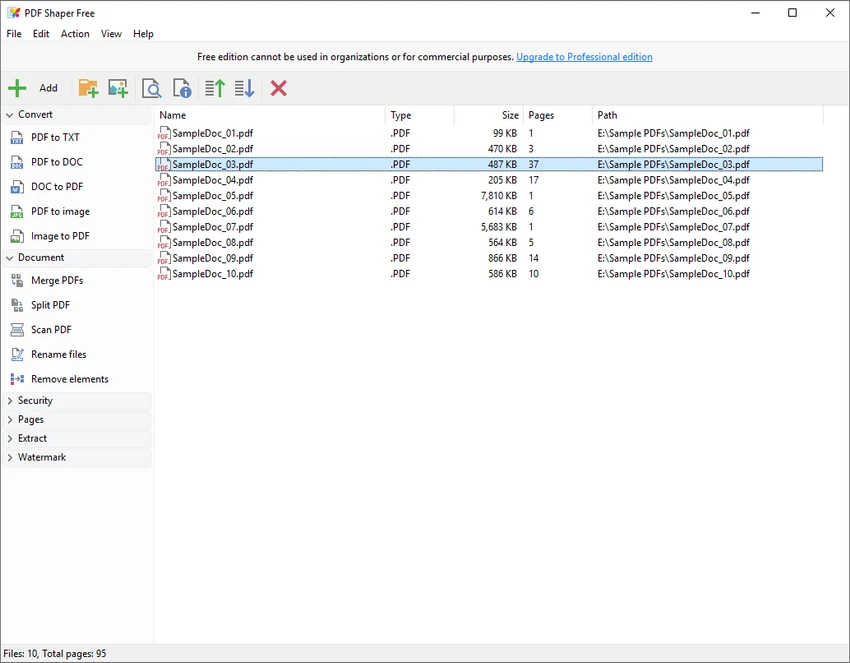

PDF Shaper is a comprehensive PDF utility for Windows designed to manage, edit, and optimize PDF documents with a wide range of tools. It provides essential features such as splitting, merging, conversion, encryption, and content extraction, making it a versatile solution for both personal and professional document workflows. The software focuses on simplicity and efficiency, allowing users to perform common PDF tasks without requiring advanced technical knowledge or multiple separate tools.
Key Features of PDF Shaper
- Split and merge PDF documents and individual pages
- Extract text, images, and pages from PDF files
- Convert images to PDF and PDF to image formats
- Rotate, crop, and delete PDF pages
- Encrypt and decrypt PDF files with password protection
- Set user permissions and access restrictions
- Add or remove watermarks
- Update and edit PDF metadata
- Convert Word DOC/DOCX files to PDF
- Convert PDF files to RTF format
- View and print PDF documents using external viewers
- Batch processing support for multiple files
User Experience
After using PDF Shaper, the most noticeable aspect is its practicality as a multi-purpose PDF toolkit. Instead of relying on multiple applications for different tasks, it consolidates essential PDF operations into one interface.
The layout is straightforward, with clearly separated tools for conversion, editing, and document processing. This makes it easy to quickly find the required function, whether splitting a file, converting documents, or applying security settings. File conversion between formats such as Word, images, and PDF works efficiently, making it useful for office workflows. The ability to extract text and graphics from PDFs is particularly helpful for repurposing document content.
Security features like encryption, decryption, and permission control add value for users handling sensitive documents. Batch processing support also improves productivity when working with multiple files at once. Overall, PDF Shaper delivers a balanced mix of simplicity and functionality, making it suitable for everyday PDF management tasks.
Who Should Use PDF Shaper?
- Office workers managing PDF documents
- Students handling study materials and assignments
- Users who need quick PDF conversion tools
- Professionals dealing with document workflows
- Anyone needing basic PDF editing and security features
Conclusion
PDF Shaper is a practical and efficient PDF utility that combines essential document tools in a single application. With features for splitting, merging, converting, and securing PDFs, it offers a reliable solution for everyday document management needs.


