


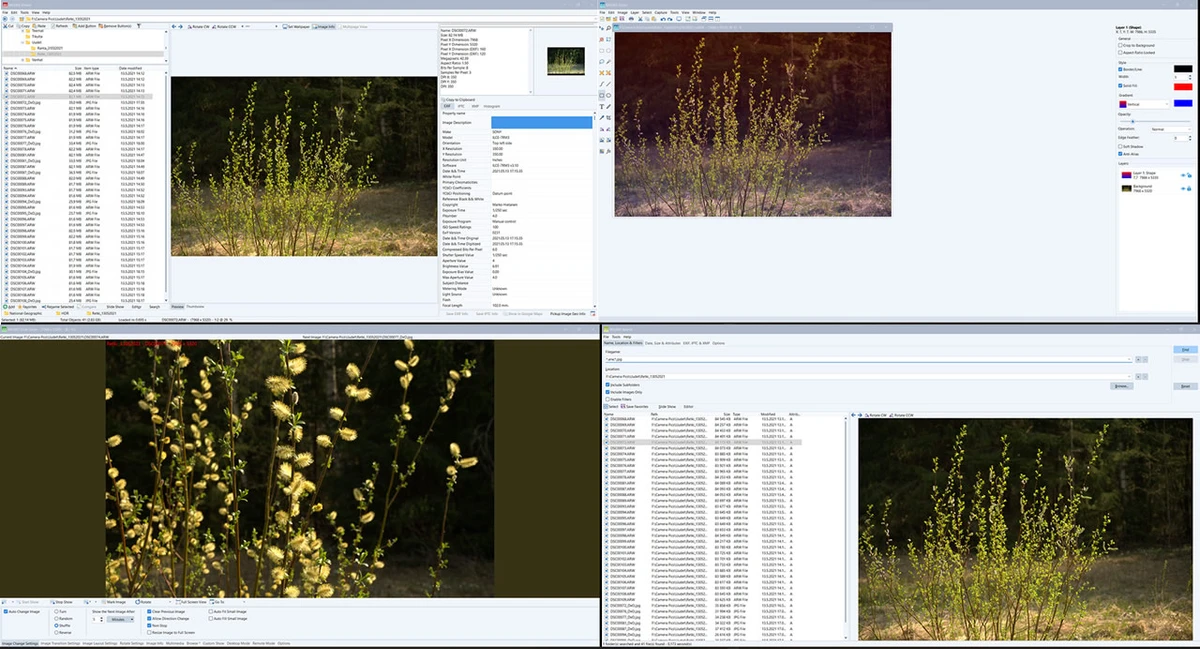

WildBit Viewer is a compact and fast image viewer designed for Windows users who need a simple yet feature-rich tool to browse, compare, and organize images. It focuses on speed, usability, and support for a wide range of image formats, making it suitable for both casual users and professionals managing large photo collections.
Overview of WildBit Viewer
WildBit Viewer combines an image viewer, slideshow tool, and basic editing utilities into one lightweight application. It offers a fast folder and thumbnail browsing system, making image navigation smooth even with large directories. The software supports major graphic formats including BMP, JPEG, PNG, GIF, TIFF, TGA, and many others (over 70 formats). It also includes detailed image information tools such as EXIF metadata support for JPEG and TIFF files, as well as IPTC (IIMV4) data commonly used in professional photography workflows. System support is focused on modern Windows versions, specifically Windows 10 and Windows 11.
Features of WildBit Viewer
- Fast and lightweight image viewing engine
- Thumbnail browser with adjustable views and sorting options
- Slideshow mode with 176 transition effects
- Side-by-side image comparison tool
- Favorites system for saving and managing image lists
- Shell toolbar for quick folder access and organization
- Image information viewer with EXIF and IPTC metadata support
- Support for 70+ image formats including BMP, JPEG, PNG, TIFF, GIF, and more
- Multi-monitor support in slideshow mode
User Experience
Using WildBit Viewer feels responsive and efficient, especially when navigating large image folders. The thumbnail view loads quickly, and switching between directories is smooth. The slideshow feature stands out due to its wide variety of transition effects, making it useful for presentations or personal photo viewing. The compare tool is practical for photographers or designers who need to evaluate similar images side by side. The interface is functional and focused on utility rather than modern visual styling, prioritizing performance over design complexity.
Who Should Use WildBit Viewer?
- Users who need a fast image browsing tool
- Photographers managing large image collections
- Designers comparing multiple image versions
- Windows users looking for a lightweight alternative to heavy photo software
- Anyone needing slideshow functionality with advanced transitions
Conclusion
WildBit Viewer is a strong choice for users who want a fast, no-frills image viewer with powerful browsing and slideshow capabilities. While it does not focus on advanced editing, it excels in performance, format support, and image organization features.


