


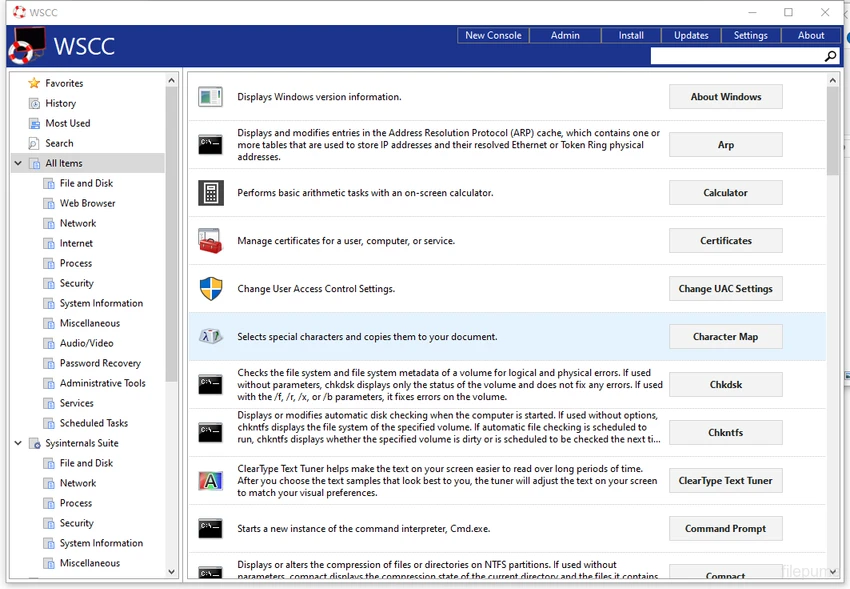

WSCC (Windows System Control Center) is a lightweight utility manager designed to help users install, update, organize, and run system tools from various Windows utility suites. It is especially focused on tools from the Sysinternals collection and similar diagnostic utilities. Instead of manually downloading and managing multiple system tools, WSCC centralizes everything into one interface, making system administration and troubleshooting faster and more organized.
Overview
WSCC acts as a control center for Windows system utilities. It provides a structured interface where users can browse available tools, install them automatically, and launch them directly from the application. The software supports both automatic updates and manual execution via HTTP downloads, giving users flexibility in how tools are managed. It also includes a built-in console for running command-line utilities, making it useful for advanced system tasks. With its simple folder-based layout and minimal design, WSCC is built for efficiency rather than complexity.
Features of WSCC
- Install and manage Sysinternals and system utility suites
- Automatically update supported tools
- Launch utilities directly from a centralized interface
- Organize tools using folder-style structure and favorites
- Built-in console for running command-line applications
- Multiple view modes (detailed list, icons, reports)
- Search tools by name or description
- Show or hide system and hidden items
- Access tool properties and online information
- Customizable console (font, background, opacity)
- Optional system tray minimization
- Lightweight performance with minimal system impact
User Experience
WSCC offers a clean and straightforward interface that makes system tool management more accessible. Users are presented with a categorized list of utilities, each with a short description and quick access options. The application is especially useful for IT professionals and power users who regularly work with system diagnostic tools. Instead of navigating multiple websites or folders, everything is centralized in one place.
Despite its functionality, WSCC remains lightweight and responsive, with minimal system resource usage. The learning curve is low, although its value increases significantly for users familiar with system-level utilities.
Who Should Use WSCC?
WSCC is best suited for:
- IT administrators managing Windows systems
- System engineers using Sysinternals tools
- Power users who frequently troubleshoot Windows
- Developers working with system diagnostics
- Users who want centralized access to utility tools
Conclusion
WSCC (Windows System Control Center) is a practical utility for organizing and managing Windows system tools in one place. It is especially useful for IT professionals and advanced users who rely on diagnostic utilities like Sysinternals.


