


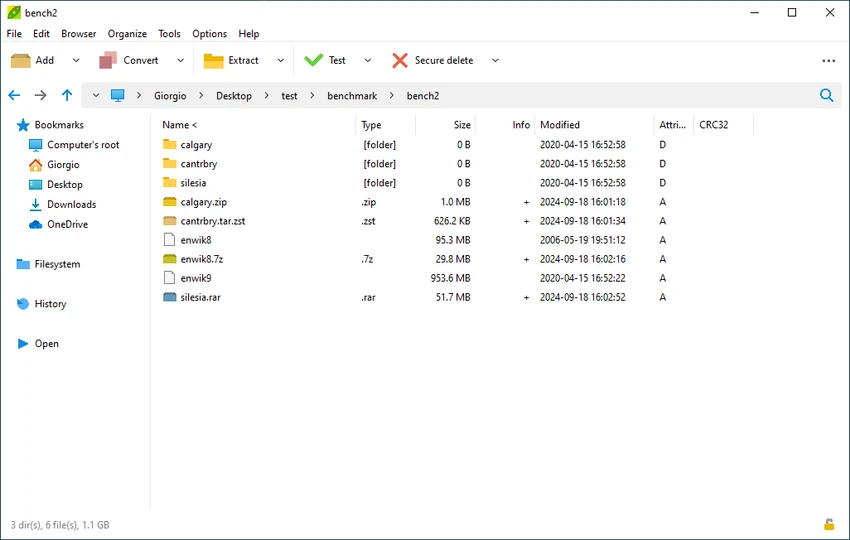

PeaZip is a free, open-source file compression and archive management utility that offers an impressive combination of broad format compatibility, security features, and file management tools. Designed as an alternative to commercial archiving software, it enables users to create, extract, convert, and manage compressed archives through an intuitive interface while supporting hundreds of archive formats.
The software can create archives in several popular formats, including 7Z, ZIP, TAR, ARC, BZ2, GZ, PEA, and others, while opening and extracting over 200 archive types such as RAR, ZIPX, ISO, CAB, DMG, ACE, and the newer RAR5 format. Beyond standard compression and extraction, PeaZip also functions as a capable file manager with tools for duplicate file detection, hash verification, secure deletion, file splitting and merging, and archive integrity testing.
Security is another major strength. PeaZip includes strong encryption options, two-factor authentication support, an encrypted password manager, and secure deletion features to help protect sensitive data. Additional conveniences such as drag-and-drop support, Windows context menu integration, Unicode filename support, quick search, customizable themes, and batch operations make everyday archive management both efficient and user-friendly.
Whether you're compressing files for storage, extracting downloaded archives, or managing large collections of files, PeaZip provides a feature-rich solution without requiring a paid license.
Features of PeaZip
- Free and open-source file compression utility.
- Creates archives in formats including 7Z, ZIP, TAR, ARC, BZ2, GZ, PEA, PAQ/ZPAQ, QUAD/BALZ, and UPX.
- Opens and extracts over 200 archive formats, including ZIP, ZIPX, RAR, RAR5, 7Z, ISO, DMG, CAB, TAR, and ACE.
- Supports drag-and-drop for compression and extraction.
- Windows context menu integration.
- Built-in file manager with advanced file management tools.
- Find duplicate files.
- Verify file hashes and checksums.
- Secure file deletion.
- Split and merge files.
- Archive testing to verify archive integrity.
- Strong encryption support.
- Two-factor authentication support.
- Encrypted password manager.
- Batch processing capabilities.
- Unicode filename support.
- Quick search functionality.
- Customizable themes.
Interface and Usability
PeaZip offers a clean and modern interface that balances simplicity with functionality. During use, navigating folders, creating archives, and extracting compressed files feels straightforward, even when working with multiple archive formats.
Drag-and-drop support makes common tasks quick, while Windows context menu integration allows users to compress or extract files directly from File Explorer without launching the main application. The interface also provides quick access to file management tools such as archive testing, hash verification, and duplicate file detection.
Despite its extensive feature set, the application remains approachable for everyday users while offering enough advanced functionality for power users. Customizable themes further enhance the user experience by allowing the interface to match personal preferences. Overall, PeaZip successfully combines ease of use with a comprehensive collection of archive and file management tools.
Who Should Use PeaZip?
- Users looking for a free alternative to commercial archive software.
- Anyone who regularly compresses or extracts files.
- IT professionals managing multiple archive formats.
- Users who prioritize file encryption and data security.
- Developers and advanced users handling large collections of compressed files.
- Anyone who needs integrated file management alongside archive tools.
Conclusion
PeaZip is much more than a traditional file compression utility. In addition to supporting an extensive range of archive formats, it provides powerful security features, practical file management tools, and a polished user interface—all while remaining completely free and open source.
Its combination of archive creation, extraction, encryption, secure deletion, duplicate detection, and checksum verification makes it suitable for both everyday users and professionals who require a versatile archive management solution. While newcomers may need a little time to explore its more advanced capabilities, the software remains accessible for routine compression and extraction tasks.


