Actual Window Guard logo

Actual Window Guard 8.15.4

  • User Rating:
    ★★★★★
    ★★★★★
    0.0 ★ 0Votes
  • Requirements:
    Windows
  • Version: 8.15.4
  • Latest updated: 3 weeks ago
  • License: Free Trial  
  • Publisher: Actual Tools
  • Size: 9 MB
× app stores

Actual Window Guard is a Windows desktop utility designed to automate window management and improve workspace organization. Instead of manually resizing, positioning, and arranging application windows, users can define rules that automatically control how windows behave when they are opened.

The software helps maintain a clean and structured desktop environment by applying predefined settings such as window position, size, and behavior. It is particularly useful for users who work with many applications at once and want a consistent workspace layout without constant manual adjustments. By offering rule-based automation, Actual Window Guard reduces repetitive tasks and helps maintain an efficient workflow.

Features of Actual Window Guard

  • Automatically position and resize application windows
  • Create rules for window behavior based on application type
  • Apply consistent layout settings across all windows
  • Remove selected windows from the taskbar
  • Customize window title and icon behavior
  • Set window dimensions using percentage-based screen values
  • Automatically assign windows to specific monitors in multi-display setups
  • Support for multi-monitor workspace automation
  • Apply global or application-specific window rules
  • Manage command prompt (CMD/DOS) windows
  • Works with both 32-bit and 64-bit applications
  • Simplifies repetitive window arrangement tasks
  • System-wide rule configuration for desktop optimization

Interface and Usability

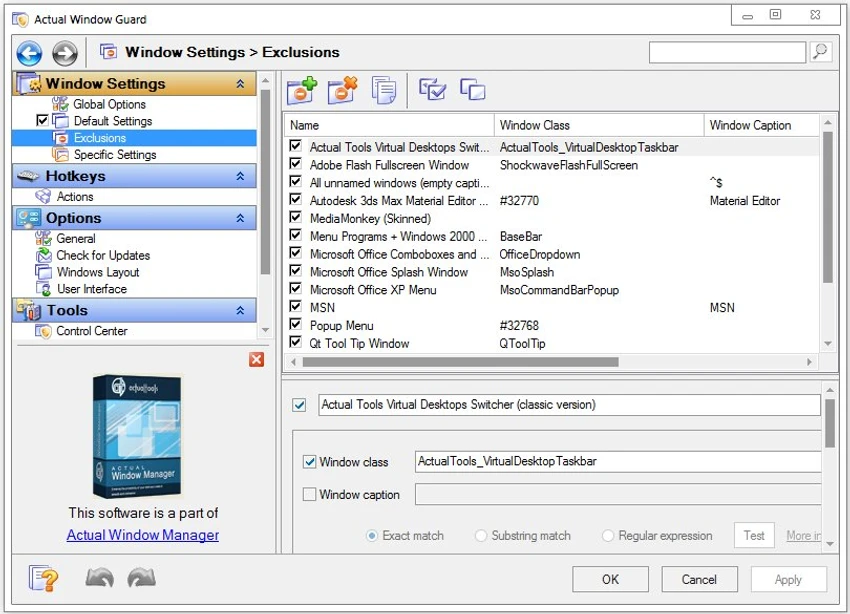
Actual Window Guard provides a rule-based interface where users define how different windows should behave when opened. Once configured, the software runs in the background and automatically applies these rules without requiring further user interaction. The interface is structured around creating and managing rule sets, allowing users to apply settings globally or target specific applications. Despite offering advanced customization, the tool is designed to remain accessible, with a clear layout that helps users build their workspace automation gradually. Over time, users can refine rules to achieve a fully optimized desktop environment tailored to their workflow.

Who Should Use Actual Window Guard?

  • Office professionals working with multiple applications daily
  • Developers managing coding, testing, and documentation windows
  • Multi-monitor users needing consistent window layouts
  • Users who prefer automated workspace organization
  • System administrators managing multiple tools and consoles
  • Anyone who wants to reduce repetitive window management tasks

Conclusion

Actual Window Guard is a highly practical automation tool that improves productivity by taking control of repetitive window management tasks. Its rule-based system allows users to maintain a clean, organized, and consistent desktop without manual adjustments.

Pros & Cons

✓

Pros

  • Automates window positioning and sizing
  • Supports rule-based customization per application
  • Works well in multi-monitor environments
  • Reduces repetitive manual window arrangement
  • Can manage command prompt windows effectively
  • Lightweight and runs in the background
  • Highly customizable workflow automation
✕

Cons

  • Requires initial setup of rules
  • Not visually focused (no modern UI enhancements)
  • Advanced configuration may take time to learn
  • Less useful for users with simple workflows

Frequently Asked Questions

What is Actual Window Guard used for?

Actual Window Guard is used to automatically manage window positions, sizes, and behaviors based on user-defined rules, improving desktop organization and productivity.

Can it automatically position windows?

Yes. The software can automatically place windows in specific positions and sizes when they are opened.

Does it support multiple monitors?

Yes. It can assign windows to specific monitors and manage layouts across multi-display setups.

Can I create rules for specific applications?

Yes. You can define rules for individual applications or apply global settings to all windows.

Does it work with command prompt windows?

Yes. It is one of the few tools that can manage CMD/DOS console windows.

Is Actual Window Guard difficult to use?

It is easy to use after setup, but creating and fine-tuning rules may take some initial learning.

Recommended apps [Freeware]:
  • Glow 26.9 Glow logo advanced Windows system analysis tool offering deep hardware insights, diagnostics, benchmarks, and system optimization utilities
  • OcenAudio 3.20.0 OcenAudio logo a fast and easy-to-use audio editor with real-time effects, spectrogram analysis, and VST plugin support
  • Ultimaker Cura 5.13.0 Ultimaker Cura logo Prepare, slice, and manage 3D prints with Ultimaker Cura, an open-source software for beginners and professionals
  • VirtualDJ 2026 Build 9482 VirtualDJ logo mix music, video, and karaoke with AI stems, controllers, streaming, and pro DJ tools
  • Comet Browser 2026 Comet Browser logo Browse faster with an AI-powered browser that automates tasks, summarizes content, and provides intelligent online assistance.
  • UEFITool A75 UEFITool logo Analyze, extract, and modify UEFI firmware images with support for multiple BIOS formats and detailed firmware structure viewing.
Recommended apps [Shareware]:
  • EF Mailbox Manager 26.05 EF Mailbox Manager logo Manage multiple POP3 email accounts, remove spam on the server, and download messages securely
  • MailWasher Pro 8.0.119 MailWasher Pro logo blocks spam, scams, and unwanted emails before download with advanced filtering tools
  • HTML Compiler 2026.7 HTML Compiler logo convert HTML apps into secure Windows executables using Chromium-based runtime
  • Draftable Desktop 26.6.200 Draftable Desktop logo compares PDF, Word, Excel, and PowerPoint files side by side securely on your computer without uploading documents online
  • Becky! Internet Mail 2.83.03 Becky! Internet Mail logo a fast, feature-rich Windows email client with POP3/IMAP support and advanced mailbox management
  • Rapid PHP 2025 v18.7.0.277 Rapid PHP logo Lightweight PHP editor with intelligent coding tools, debugging, FTP support, and modern web development features for Windows.