Dism++ logo

Dism++ 10.1.1002.2

  • User Rating:
    ★★★★★
    ★★★★★
    0.0 0Votes
  • Requirements:
    Windows
  • Version: 10.1.1002.2
  • Latest updated: 3 years ago
  • License: Freeware  
  • Publisher: Chuyu Team
  • Size: 3.5 MB
× app stores

Dism++ is a powerful Windows system maintenance and optimization utility built as a graphical interface over low-level Windows servicing components. Unlike typical cleanup tools, it interacts deeply with Windows system structures to provide advanced control over system components, updates, and image management.

The software is designed for users who want more than basic “junk file cleaning.” It offers tools for managing system storage, startup programs, updates, drivers, and Windows image files. One of its key strengths is that it is portable and does not require installation. Because of its advanced nature, Dism++ is often used by technicians, IT users, and experienced Windows users who need deeper system-level control.

Features of Dism++

  • System cleanup and optimization tools
  • WinSxS folder cleanup to free disk space
  • Windows image servicing and management
  • Lightweight design with reduced system footprint
  • Support for ESD file handling (no manual ISO conversion needed)
  • Windows update management and control
  • Startup program and boot entry management
  • Removal of temporary files, cache, logs, and system junk
  • Ability to delete Windows Store residual data
  • Backup and restore system functionality without Windows PE
  • Portable application (no installation required)
  • Free, ad-free, and no spyware

Interface and Usability

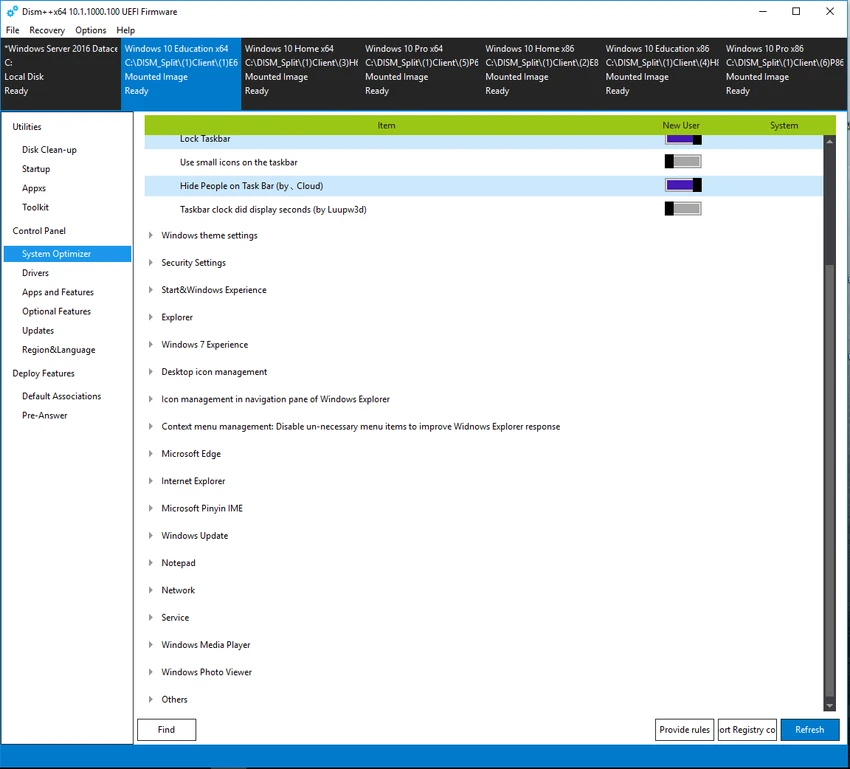
Dism++ features a structured and functional interface designed for efficiency rather than visual appeal. All major tools are grouped into clearly labeled sections, allowing users to access system cleanup, startup management, and update controls quickly. Although the interface is relatively simple, the tools it provides are advanced and require careful use. Most features are designed for users who understand Windows system components or are comfortable working with system-level settings. Despite its technical depth, navigation is straightforward thanks to its organized layout and single-window design.

Who Should Use Dism++?

  • Advanced Windows users
  • IT technicians and system administrators
  • Users wanting deep system cleanup beyond basic tools
  • People managing multiple Windows installations
  • Users needing control over startup and update components
  • Anyone looking for a portable system maintenance tool

Conclusion

Dism++ is a powerful and efficient system optimization tool that provides deep control over Windows cleanup, updates, and system configuration. Its portable nature and wide feature set make it especially valuable for technical users who want more control than standard cleanup utilities offer.

Pros & Cons

Pros

  • Deep system-level cleanup and optimization
  • Lightweight and portable (no installation needed)
  • Effective WinSxS and junk file cleaning
  • Startup and update management tools included
  • Supports system backup and restore
  • Free and ad-free
  • Powerful Windows image management features

Cons

  • Not beginner-friendly for all features
  • Advanced options require technical understanding
  • Interface is functional but not modern or polished
  • Misuse of system tools may affect Windows stability

Frequently Asked Questions

What is Dism++ used for?

Dism++ is used for cleaning, optimizing, and managing Windows systems, including system files, updates, and startup items.

Is Dism++ safe to use?

Yes, but it should be used carefully. Some features modify system-level components and require understanding of Windows internals.

Does Dism++ need installation?

No. Dism++ is a portable tool that can run directly without installation.

Can Dism++ improve PC performance?

Yes. It can improve performance by cleaning system junk, managing startup programs, and optimizing system components.

Can it remove Windows update files?

Yes. Dism++ includes tools for managing and cleaning Windows update-related files.

Is Dism++ suitable for beginners?

It is mainly designed for advanced users, but beginners can use basic cleanup features with caution.

Recommended apps [Freeware]:
  • Visual Studio Code 1.129.1 Visual Studio Code logo Free and powerful code editor from Microsoft with extensions, debugging, Git support, and multi-language development
  • WinScript 2.21.0 WinScript logo customize Windows with debloat, privacy, performance tweaks, and one-click app installation scripts
  • AVG Clear 26.6.11050 AVG Clear logo completely removes AVG antivirus products, files, settings, and registry entries from Windows systems
  • Disk Drill 6.3.1398.0 Disk Drill logo advanced data recovery software for Windows to restore deleted files from drives, USB, and partitions
  • SponsorBlock 6.1.6 SponsorBlock logo browser extension that automatically skips YouTube sponsorships, intros, outros, and other non-essential video segments
  • Black Menu for Google 31.6.2 Black Menu for Google logo Access popular Google services quickly from your browser with a customizable menu extension for search, Gmail, Maps, Drive, and more.
Recommended apps [Shareware]:
  • VovSoft Batch Audio Converter 2.1 VovSoft Batch Audio Converter logo a Windows tool for fast bulk audio conversion with drag-and-drop simplicity and format flexibility
  • TweakNow Gallery 1.3.5 TweakNow Gallery logo a fast Windows photo viewer and organizer with slideshow and built-in image conversion tools
  • OkMap Desktop 19.6.6 OkMap Desktop logo a GPS mapping software for route planning, waypoint creation, and offline/online map management
  • TapinRadio 2.17.00 TapinRadio logo simple internet radio player for Windows with recording, equalizer, search and alarms and sleep timer
  • Freemake Video Converter 6.0.1.3 Freemake Video Converter logo Convert videos, burn DVDs, create slideshows, and edit media with Freemake Video Converter for Windows
  • pdfFactory Pro 9.31 pdfFactory Pro logo creates, combines, previews, and prints PDFs easily with advanced tools like bookmarks, email export, and job control