AOMEI Backupper logo

AOMEI Backupper 8.4.0

  • User Rating:
    ★★★★★
    ★★★★★
    0.0 0Votes
  • Requirements:
    Windows
  • Version: 8.4.0
  • Latest updated: 1 week ago
  • License: Freeware  
  • Publisher: Aomei Technology
  • Size: 189.5 MB
× app stores

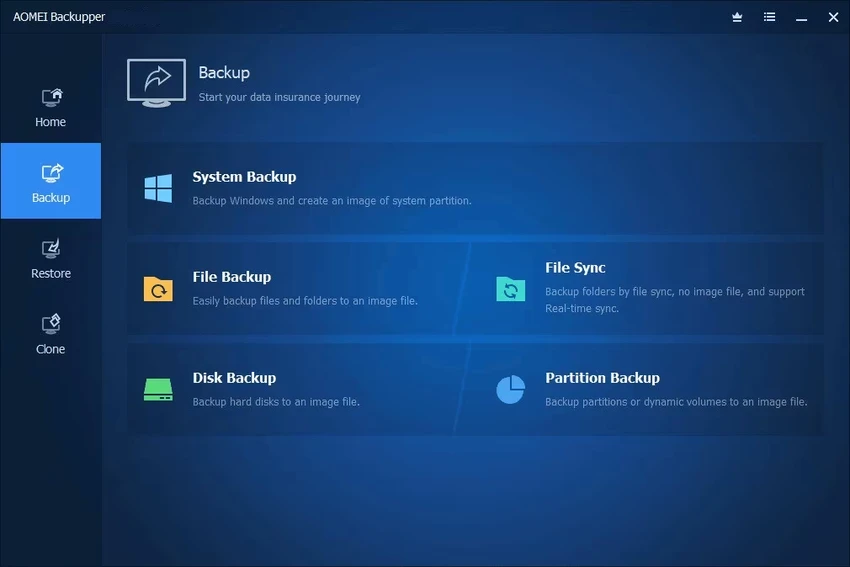
AOMEI Backupper is a Windows backup and recovery solution designed to help users protect their system, files, and entire disks with minimal effort. It supports system backup, disk imaging, partition backup, and cloning features, making it a practical tool for both everyday users and IT environments.

Overview of AOMEI Backupper

AOMEI Backupper focuses on simplifying data protection through automated and manual backup options. It allows users to create full system images, back up specific partitions, or clone entire drives without complicated setup. It also includes recovery tools that help restore systems or individual files when something goes wrong. One of its standout capabilities is disk cloning, which is especially useful when upgrading to a new hard drive or SSD. The software supports Windows systems from Windows 7 to Windows 11 and includes bootable recovery media creation via Windows PE ISO.

Features of AOMEI Backupper

  • System Backup: One-click backup of the entire system drive, including installed applications and system files
  • Disk Backup: Full backup of HDDs, SSDs, USB drives, and external storage devices
  • Partition Backup: Backup selected partitions or volumes instead of entire disks
  • System Restore: Quickly restore system partitions to a bootable state
  • Disk & Partition Recovery: Restore full disks or individual partitions to their original state
  • Selective File Restore: Recover specific files or folders from backup images
  • Disk Clone: Copy entire drives, with support for resizing partitions during migration
  • Partition/Volume Clone: Duplicate individual partitions or dynamic volumes
  • Bootable Recovery Media: Create Windows PE ISO for system recovery via USB

User Experience

AOMEI Backupper is designed with accessibility in mind. The interface is structured in a way that guides users through backup, restore, and clone tasks without requiring technical expertise. Creating a system backup or disk image is straightforward, typically involving just a few clicks. The cloning process is particularly useful for upgrading to SSDs, as it allows disk migration without reinstalling Windows or applications. Restoration options are flexible, allowing either full system recovery or selective file restoration from backup images, which is helpful when only specific data is needed.

Conclusion

AOMEI Backupper is a practical and user-friendly backup solution for Windows users who want reliable protection against data loss. With strong system imaging, cloning, and recovery tools, it is especially useful for system migration and disaster recovery scenarios.

Pros & Cons

Pros

  • Easy-to-use interface suitable for beginners
  • Comprehensive backup, restore, and cloning tools
  • Supports full system imaging and selective file recovery
  • Works with HDDs, SSDs, USB drives, and external storage
  • Bootable recovery media creation included

Cons

  • Advanced features may require some learning for new users
  • No rating or performance benchmark data provided
  • Windows-only software

Frequently Asked Questions

What is AOMEI Backupper used for?

AOMEI Backupper is used for system backup, disk imaging, file recovery, and disk cloning on Windows.

Can AOMEI Backupper clone an SSD?

Yes, it supports disk cloning and can migrate data from HDD to SSD.

Does AOMEI Backupper allow selective file recovery?

Yes, users can restore individual files or folders from backup images.

Is AOMEI Backupper suitable for beginners?

Yes, it is designed with a simple interface that is easy for non-technical users.

Recommended apps [Freeware]:
  • WD Drive Utilities 2.1.6.511 WD Drive Utilities logo Manage, diagnose, and optimize Western Digital external hard drives with WD Drive Utilities for Windows
  • RustDesk 1.4.8 RustDesk logo open-source remote desktop solution with self-hosting, cross-platform support, and customizable remote access tools
  • Donemax Video Downloader 3.0 Donemax Video Downloader logo download videos and audio from 1,200+ websites for offline viewing and playback
  • Ventoy 1.1.16 + LiveCD Ventoy logo create bootable USB drives and boot directly from ISO files without extraction or reformatting
  • KMPlayer 2026.6.26.11 KMPlayer logo high-performance 4K/8K media player with ad-free UI, codec support, and YouTube playback tools
  • BitDefender Antivirus Free Edition 27.0.60.339 BitDefender Antivirus Free Edition logo real-time protection against malware, phishing, and viruses for Windows users
Recommended apps [Shareware]:
  • Gilisoft SnapID 8.8.0 Gilisoft SnapID logo Edit, enhance, retouch, and transform images with powerful tools in Gilisoft SnapID for Windows
  • VideoPad Video Editor 18.38 VideoPad Video Editor logo a Windows movie maker for editing videos, adding effects, transitions, audio, and exporting to social platforms
  • XL-Connector 3.7.14.0 XL-Connector logo Excel plugin for Salesforce data export, import, bulk updates, and metadata management.
  • Pano2VR 8.0.4 Pano2VR logo powerful software for building interactive panoramic images and virtual tours for desktop and mobile platforms
  • Google Antigravity 2.2.1 Google Antigravity logo AI-powered IDE that uses autonomous agents to automate coding, testing, and software development workflows
  • RecoveryTools zMigrator 26.6 RecoveryTools zMigrator logo Migrate Zimbra emails, contacts, and calendars to multiple formats