FileLegit Windows Multimedia Media Players Universal Media Server
Universal Media Server logo

Universal Media Server 15.6.0

  • User Rating:
    ★★★★★
    ★★★★★
    0.0 ★ 0Votes
  • Requirements:
    Windows
  • Version: 15.6.0
  • Latest updated: 2 weeks ago
  • License: Open Source  
  • Publisher: Subjunk
  • Size: 157 MB
× app stores

Universal Media Server is a cross-platform UPnP and DLNA-compatible media server designed to make sharing multimedia files between computers and connected devices easier and more convenient. The software allows users to stream and exchange media content across a network while supporting a wide range of output devices.

Originally based on PS3 Media Server, Universal Media Server provides compatibility with various entertainment devices, including PlayStation 3, Xbox 360, and selected Samsung and Sony televisions. It is designed to automatically handle many media formats through streaming and transcoding capabilities, reducing the need for extensive manual configuration.

The application supports major desktop operating systems, including Windows, Linux, and macOS. Built with Java, Universal Media Server can run across different platforms while using technologies such as MEncoder, FFmpeg, tsMuxeR, AviSynth, MediaInfo, and VLC to provide broad multimedia format support.

Universal Media Server is suitable for users who want to create a personal media hub for their home network. It helps connect computers with compatible devices, allowing videos, music, and other supported media files to be accessed from different screens and playback systems.

The software supports various devices, including smart TVs, mobile devices, media players, and gaming consoles. With its combination of DLNA compatibility, transcoding support, and multi-platform availability, Universal Media Server provides a flexible solution for managing and streaming personal media collections.

Features of Universal Media Server

  • UPnP and DLNA-compatible media server
  • Cross-platform support for Windows, Linux, and macOS
  • Streams and shares multimedia files across connected devices
  • Supports media transcoding with multiple integrated technologies
  • Compatible with PlayStation 3 and Xbox 360
  • Supports Samsung and Sony TV devices
  • Works with various smart TVs and network media devices
  • Uses technologies including FFmpeg, MEncoder, tsMuxeR, AviSynth, MediaInfo, and VLC
  • Supports a wide range of multimedia formats
  • Provides automatic media streaming with minimal configuration
  • Includes support for devices such as LG TVs, Panasonic TVs, Philips Net TVs, and iPhone devices

Interface and Usability

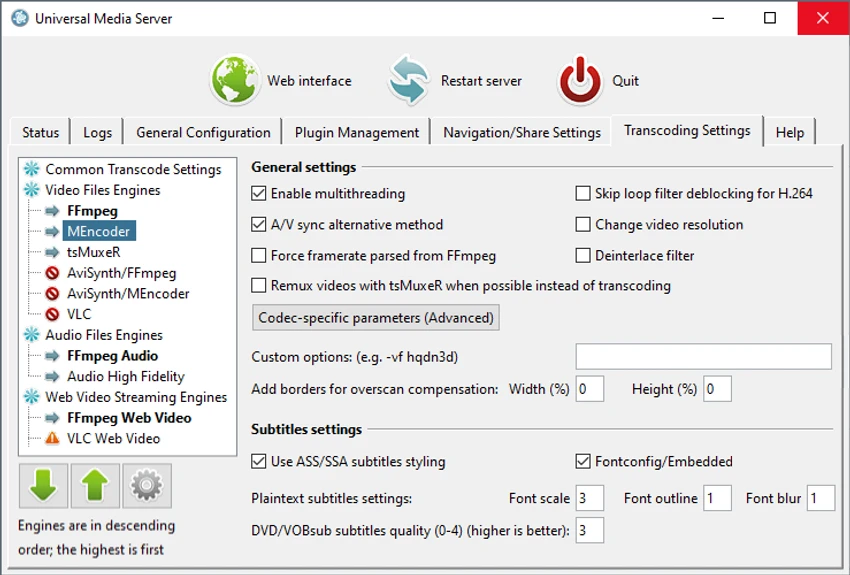
Universal Media Server is designed with a straightforward approach focused on setting up media sharing rather than complex customization. The software provides a server-based interface where users can configure their media library and connect compatible playback devices on the same network. Its automatic streaming and transcoding capabilities help simplify playback across different devices. Instead of manually converting files into different formats, the software can process supported media formats using its integrated multimedia technologies.

Because Universal Media Server works with many device types and operating systems, it offers flexibility for users with mixed home entertainment setups. However, users may still need basic knowledge of network connections and DLNA-compatible devices to configure their environment effectively.

Who Should Use Universal Media Server?

  • Users who want to stream personal media across a home network
  • People with DLNA-compatible smart TVs or media devices
  • Owners of supported gaming consoles such as PlayStation 3 and Xbox 360
  • Users looking for a cross-platform media sharing solution
  • Anyone who needs a local media server for videos, music, and images

Conclusion

Universal Media Server is a capable media streaming solution for users who want to access their personal media collection from different devices around their home. Its DLNA compatibility, multi-platform support, and built-in transcoding technologies make it a flexible option for creating a personal media server.

Pros & Cons

✓

Pros

  • Supports multiple operating systems
  • Compatible with many DLNA and UPnP devices
  • Provides media streaming and transcoding features
  • Supports many multimedia formats
  • Works with smart TVs, consoles, and mobile devices
  • Based on established multimedia technologies
✕

Cons

  • Requires compatible network devices for full functionality
  • Setup may require basic understanding of media servers and network sharing

Frequently Asked Questions

What is Universal Media Server used for?

Universal Media Server is used to stream and share multimedia files from a computer to compatible devices through UPnP and DLNA technology.

Which operating systems does Universal Media Server support?

Universal Media Server supports Windows, Linux, and macOS according to the provided information.

What devices are compatible with Universal Media Server?

The software supports various devices, including PlayStation 3, Xbox 360, Samsung TVs, Sony TVs, LG TVs, Panasonic TVs, Philips Net TVs, iPhone devices, and other compatible media players.

Does Universal Media Server support video transcoding?

Yes. Universal Media Server can stream and transcode different media formats using technologies such as FFmpeg, MEncoder, tsMuxeR, AviSynth, MediaInfo, and VLC.

Do I need advanced configuration to use Universal Media Server?

The software is designed to work with little or no configuration for many media formats. However, users may need basic network and device setup knowledge depending on their home environment.

Is Universal Media Server free to use?

The provided information does not include licensing details, so availability or pricing cannot be confirmed from the available data.

Recommended apps [Freeware]:
  • AnyTXT Searcher 1.3.3241 AnyTXT Searcher logo fast desktop search tool that indexes and searches full-text content across documents, PDFs, emails, and more
  • Valentina Studio 17.5.2 Valentina Studio logo manage SQL and NoSQL databases with schema design, queries, reports, and cross-platform support.
  • DefenderUI 2.10 DefenderUI logo enhances Microsoft Defender on Windows 10/11 with advanced security profiles and easier system protection control
  • Media Player Codec Pack 5.1.2.625 Media Player Codec Pack logo enables smooth playback of audio and video formats on Windows by adding essential codecs and filters.
  • ChrisPC Free VideoTube Downloader 15.26.0718 ChrisPC Free VideoTube Downloader logo a Windows tool for downloading, recording, and converting online videos
  • DesktopOK 12.61 DesktopOK logo a free Windows utility that saves and restores desktop icon layouts across screen resolution changes
Recommended apps [Shareware]:
  • eM Client 10.4.5606.0 eM Client logo a modern Windows email client with support for Gmail, Exchange, calendars, tasks, contacts, and chat in one app
  • O&O Defrag Professional 31.3.26064 O&O Defrag Professional logo optimizes HDDs and SSDs with intelligent defragmentation, automatic maintenance, startup management, and disk cleanup tools
  • PerfectXL Explore 1.6.4 PerfectXL Explore logo analyze complex Excel models with visual maps, formula lists, and spreadsheet insights.
  • Software Ideas Modeler 15.50 Software Ideas Modeler logo Design UML, ERD, BPMN, SysML, and 110+ diagram types with an intuitive modeling tool built for software analysis and planning.
  • Blocker Web 1.1.5.0 Blocker Web logo Block distracting websites on Windows, manage blocked URLs, and stay focused with a lightweight website blocking utility.
  • CorelDRAW Technical Suite 2026 v27.1.0.129 CorelDRAW Technical Suite logo Create detailed technical illustrations, documentation, and graphics with professional vector design, 3D, and publishing tools.