DP Animation Maker logo

DP Animation Maker 3.5.51

  • User Rating:
    ★★★★★
    ★★★★★
    0.0 0Votes
  • Requirements:
    Windows
  • Version: 3.5.51
  • Latest updated: 1 week ago
  • License: Free Trial  
  • Publisher: DesktopPaints LLC
  • Size: 6.4 MB
× app stores

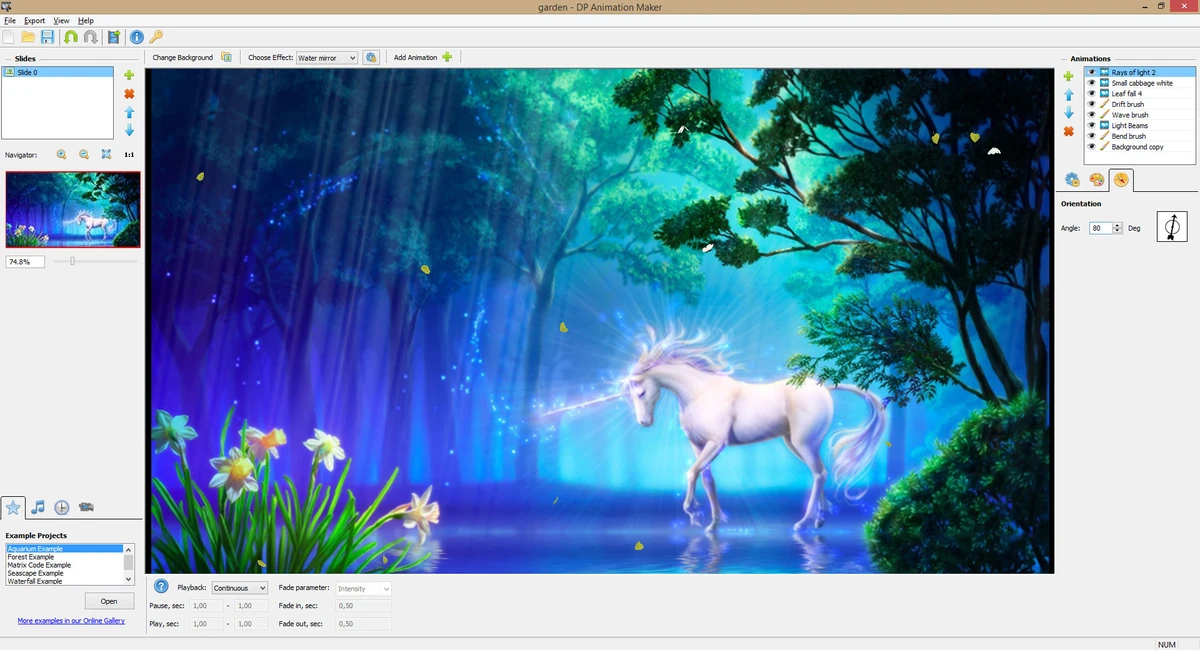
DP Animation Maker is a user-friendly animation tool designed to transform static images into dynamic animated visuals. It allows users to add motion effects, objects, sound, and camera adjustments to create animated videos, GIFs, and other multimedia content without requiring advanced technical skills.

Overview of DP Animation Maker

DP Animation Maker focuses on making animation creation accessible to beginners while still offering enough flexibility for creative users. The software works by letting users import an image, apply animation effects, add moving objects, and export the final result in various formats. It supports a wide range of output options including animated GIFs, AVI, MOV, PNG sequences, and even standalone EXE files. This makes it suitable for web content, presentations, social media, and video projects. The tool includes a library of prebuilt effects and objects such as weather effects, natural elements, lighting effects, and abstract animations. Users can also import music to enhance their animated creations.

Features of DP Animation Maker

  • Convert static images into animated videos and GIFs
  • Wide variety of prebuilt animation effects (fire, water, waves, reflections, etc.)
  • Over 60 built-in animated objects (snow, rain, fog, lightning, butterflies, etc.)
  • Advanced animation brushes for motion control and visual effects
  • Add music tracks (MP3 support) to animations
  • Camera zoom and motion settings for scene control
  • Export formats include GIF, AVI, MOV, PNG sequences, and EXE
  • Adjustable settings for speed, size, opacity, blending, and motion paths
  • Suitable for creating web banners, YouTube videos, slideshows, and greeting cards

User Experience

DP Animation Maker is designed with simplicity in mind. The workflow is straightforward: import an image, choose effects, add animated elements, and export the final result. This makes it accessible even to users without animation or video editing experience. At the same time, it provides deeper customization options for more advanced users. Adjusting motion speed, object behavior, and brush effects allows for more creative control over the final animation. The interface is practical and task-focused, prioritizing ease of use over complex editing timelines or professional-grade animation systems.

Who Should Use DP Animation Maker?

  • Beginners interested in creating animations from images
  • Content creators making social media visuals or YouTube content
  • Teachers and presenters creating engaging slideshow materials
  • Designers needing simple animated banners or greeting cards
  • Users who want quick animation results without complex software

Conclusion

DP Animation Maker is a practical and accessible animation tool that makes it easy to bring static images to life. With its wide range of effects, export options, and simple workflow, it is well-suited for users who want quick results without learning complex animation software.

Pros & Cons

Pros

  • Very easy to use, even for beginners
  • Wide range of animation effects and objects
  • Multiple export formats including GIF and video
  • Supports music integration
  • Fast workflow from image to finished animation

Cons

  • Limited to image-based animation (not full 3D or timeline editing)
  • Interface is functional rather than modern or highly polished
  • Advanced control still limited compared to professional animation suites

Frequently Asked Questions

What is DP Animation Maker used for?

It is used to turn static images into animated videos, GIFs, and visual effects for presentations or online content.

Can DP Animation Maker create videos?

Yes, it can export animations as AVI, MOV, and other video formats.

Does it support GIF creation?

Yes, animated GIF export is one of its key features.

Can I add music to animations?

Yes, users can import MP3 files and sync them with animations.

Is DP Animation Maker suitable for professionals?

It can be useful for simple projects, but it is mainly designed for beginners and lightweight animation tasks.

Recommended apps [Freeware]:
  • Android Studio 2026.1.1.9 Android Studio logo Google’s official IDE for Android, offering intelligent coding, fast emulators, and cloud integration.
  • TickTick 8.1.0.1 TickTick logo Organize tasks, manage schedules, and stay focused with TickTick's calendar, Pomodoro timer, and collaboration tools
  • Cyberduck 9.5.0.45237 Cyberduck logo Manage FTP, SFTP, and cloud storage services like Google Drive, Dropbox, and Amazon S3 with Cyberduck for Windows
  • TeamViewer 15.79.4 TeamViewer logo a secure remote desktop tool for PC control, file transfer, and remote support worldwide
  • WAU Manager 3.8.7.0 WAU Manager logo Provides complete control over Windows Updates, including scheduling, installing, hiding, and uninstalling updates on Windows 10/11
  • Trellix Stinger 26.06.26.4 Trellix Stinger logo portable malware removal tool for Windows designed to detect and remove specific viruses from infected systems
Recommended apps [Shareware]:
  • VovSoft Audio to Lyrics Converter 1.0 VovSoft Audio to Lyrics Converter logo offline AI tool to transcribe audio into LRC, SRT, VTT, and text files.
  • Total PDF Converter 6.5.0.171 Total PDF Converter logo converts PDF to DOC, XLS, images, TXT, PDF/A and more with batch processing and advanced tools.
  • Advanced Installer 23.8 Advanced Installer logo Windows MSI packaging tool for developers to build, customize, and deploy reliable installers
  • Shield Antivirus 5.6.5 Shield Antivirus logo real-time protection against viruses, ransomware, spyware, and malware with scheduled scans and system tools
  • Pdf995 26.1 Pdf995 logo Create high-quality PDF files from any application with Pdf995 Printer Driver using a lightweight virtual printer
  • Fast Video Cutter Joiner 7.1.4.0 Fast Video Cutter Joiner logo a lightweight video editing tool for quickly cutting, trimming, and joining videos