iTop Voicy logo

iTop Voicy 1.3.0.1696

  • User Rating:
    ★★★★★
    ★★★★★
    0.0 ★ 0Votes
  • Requirements:
    Windows
  • Version: 1.3.0.1696
  • Latest updated: 3 weeks ago
  • License: Freeware  
  • Publisher: iTop
  • Size: 65 MB
× app stores

iTop Voicy is an AI-powered voice changer for Windows that lets you transform your voice in real time with minimal latency. Designed for gamers, streamers, content creators, and anyone looking to experiment with voice effects, it combines AI voice processing with an extensive voice library, recording tools, and customizable voice models.

Beyond live voice changing, iTop Voicy also supports modifying voices in existing audio and video files, making it useful for voice-overs, podcasts, audiobooks, storytelling, and social media content. Its integrated noise reduction helps improve recording quality by reducing background noise and microphone echo, allowing users to produce cleaner audio without relying on separate editing software. Whether you want to sound younger, older, robotic, or create your own personalized voice profile, iTop Voicy provides an accessible way to experiment with AI-powered voice transformation.

Features of iTop Voicy

  • AI-powered real-time voice changing
  • Low-latency voice processing
  • Voice modification for live audio
  • Voice changing for audio files
  • Voice changing for video files
  • One-click voice conversion
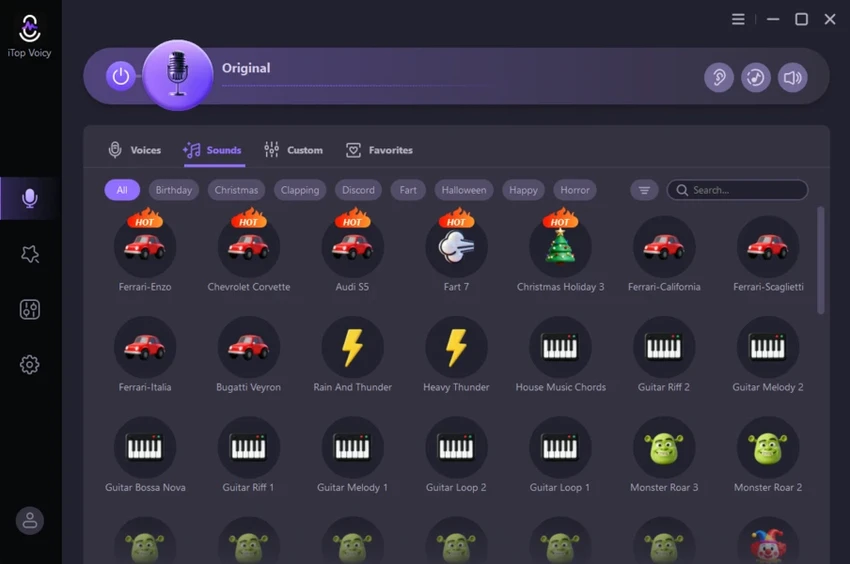
  • Extensive library of pre-built voice models
  • Male, female, cartoon, and AI-style voices
  • Custom voice creation
  • Personalized voice model management
  • Adjustable pitch
  • Adjustable timbre
  • Adjustable voice emotion
  • Studio-quality voice recording
  • Built-in noise reduction
  • Microphone echo reduction
  • Voice recording tools
  • Suitable for voice-overs
  • Podcast recording support
  • Audiobook narration support
  • Audio enhancement without additional editing software

Interface and Usability

iTop Voicy offers a clean, beginner-friendly interface that makes voice modification easy, even for users with little audio editing experience. Voice models are organized for quick selection, while essential controls remain accessible without cluttering the workspace.

Changing voices during live sessions feels straightforward, and the software allows users to switch between different voice styles with minimal effort. Creating custom voice models is equally approachable, with adjustable settings for pitch, timbre, emotion, and other voice characteristics that help personalize the final result. The built-in recording features and integrated noise reduction further simplify the workflow by reducing the need for separate audio processing applications.

Performance

iTop Voicy is designed to deliver real-time voice transformation with very low latency, making it well suited for gaming, live streaming, online chat, and voice communication. During voice recording, the integrated noise reduction effectively minimizes background noise and microphone echo, producing cleaner recordings suitable for podcasts, narration, and other spoken-word projects. Performance will naturally depend on your computer hardware and microphone quality, but the software is optimized to provide responsive voice processing.

Who Should Use iTop Voicy?

  • Gamers
  • Live streamers
  • Content creators
  • Podcasters
  • Voice-over artists
  • Audiobook narrators
  • Social media creators
  • Online chat users
  • Anyone looking to experiment with AI voice effects

Conclusion

iTop Voicy successfully combines AI-powered voice changing with practical recording and audio enhancement tools in an interface that's approachable for beginners while offering enough flexibility for more experienced creators.

Pros & Cons

✓

Pros

  • AI-powered real-time voice changing
  • Low-latency performance
  • Large collection of voice presets
  • Supports live and recorded audio
  • Can modify voices in video files
  • Custom voice model creation
  • Adjustable voice parameters
  • Built-in noise reduction
  • Microphone echo reduction
  • Easy-to-use interface
  • Suitable for gaming, streaming, podcasts, and voice-overs
✕

Cons

  • Available for Windows only
  • Some advanced voice customization may require experimentation
  • Audio quality also depends on microphone hardware

Frequently Asked Questions

What is iTop Voicy used for?

iTop Voicy is an AI-powered voice changer that modifies voices in real time and in existing audio or video files. It can be used for gaming, live streaming, podcasts, voice-overs, audiobooks, and social media content.

Can iTop Voicy change my voice in real time?

Yes. iTop Voicy is designed for real-time voice transformation with low-latency processing, making it suitable for live conversations, online games, and streaming.

Can I create my own voice models in iTop Voicy?

Yes. The software allows users to build custom voice models by adjusting characteristics such as pitch, timbre, emotion, and other voice parameters.

Does iTop Voicy reduce background noise?

Yes. iTop Voicy includes built-in noise reduction that helps minimize background noise and microphone echo during recordings.

Can iTop Voicy modify existing audio and video files?

Yes. In addition to live voice changing, iTop Voicy can apply voice modifications to supported audio and video files with a single click.

Who should use iTop Voicy?

iTop Voicy is suitable for gamers, streamers, podcasters, voice-over creators, audiobook narrators, content creators, and anyone interested in experimenting with AI-powered voice effects.

Recommended apps [Freeware]:
  • DriversCloud 12.1.6 DriversCloud logo scan system hardware, update drivers, monitor performance, and analyze blue screen errors (BSODs) on Windows.
  • PC Timer 19.7 PC Timer logo a lightweight Windows tool to schedule shutdown, restart, logout, or lock actions with a simple timer or calendar-based scheduler
  • QR-Code Creator 7.6.8 QR-Code Creator logo a free Windows tool for making customizable QR codes with offline generation and exports
  • Total Commander Ultima Prime 9.4 Total Commander Ultima Prime logo enhanced file manager package with plugins and tools for advanced file and system management on Windows.
  • OpenCode 1.17.20 OpenCode logo Use an open source AI coding assistant that helps write code, fix bugs, understand projects, and work with flexible AI models.
  • Broot 1.58.0 Broot logo Navigate directories, search files, and manage your filesystem faster with a lightweight command-line file manager featuring a live tree view.
Recommended apps [Shareware]:
  • Secret Disk 2026 v324 Secret Disk logo create hidden, password-protected virtual drives to securely store private files on Windows
  • Royal TS 7.4.50622 Royal TS logo centralizes remote connections, credential management, automation, and secure team collaboration.
  • FoneTool 3.8.0 FoneTool logo back up, transfer, and manage iPhone data with convenient device management tools
  • Ideal Remote 26.8 Ideal Remote logo Manage Windows, macOS, and Linux systems remotely with IDEAL REMOTE, featuring secure remote access and built-in administration tools
  • Auslogics ChillMate 1.1.0.6 Auslogics ChillMate logo Monitor CPU and GPU temperature, optimize battery life, and reduce overheating with Auslogics ChillMate for Windows laptops
  • ManyCam 9.3.0.11 ManyCam logo Enhance video calls and live streams with webcam effects, screen recording, voice changing, and multi-platform broadcasting tools.