


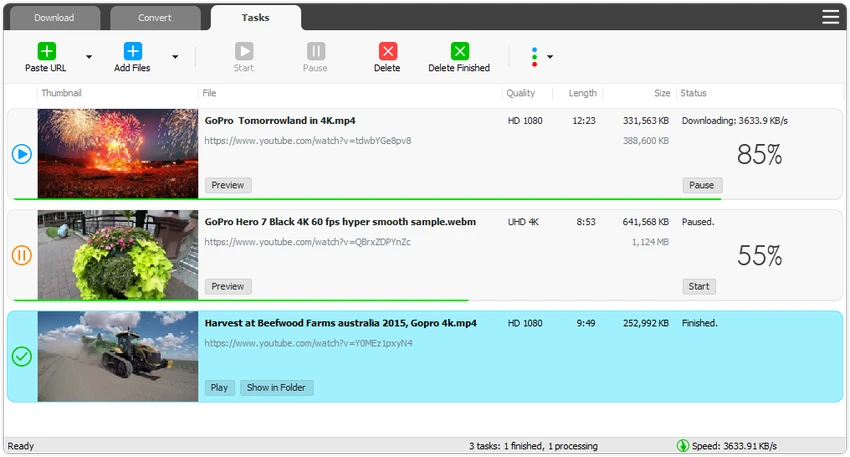

TubeMate is a video downloading and conversion application designed to help users save online videos from popular video platforms and convert them into different formats. The software supports downloading videos from websites such as YouTube, Facebook, Instagram, and Dailymotion, along with many other video sources. Beyond basic downloading, TubeMate includes conversion tools, playlist support, download acceleration, audio extraction, and device optimization features. It aims to provide a complete workflow for users who want to download, manage, and convert video or audio content on Windows.
Features of TubeMate
Online Video Downloader
- Downloads videos from YouTube, Facebook, Instagram, Dailymotion, and other video websites
- Supports saving online video content directly to a computer
- Allows users to manage downloaded media files easily
High-Quality Video Downloads
- Supports downloading videos in multiple resolutions:
- UHD 8K
- 5K
- 4K
- QHD 2K
- Full HD 1080p
- HD 720p
YouTube to MP3 Conversion
- Downloads only the audio stream from videos
- Converts video content into MP3 files
- Avoids downloading the complete video when only audio is needed
Playlist Download Support
- Downloads entire playlists or selected items
- Simplifies saving multiple videos with fewer steps
Faster Download Management
- Uses a multi-thread download acceleration engine
- Supports download speed improvements of up to 500% or more according to the provided information
- Allows multiple videos to download simultaneously
Download Control Options
- Pause and resume downloads at any time
- Supports drag-and-drop video links
- Automatically detects links added from browsers
Video and Audio Conversion
- Converts media files between formats including:
- MP4
- FLV
- AVI
- WMV
- MOV
- MP3
- AAC
- Extracts audio from videos and saves it as MP3, WAV, AC3, or other formats
Device Optimization
- Provides presets optimized for popular devices
- Helps prepare videos for:
- iPhone
- iPad
- Android devices
- Other supported devices
Built-In Media Player
- Includes a media player for opening files that may not play in Windows Media Player
- Provides basic playback functionality inside the application
User Experience
TubeMate focuses on combining several media tools into one application. Instead of using separate programs for downloading, converting, and optimizing videos, users can handle these tasks from a single interface. The download process is designed to be convenient. Users can add links directly, use drag-and-drop support, or manage multiple downloads through the queue system. The ability to pause and resume downloads is useful when working with larger video files or slower connections.
The conversion features add flexibility for users who need different file formats. Extracting audio from videos is straightforward, while format presets help simplify preparation for different devices. TubeMate’s playlist downloading and multi-thread acceleration features are especially useful for users managing larger collections of videos. The built-in preview option also helps check downloaded content before the process is complete. The application provides many functions, but users who only need simple video downloading may find some of the additional conversion and optimization tools more than necessary.
Who Should Use TubeMate?
- Users who frequently download online videos
- People who need video format conversion tools
- Users who extract audio from videos
- Anyone managing large video collections
- Users who need device-ready media files
Conclusion & Recommendation
TubeMate delivers a practical combination of video downloading, conversion, and media management features in one application. Its support for high-resolution downloads, playlists, and multiple output formats makes it a useful tool for users who regularly work with online video content.


