Doro PDF Writer logo

Doro PDF Writer 2.27

  • User Rating:
    ★★★★★
    ★★★★★
    0.0 ★ 0Votes
  • Requirements:
    Windows
  • Version: 2.27
  • Latest updated: 2 weeks ago
  • License: Freeware  
  • Publisher: the sz development
  • Size: 29 MB
× app stores

Doro PDF Writer is a free PDF creation tool that allows users to convert documents and images into PDF files from almost any Windows application with printing support. Instead of requiring a dedicated PDF editor, the software works as a virtual printer that appears in the Windows print dialog. Users can simply select Doro PDF Writer as their printer to create a PDF document from applications such as Microsoft Word or other programs that support printing. The software supports colored PDF output, file information settings, and optional 128-bit encryption to protect documents. With a lightweight design and no banners or usage restrictions, Doro PDF Writer provides a straightforward solution for users who need a basic PDF creation utility.

Features of Doro PDF Writer

  • Create PDF files from any Windows application that supports printing.
  • Works as a virtual printer available through the Windows Print dialog.
  • Convert documents and images into PDF format.
  • Supports colored PDF output.
  • Allows users to add author information and file details before conversion.
  • Provides optional 128-bit password encryption.
  • Can prevent copying and pasting from protected PDF files.
  • Can restrict printing of encrypted PDF documents.
  • Offers a simple workflow without banners or upgrade restrictions.
  • Supports both 32-bit and 64-bit Windows systems.

Interface and Usability

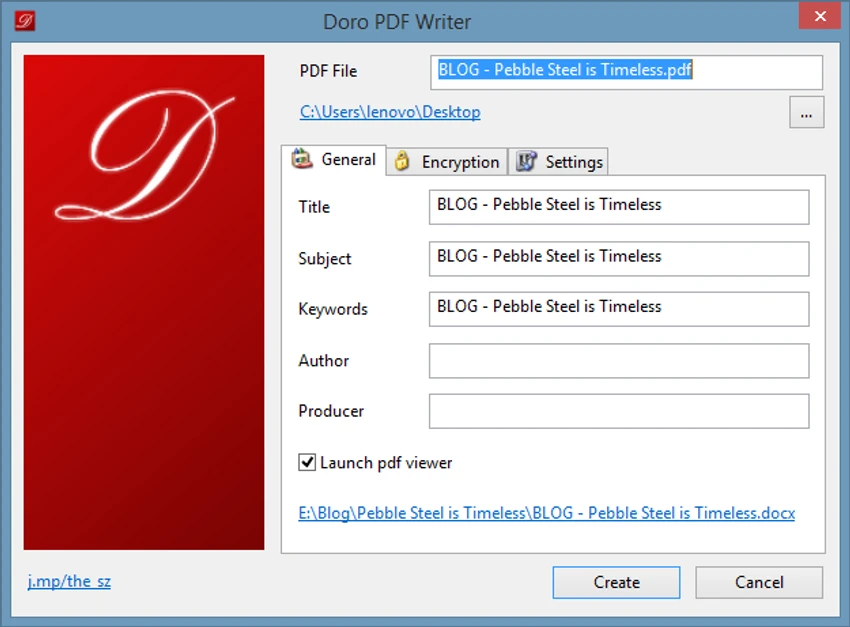
Doro PDF Writer focuses on simplicity rather than providing a full PDF editing environment. After installation, it adds a virtual printer option to Windows, allowing users to create PDFs through the same printing process they already know. The workflow is straightforward: open a document, choose Doro PDF Writer from the printer list, adjust available settings, and create the PDF file. This approach makes the software accessible even for users who do not have experience with dedicated PDF tools.

While Doro PDF Writer does not provide advanced PDF editing features, its simple design makes it useful for quickly converting printable documents into PDF files without unnecessary complexity.

Who Should Use Doro PDF Writer?

  • Users who need a free PDF creation tool.
  • People converting Word documents or images into PDF format.
  • Businesses and individuals creating printable PDF documents.
  • Users who want basic PDF password protection.
  • Anyone looking for a lightweight alternative to paid PDF software.

Conclusion

Doro PDF Writer is a practical choice for users who need a simple and free way to create PDF files without installing complex PDF editing software. Its virtual printer approach makes document conversion quick and familiar, while features such as colored output and 128-bit encryption provide useful customization and security options.

Pros & Cons

✓

Pros

  • Free to use with no banners or restrictions.
  • Creates PDFs from almost any printable Windows application.
  • Easy virtual printer-based workflow.
  • Supports colored PDF documents.
  • Includes 128-bit encryption options.
  • Lightweight and simple to operate.
  • Supports multiple Windows versions.
✕

Cons

  • Does not include advanced PDF editing tools.
  • Designed mainly for PDF creation rather than full document management.
  • The available information does not include cloud features or collaboration options.

Frequently Asked Questions

What is Doro PDF Writer used for?

Doro PDF Writer is used to create PDF files from documents or images by converting printable content from Windows applications into PDF format.

How does Doro PDF Writer create PDF files?

Doro PDF Writer installs as a virtual printer in Windows. Users can select it from the print dialog of a supported application to convert the document into a PDF file.

Can Doro PDF Writer create colored PDFs?

Yes. Doro PDF Writer supports creating colored PDF files, including documents containing colored images.

Does Doro PDF Writer support PDF password protection?

Yes. The software can encrypt PDF files with 128-bit password protection and can restrict copying, pasting, and printing.

Can Doro PDF Writer convert Word documents to PDF?

Yes. Any document that can be printed, including Word documents, can be converted into PDF format through the Doro PDF Writer virtual printer.

Which Windows versions support Doro PDF Writer?

Doro PDF Writer supports various Windows versions, including newer systems such as Windows 10 and Windows 8, as well as older Windows versions.

Recommended apps [Freeware]:
  • DefenderUI 2.10 DefenderUI logo enhances Microsoft Defender on Windows 10/11 with advanced security profiles and easier system protection control
  • Microsoft Edge 150.0.4078.83 Microsoft Edge logo modern Chromium-based browser offering fast performance, strong security, privacy controls, and cross-platform support
  • Photo Pos Pro 4.21 Build 51 Photo Pos Pro logo a feature-rich photo editor for Windows with layers, filters, RAW support, and advanced image design tools
  • SciTE (SCIntilla) 5.6.4 SciTE (SCIntilla) logo A lightweight text editor with syntax highlighting, search tools, and programming support for developers working with multiple languages.
  • Clipboard Remote 2.0.1 Clipboard Remote logo Transfer text, URLs, and images securely across your devices over LAN or Wi-Fi with fast clipboard synchronization.
  • VidMasta 30.7 VidMasta logo Search, preview, and manage movie downloads with advanced filtering, subtitles, trailers, and detailed title information.
Recommended apps [Shareware]:
  • FileCenter 12.5.36 FileCenter logo organize documents, scan files, manage PDFs, and build an efficient digital filing system
  • GiliSoft Movie DVD Creator 10.9 GiliSoft Movie DVD Creator logo Create DVD discs, ISO images, and VIDEO_TS folders on Windows with menus, chapters, subtitles, and basic editing tools
  • Microsoft Office 2606 Build 20131.20112 Microsoft Office logo Create documents, spreadsheets, presentations, and emails with Microsoft Office, the industry-standard productivity suite
  • 4K YouTube to MP3 26.2.0 4K YouTube to MP3 logo a simple tool to extract audio from YouTube, Vimeo, and more into MP3, M4A, or OGG
  • Becky! Internet Mail 2.83.03 Becky! Internet Mail logo a fast, feature-rich Windows email client with POP3/IMAP support and advanced mailbox management
  • ComboTIFF Pro 2.97 ComboTIFF Pro logo Manage multipage TIFF files with image merging, extraction, conversion, resizing, compression, and advanced editing options.