FileLegit Windows Multimedia Audio Editors Sidify Spotify Music Converter
Sidify Spotify Music Converter logo

Sidify Spotify Music Converter 2026

  • User Rating:
    ★★★★★
    ★★★★★
    0.0 0Votes
  • Requirements:
    Windows
  • Version: 2026
  • Latest updated: 1 week ago
  • License: Free Trial  
  • Publisher: Sidify Inc
  • Size: 7.4 MB
×

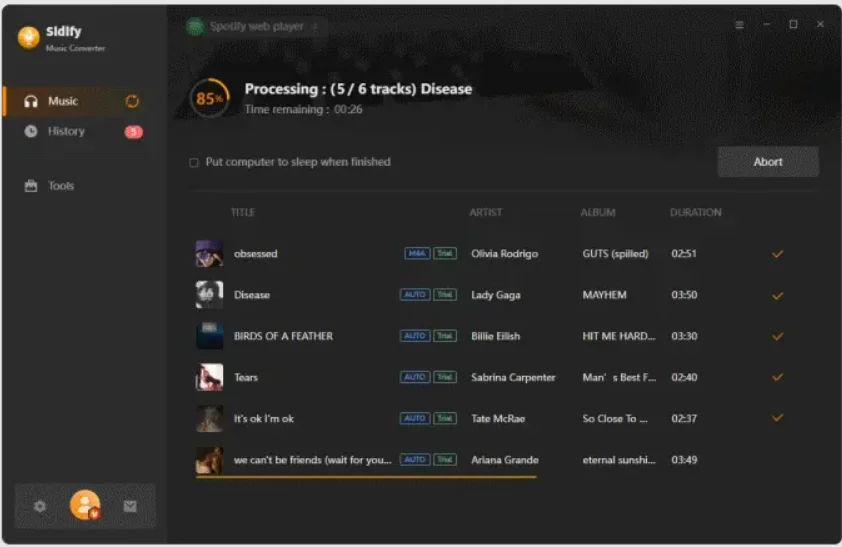
Sidify Spotify Music Converter is a desktop utility designed to convert Spotify songs, playlists, and podcasts into common audio formats such as MP3, AAC, FLAC, and WAV. The software focuses on preserving original audio quality and metadata while providing a simple and efficient conversion process.

Spotify offers access to a massive music library, but listening is generally tied to the Spotify ecosystem. Sidify Spotify Music Converter aims to provide greater flexibility by converting Spotify content into standard audio formats that can be stored locally and played on compatible devices. The software supports individual tracks, playlists, and podcasts while maintaining important metadata such as artist names, album information, and track titles. It also features accelerated conversion speeds and an easy-to-navigate interface that makes the process accessible even to less experienced users.

For users who want to organize a personal music collection, transfer audio files between devices, or listen offline using supported media players, Sidify provides a straightforward solution.

Features of Sidify Spotify Music Converter

  • Spotify Audio Conversion
    • Convert Spotify songs, playlists, and podcasts.
    • Supports MP3, AAC, FLAC, and WAV output formats.
  • Preserves Audio Quality
    • Maintains original sound quality during conversion.
  • ID3 Tag Retention
    • Keeps metadata such as artist name, album title, and track information.
  • Fast Conversion Engine
    • Converts music at speeds up to 5x faster.
  • Simple User Interface
    • Clean design suitable for beginners and advanced users alike.
  • CD Burning Support
    • One-click option to burn converted Spotify music to CD on Windows.
  • Email Sharing
    • Allows direct sharing via email on supported Windows versions.
  • Platform Compatibility
    • Supports Windows 10 and macOS Mojave (10.14) according to the provided information.

The interface is uncluttered, making it easy to import Spotify content and choose an output format without navigating complex settings. The conversion process is straightforward and generally requires only a few steps. One of the most useful aspects is the preservation of metadata, which helps maintain an organized music library after conversion. Users with large playlists may also appreciate the faster conversion speeds, reducing the time required to process multiple tracks. The software is particularly convenient for users who want locally stored audio files that can be managed alongside their existing music collections.

Who Should Use Sidify Spotify Music Converter?

  • Spotify users who want music in standard audio formats
  • Users who organize local music libraries
  • People who need support for MP3, AAC, FLAC, or WAV files
  • Users who value preserved metadata and album information
  • Individuals looking for a simple audio conversion workflow

Conclusion

Sidify Spotify Music Converter v2 is a practical audio conversion tool for users who want to convert Spotify songs, playlists, and podcasts into widely supported formats such as MP3, AAC, FLAC, and WAV. Its strengths include preserved audio quality, retained metadata, fast conversion speeds, and an intuitive user interface.

Pros & Cons

Pros

    • ✔ Supports multiple popular audio formats
    • ✔ Preserves original audio quality
    • ✔ Retains ID3 tags and metadata
    • ✔ Fast conversion performance
    • ✔ Easy-to-use interface
    • ✔ Supports playlists and podcasts

Cons

    • ✖ Primarily designed for Spotify content
    • ✖ Some users may only need a subset of its conversion features

Frequently Asked Questions

What audio formats does Sidify Spotify Music Converter support?

The software supports MP3, AAC, FLAC, and WAV output formats.

Can it convert Spotify playlists?

Yes. It can convert individual songs, playlists, and podcasts from Spotify.

Does the software preserve song information?

Yes. Original ID3 tags, including artist, album, and track information, are retained during conversion.

Is audio quality preserved after conversion?

According to the provided information, the software is designed to maintain the original audio quality.

Is Sidify Spotify Music Converter easy to use?

Yes. The software features a simple interface intended for users of all experience levels.

Recommended apps [Freeware]:
  • Trillian 6.6 Build 15 Trillian logo all-in-one chat software designed to simplify online communication
  • WinScan2PDF 9.77 WinScan2PDF logo scan documents and save them as PDFs or JPEGs with minimal setup and low CPU usage.
  • DirPrintOK 7.61 DirPrintOK logo fast and portable tool to print or export directory contents in XLS, HTML, CSV, or TXT formats.
  • iTop Easy Desktop 4.3.0.342 iTop Easy Desktop logo declutter, organize, and manage Windows desktop items efficiently and quickly
  • Android Studio 2026.1.1.9 Android Studio logo Google’s official IDE for Android, offering intelligent coding, fast emulators, and cloud integration.
  • TreeSize 9.8.1.2302 TreeSize logo Windows disk space analyzer to scan, visualize, and clean storage efficiently with reports.
Recommended apps [Shareware]:
  • Amazing Laptop Cooling Wizard 1.1.5.8 Amazing Laptop Cooling Wizard logo Reduce laptop overheating by optimizing CPU and fan cooling performance on Windows.
  • Typing Instructor Platinum 21.1 Typing Instructor Platinum logo improve typing speed and accuracy through interactive lessons, games, and 10-finger typing practice.
  • DSLR Remote Pro 3.31.5 DSLR Remote Pro logo Windows software for Canon DSLR control, photo booth creation, live view, HDR capture via USB connection
  • SketchUp Pro 2026 SketchUp Pro logo powerful 3D modeling software for architects, designers, and engineers with intuitive tools.
  • Adobe Acrobat Pro DC 2026 Adobe Acrobat Pro DC logo create, edit, and secure PDFs easily. Professional PDF solution for individuals and businesses.
  • Wondershare AllMyTube 7.4.9.2 Wondershare AllMyTube logo download and convert videos from YouTube and 100+ sites into multiple formats for offline viewing.