


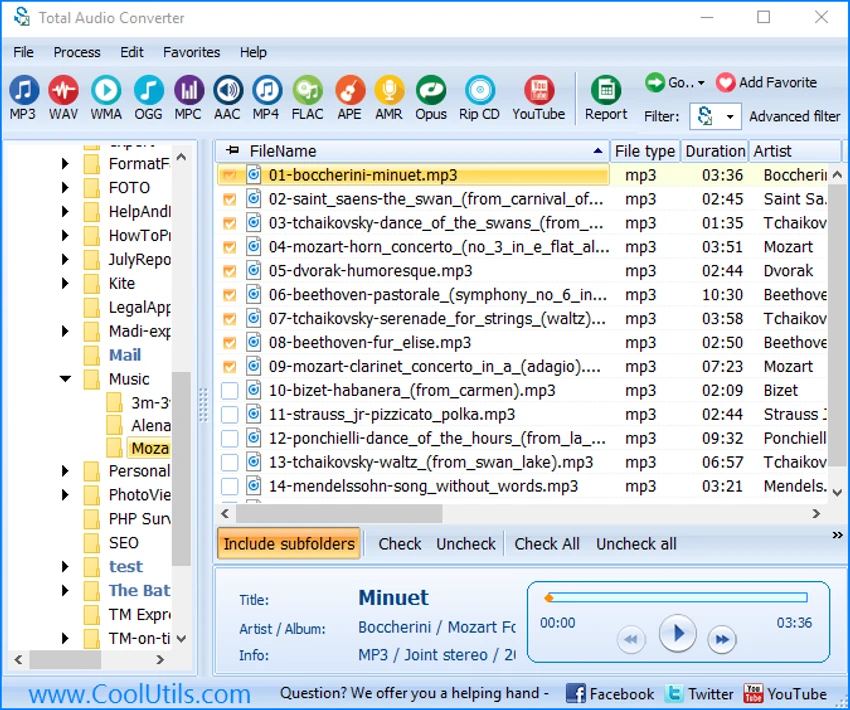

Total Audio Converter by CoolUtils is a Windows-based audio conversion utility designed to convert between a wide range of audio formats quickly and efficiently. It supports batch processing, CD ripping, and file management features, making it a practical tool for users who frequently work with music or audio libraries.
Overview
Total Audio Converter is built to simplify audio format conversion across both common and niche file types. It supports formats such as MP3, WAV, FLAC, OGG, AAC, WMA, and many others, allowing users to convert files without complex configuration.
The software integrates directly into Windows Explorer, enabling right-click conversion from the file manager. It also includes a tree-view file browser, batch conversion support, and options for adjusting bitrate and sample rate. Beyond simple conversion, it can handle CD ripping, metadata tagging, and even basic audio downloading from online sources.
Features of Total Audio Converter
- Converts a wide range of audio formats (MP3, WAV, FLAC, AAC, WMA, OGG, and more)
- Batch audio conversion for multiple files and folders
- Windows Explorer right-click integration for quick access
- CD ripping functionality for audio discs
- ID3 tag and metadata support
- Built-in audio player for previewing files
- Adjust bitrate and sample rate settings
- Direct conversion without temporary files
- Command-line support for automation
- Tree-view file navigation for easy browsing
- Integration with iTunes library
- Supports merging audio tracks into a single file
- Can download and convert audio from YouTube and SoundCloud
- Displays technical audio file information
User Experience
Using Total Audio Converter feels straightforward and task-oriented. The interface is centered around file selection and format conversion, making it easy for users to pick a source file and quickly choose an output format.
The Windows Explorer integration is one of its most convenient features, allowing users to convert files without opening the full application. Batch processing is also efficient, especially for managing large music collections.
Who Should Use Total Audio Converter?
- Users converting large music libraries between formats
- Audio professionals needing quick format changes
- Users ripping CDs into digital formats
- People managing playlists and metadata
- Anyone needing batch audio conversion tools
Conclusion
Total Audio Converter is a reliable and efficient tool for users who need fast audio format conversion without unnecessary complexity. Its strength lies in its broad format support, batch processing capabilities, and seamless Windows integration.


