


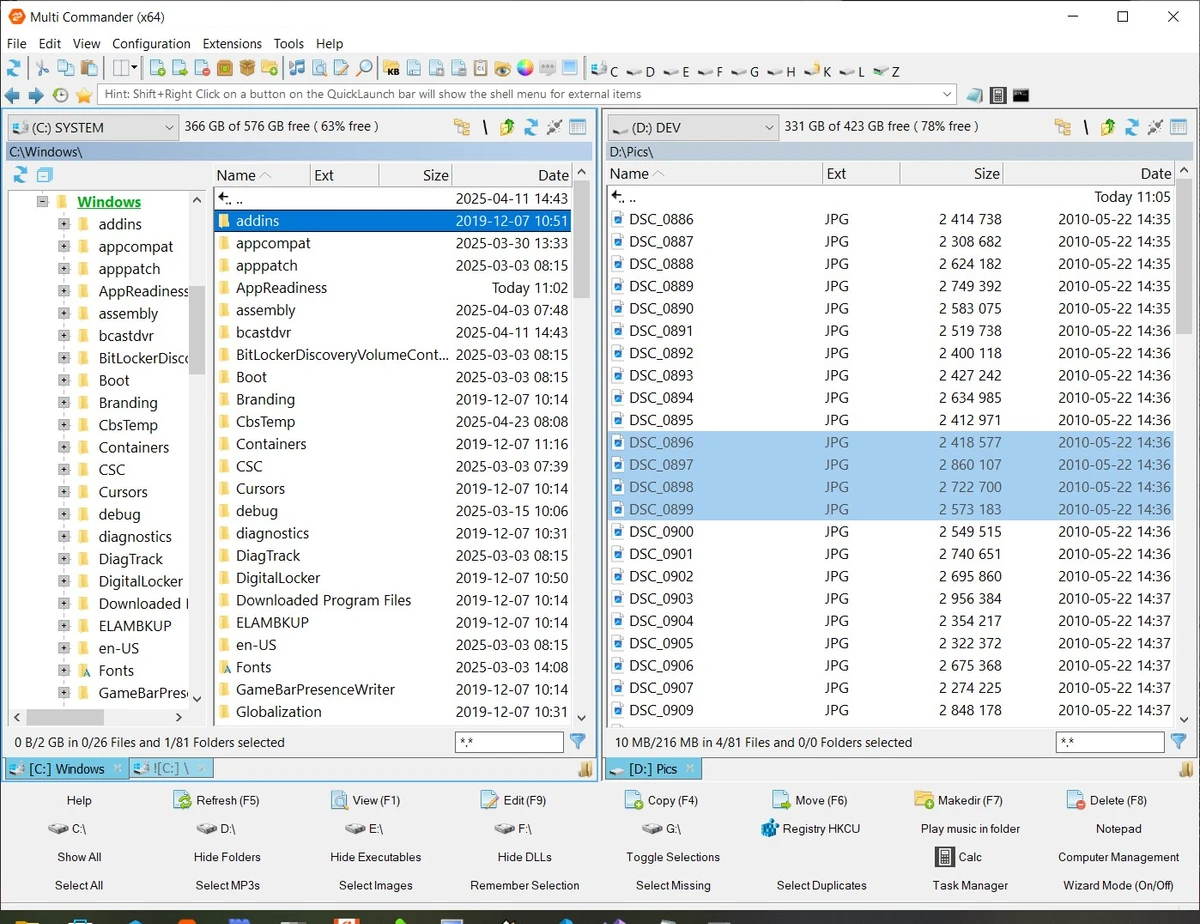

Multi Commander is a multi-tabbed file manager designed as an alternative to the standard Windows Explorer. It provides a dual-panel interface that helps users manage files more efficiently by allowing multiple folders to be opened and compared at the same time. The software includes standard file operations such as copying, moving, renaming, and viewing files, while also adding advanced tools for users who need more control over their file management workflow.
The application is built around speed and flexibility, with features such as file caching for faster browsing, background processing for lengthy tasks, and support for keyboard-driven operations. Multi Commander is designed to handle large collections of files and folders efficiently, including directories containing thousands of items.
Beyond basic file management, Multi Commander includes tools for working with archives, FTP connections, Windows Registry access, file permissions, and automated workflows. Users can browse inside archive formats, compare folders, search for files, and create scripts to automate repetitive tasks. The software also supports plugins and extensions to expand its capabilities.
Multi Commander offers additional media-related tools, including image conversion, EXIF information management, audio file property viewing, and MP3 tag editing. Available in both 32-bit and 64-bit versions, it can also run as a portable application from a USB device, making it a versatile choice for users who need a powerful and customizable file management solution.
Features of Multi Commander
- Dual-panel file manager interface
- Multi-tab folder browsing
- Alternative to Windows Explorer
- Copy, move, rename, and view file operations
- Fast file browsing with caching
- Background processing for long-running tasks
- Keyboard shortcuts for efficient file operations
- Folder comparison tools
- Powerful file search and filtering
- Archive browsing support:
- ZIP
- 7-Zip
- RAR
- TAR
- GZ
- BZ2
- JAR
- FTP support
- Windows Registry access
- View and change file permissions
- Take ownership of files
- Built-in scripting engine for automation
- Plugin and extension support
- Image tools for conversion and EXIF management
- Audio tools for file properties and MP3 tags
- Portable version support
Interface and Usability
Multi Commander uses a dual-panel layout combined with tab support, making it easier to work with multiple locations and transfer files between folders. The interface is designed for users who want more control than the default Windows file manager provides.
The software supports both mouse-based actions and keyboard commands, allowing users to choose their preferred workflow. Features such as drag-and-drop operations, customizable layouts, and saved selections help improve everyday file management tasks. The large number of available tools may feel more advanced than a standard file browser, but users who frequently organize files, manage archives, or perform repetitive tasks can benefit from its extensive feature set.
Who Should Use Multi Commander?
- Users looking for a Windows Explorer replacement
- Power users managing large numbers of files
- IT professionals handling complex file operations
- Users who need advanced file search and sorting tools
- People who want portable file management software
- Users who automate repetitive file tasks
Conclusion
Multi Commander is a powerful file management solution for users who need more than the standard Windows Explorer experience. Its dual-panel interface, extensive file operation tools, scripting support, and archive handling features make it suitable for advanced file organization and automation tasks.


