


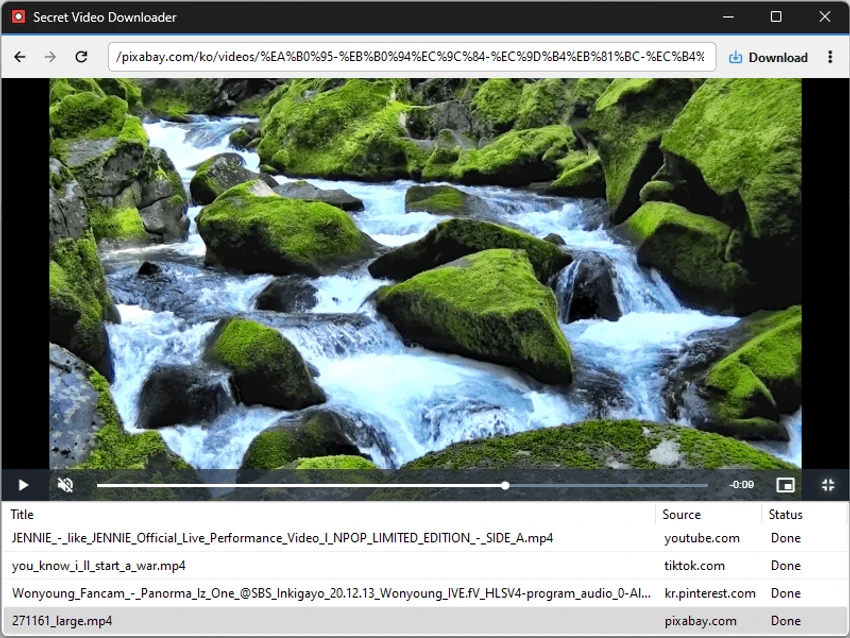

Secret Video Downloader is a lightweight desktop application designed to make downloading online videos as simple as possible. Built on the powerful yt-dlp command-line engine, it provides an easy-to-use graphical interface that removes much of the complexity often associated with video downloading tools. Instead of requiring users to configure numerous options, the application focuses on delivering a straightforward workflow that allows videos to be saved quickly for offline viewing.
The software supports downloading videos from a wide range of websites, making it a versatile option for users who regularly save online content. Its minimalist interface keeps the process uncomplicated: simply paste a video URL, load the page within the built-in browser, and start the download with a single click. Downloads begin automatically after being added to the queue, and the application does not require users to create an account or provide personal information.
While Secret Video Downloader prioritizes simplicity over advanced functionality, it still delivers reliable access to high-quality downloads. Users looking for extensive customization, batch downloads, or playback quality selection may find its feature set limited, but those who value speed and ease of use will likely appreciate its streamlined design.
Features of Secret Video Downloader
- Built on the yt-dlp download engine
- Download videos from a wide range of supported websites
- Minimalist and beginner-friendly interface
- Built-in browser for loading video content
- One-click download process
- Downloads videos in the highest available quality
- Automatic download queue management
- No account or login required
- Simple workflow with minimal configuration
Interface and Usability
After using Secret Video Downloader, I found its interface refreshingly simple. The application avoids overwhelming users with technical settings or complicated menus, making it approachable even for beginners.
The workflow is straightforward: paste the video URL, load the content in the built-in browser, and click Download. The video is immediately added to the download queue, and the process starts automatically without additional prompts.
This simplicity comes with a few trade-offs. There are no options for selecting video quality, configuring download settings, enabling batch downloads, or automatically detecting copied URLs from the clipboard. For users who only need quick downloads, these omissions are unlikely to be a major drawback. However, power users may prefer software that offers more customization.
Who Should Use Secret Video Downloader?
- Users who want a simple desktop video downloader
- Beginners who prefer an easy-to-use interface
- Users downloading videos for offline viewing
- People who don't need advanced download settings
- Anyone looking for a graphical interface powered by yt-dlp
Conclusion
Secret Video Downloader succeeds in its goal of making video downloading as easy as possible. By combining the proven capabilities of yt-dlp with a clean graphical interface, it removes much of the complexity that often discourages less experienced users.


