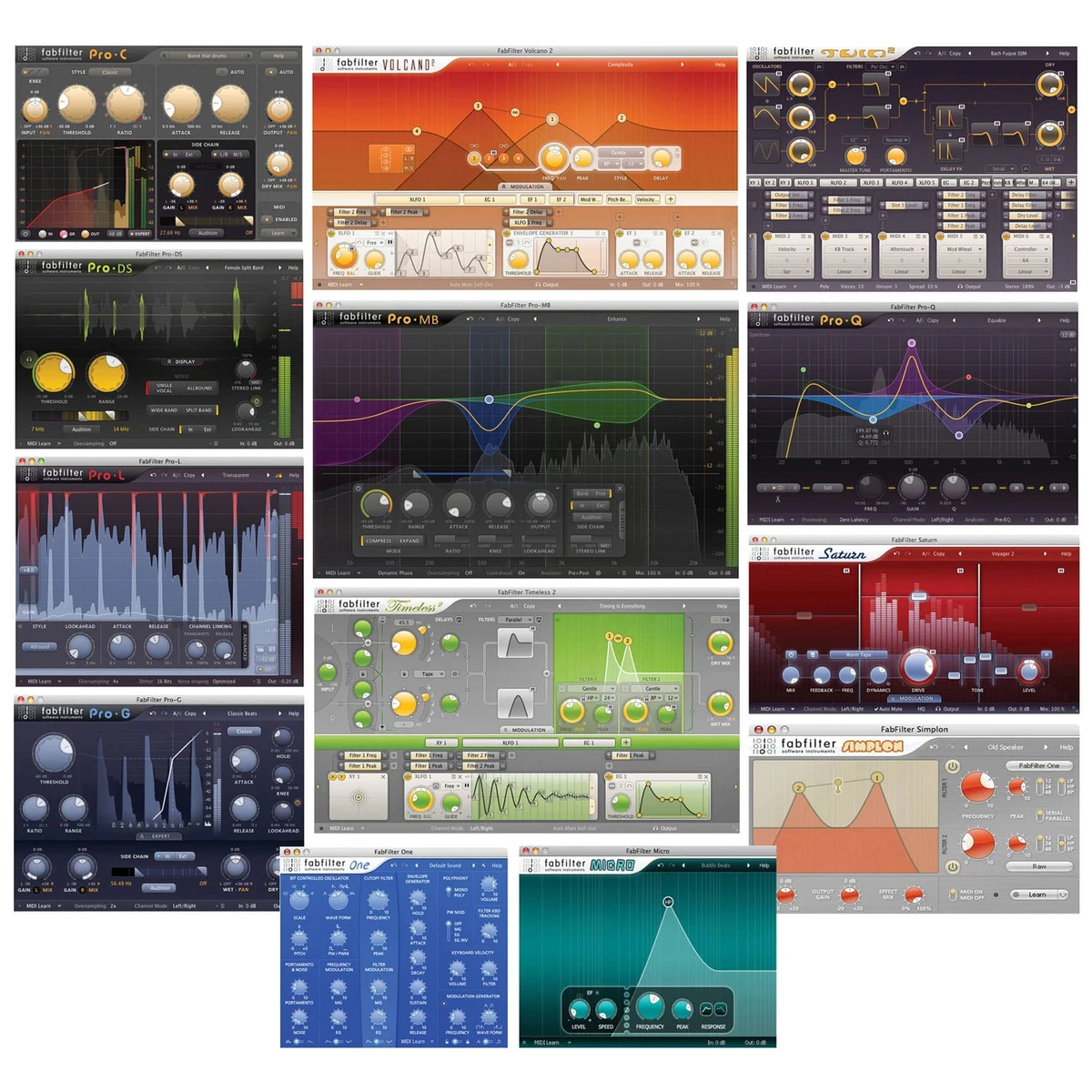
FileLegit Windows Multimedia Audio Editors FabFilter Total bundle
FabFilter Total bundle logo

FabFilter Total bundle 2026.06.25

  • User Rating:
    ★★★★★
    ★★★★★
    0.0 ★ 0Votes
  • Requirements:
    Windows
  • Version: 2026.06.25
  • Latest updated: 3 weeks ago
  • License: Free Trial  
  • Publisher: FabFilter
  • Size: 92 MB
× app stores

FabFilter Total Bundle is a comprehensive collection of professional audio plugins designed for music production, mixing, and mastering. It brings together a wide range of tools covering equalization, compression, limiting, distortion, filtering, synthesis, and delay effects.

The bundle is widely used in professional audio environments due to its precision-focused design and high-quality sound processing. Instead of offering a single tool, it provides a complete ecosystem of plugins that work together across different stages of audio production—from shaping individual sounds to mastering full tracks. Each plugin in the bundle is built with a focus on clarity, usability, and detailed control, making it suitable for both technical sound engineers and creative music producers.

Features of FabFilter Total Bundle

  • Professional EQ, compressor, limiter, and de-esser tools
  • Multiband dynamics processing (compression, distortion, and more)
  • High-quality gate and expander for noise control
  • Creative saturation and multiband distortion effects
  • Stereo delay with advanced time-stretching and filtering
  • Advanced filter effects with modulation capabilities
  • Synthesizer plugins for sound design and synthesis
  • Drag-and-drop modulation systems for flexible control
  • High-precision audio processing for mixing and mastering
  • Multiple specialized plugins for different production stages
  • Wide range of creative and corrective audio tools

Included Plugins

  • Pro-Q (EQ) for precise mixing and mastering
  • Pro-MB multiband dynamics processor
  • Pro-L brickwall limiter for mastering
  • Pro-C compressor with flexible routing
  • Pro-DS de-esser for vocal control
  • Pro-G gate/expander for noise shaping
  • Saturn multiband distortion and saturation
  • Timeless delay effect plugin
  • Twin synthesizer for sound design
  • Volcano filter effect plugin
  • Simplon and Micro lightweight filter tools
  • One basic synthesizer for simple sound creation

Interface and Usability

FabFilter plugins are known for their clean, visually guided interfaces that focus on direct manipulation of sound parameters. Most tools use interactive displays where users can adjust frequencies, dynamics, or effects in real time.

The workflow is designed to be intuitive while still offering deep control. Instead of relying on traditional complex menus, many adjustments can be made directly on graphical interfaces such as EQ curves, filter points, or modulation routing views. This approach makes the bundle accessible for detailed professional work while still maintaining a fast and creative workflow during production sessions.

Who Should Use FabFilter Total Bundle?

  • Music producers working on mixing and mastering
  • Audio engineers in professional studios
  • Sound designers creating effects and synth textures
  • Vocal editors handling compression, de-essing, and cleanup
  • Electronic music producers and beatmakers
  • Anyone working with advanced VST plugin workflows

Conclusion

FabFilter Total Bundle is a complete professional toolkit for audio production, offering precise control over every stage of sound processing. With tools covering EQ, dynamics, effects, and synthesis, it supports both technical mixing tasks and creative sound design.

Pros & Cons

✓

Pros

  • Extremely wide range of professional audio tools
  • High-quality sound processing across all plugins
  • Clean and intuitive graphical interfaces
  • Suitable for mixing, mastering, and sound design
  • Flexible modulation and control systems
✕

Cons

  • Requires experience for full utilization of advanced tools
  • Not a standalone DAW (works as plugin suite)

Frequently Asked Questions

What is FabFilter Total Bundle used for?

FabFilter Total Bundle is used for music production, mixing, mastering, and sound design. It provides tools for EQ, compression, limiting, distortion, filtering, and synthesis.

Does FabFilter Total Bundle include multiple plugins?

Yes. It includes a full suite of plugins such as Pro-Q, Pro-C, Pro-L, Pro-DS, Pro-G, Saturn, Timeless, Twin, Volcano, and more.

Can FabFilter plugins be used for mastering?

Yes. Several plugins in the bundle, such as Pro-L (limiter), Pro-Q (EQ), and Pro-MB (multiband dynamics), are commonly used in professional mastering workflows.

Is FabFilter suitable for beginners?

It can be used by beginners, but it is primarily designed for professional audio work. Some plugins require understanding of audio mixing and signal processing concepts.

Does FabFilter support sound design?

Yes. Plugins like Saturn, Volcano, Twin, and Timeless are specifically designed for creative sound design and audio manipulation.

What makes FabFilter plugins popular?

They are known for high-quality sound processing, precise control, and intuitive visual interfaces that make complex audio tasks easier to understand and manage.

Recommended apps [Freeware]:
  • Wondershare Recoverit 14.0.30 Wondershare Recoverit logo Recover deleted, lost, formatted, or corrupted files from PCs, USB drives, SD cards, and more with Wondershare Recoverit
  • Cyberduck 9.5.2.45323 Cyberduck logo Manage FTP, SFTP, and cloud storage services like Google Drive, Dropbox, and Amazon S3 with Cyberduck for Windows
  • Wireless Network Watcher 2.45 Wireless Network Watcher logo a lightweight utility that scans your Wi-Fi network and lists connected devices
  • Rufus 4.15 Rufus logo Create bootable USB drives quickly with Rufus, a lightweight Windows tool for installing OS, recovery, and firmware tasks
  • DBeaver 26.1.3 DBeaver logo Manage multiple databases with a powerful graphical interface for SQL editing, data handling, visualization, and administration tasks.
  • Alternate Pic View 3.660 Alternate Pic View logo View, edit, organize, and convert images with a lightweight photo viewer featuring batch tools, slideshows, and GIF support.
Recommended apps [Shareware]:
  • Total PDF Converter 6.5.0.183 Total PDF Converter logo converts PDF to DOC, XLS, images, TXT, PDF/A and more with batch processing and advanced tools.
  • MobiKin Assistant for Android 5.1.47 MobiKin Assistant for Android logo back up, restore, and manage Android data, contacts, apps, and files from a PC
  • Visual Subst 6.0 Visual Subst logo Create virtual drives from folders with Visual Subst. Easily map directories to drive letters on Windows with persistence and labels
  • MobiKin Transfer for Mobile 5.1.17 MobiKin Transfer for Mobile logo Transfer contacts, photos, messages, and more between iOS and Android devices with MobiKin Transfer for Mobile on Windows
  • Blue Iris 6.0.8.6 Blue Iris logo a Windows surveillance software for managing IP cameras, DVRs, motion detection, recording, and remote monitoring
  • tinyMediaManager 5.3.0 tinyMediaManager logo Organize movie and TV libraries easily with metadata editing, artwork downloads, NFO support, and powerful media management tools.