


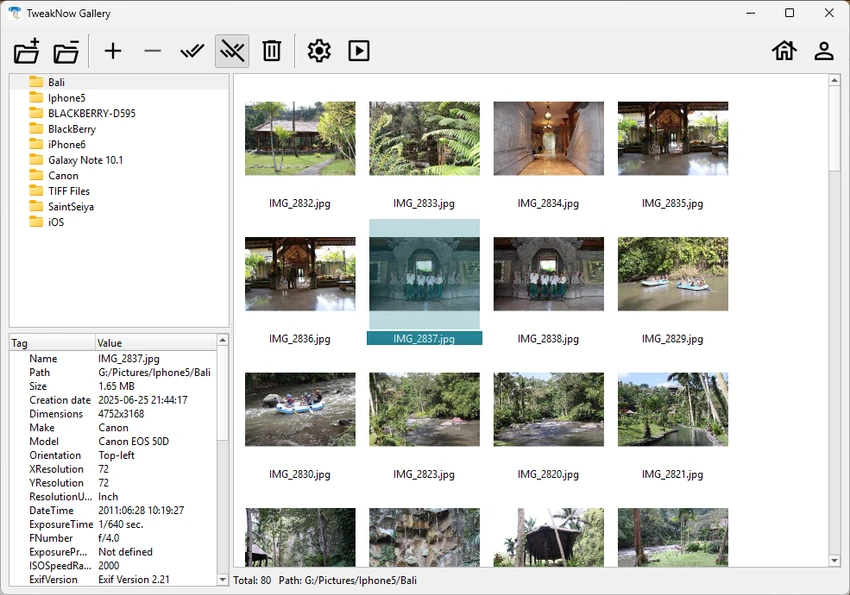

TweakNow Gallery is designed for users who need a fast and efficient way to browse, organize, and manage large photo collections on Windows. It focuses on speed, simplicity, and essential image handling tools, making it suitable for both casual users and those dealing with extensive image libraries.
Overview
TweakNow Gallery positions itself as a lightweight alternative to heavier photo management software. Its main strength lies in performance, allowing users to scroll through large image folders smoothly without noticeable lag. The application combines fast thumbnail generation, a simple slideshow feature, and a built-in image conversion tool. It is built for Windows 10 and 11, with a clean interface that keeps attention on the images rather than unnecessary controls.
Features of TweakNow Gallery
- Lightning-fast image browsing for large directories
- Multi-threaded thumbnail rendering for smoother navigation
- Built-in slideshow feature with quick one-click access
- Image conversion support for JPEG, PNG, WEBP, and BMP formats
- Clean and distraction-free user interface
- Lightweight design optimized for Windows 10 and 11
User Experience
In everyday use, TweakNow Gallery feels responsive and straightforward. Image folders load quickly, and scrolling through large collections remains smooth thanks to its optimized rendering engine. The interface is minimal, which helps reduce clutter, especially when managing thousands of images. The slideshow feature is easy to launch and works well for quick presentations or casual viewing sessions. The image converter is integrated directly into the workflow, allowing users to switch formats without needing external tools, which improves efficiency for basic tasks.
Who Should Use TweakNow Gallery?
- Work with large image collections on Windows
- Want a lightweight alternative to heavy photo management software
- Need quick image format conversion tools
- Prefer a simple, distraction-free viewing experience
Conclusion
TweakNow Gallery is a practical choice for users who prioritize speed and simplicity in managing image collections on Windows. It performs well as a lightweight viewer with useful built-in tools like slideshows and image conversion.


