Alternate Pic View logo

Alternate Pic View 3.660

  • User Rating:
    ★★★★★
    ★★★★★
    0.0 ★ 0Votes
  • Requirements:
    Windows
  • Version: 3.660
  • Latest updated: 2 weeks ago
  • License: Freeware  
  • Publisher: Alternate Tools
  • Size: 15 MB
× app stores

Alternate PicView is a free image viewer and editor designed to help users view, organize, and perform basic editing tasks on a wide range of image formats. Combining image browsing with practical editing tools, the software offers an all-in-one solution for everyday photo management without the complexity of professional graphics applications.

The program allows users to browse image collections through thumbnails, create slideshows, compare images, and search for pictures stored on their computer. In addition to viewing images, Alternate PicView includes editing features such as drawing tools, red-eye reduction, color adjustments, image rotation, and selection-based editing. Users can also combine multiple images, create tiled layouts, resize pictures, and perform batch conversions to process multiple files more efficiently.

For users working with specialized image formats, Alternate PicView supports multipage TIFF files and includes tools for creating and editing animated GIFs. The software also preserves EXIF and IPTC metadata when saving images, helping maintain important photo information during editing.

Additional utilities include icon extraction from DLL and EXE files, file property viewing, and printing support for multipage GIF and TIFF files. With its lightweight design and broad feature set, Alternate PicView provides a practical solution for users seeking both image viewing and basic editing capabilities in a single application.

Features of Alternate PicView

  • View images in multiple formats
  • Create image slideshows
  • Thumbnail image browsing
  • Drawing and annotation tools
  • Combine multiple images
  • Create tiled image layouts
  • Resize and extend images
  • Batch image conversion and resizing
  • Compare two images
  • Search for pictures
  • Create and edit animated GIFs
  • Support for multipage TIFF files
  • Red-eye reduction
  • Color scaling and color rotation
  • Draw arrows on images
  • Extract icons from DLL and EXE files
  • Save selected image regions
  • View file properties
  • Preserve EXIF and IPTC metadata when saving
  • Print all or selected pages of multipage GIF and TIFF files

Interface and Usability

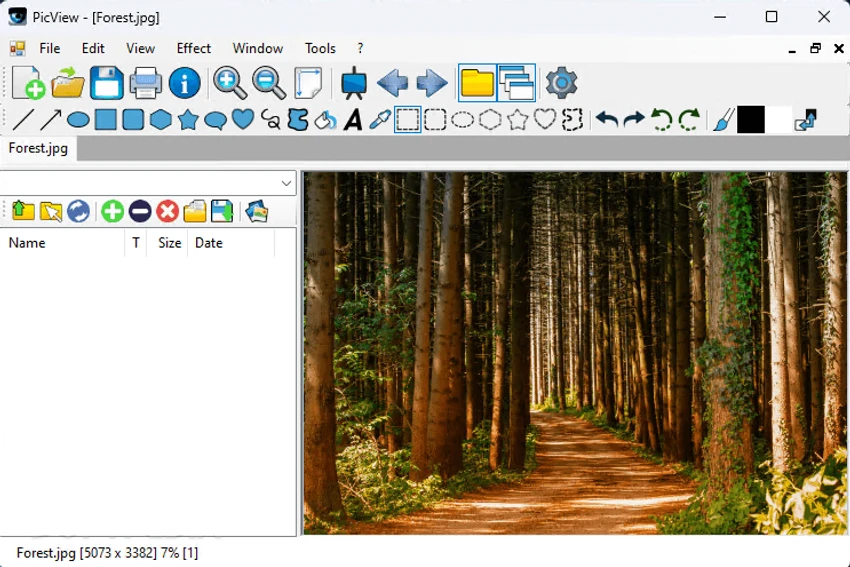
Alternate PicView offers a straightforward interface that combines image viewing with editing tools in a single application. Users can quickly browse photos through thumbnail views, launch slideshows, or open editing functions without navigating through complex menus.

The software keeps frequently used tools accessible, making tasks such as resizing, comparing images, or applying simple edits easy to perform. Batch processing features also simplify working with large image collections by allowing multiple files to be converted or resized simultaneously. While the interface focuses on functionality rather than advanced photo editing workflows, it provides an efficient environment for everyday image management.

Who Should Use Alternate PicView?

  • Home users managing photo collections
  • Users needing a lightweight image viewer
  • Photographers performing basic image adjustments
  • Users creating animated GIFs
  • Anyone looking for free image viewing and editing software

Conclusion

Alternate PicView is a versatile image viewer that goes beyond simple photo browsing by including a variety of useful editing and management tools. From slideshows and batch processing to animated GIF editing and metadata preservation, it offers a well-rounded feature set for everyday image tasks.

Pros & Cons

✓

Pros

  • Free and lightweight
  • Supports many image formats
  • Includes both viewing and editing tools
  • Batch conversion and resizing
  • Animated GIF creation and editing
  • Preserves EXIF and IPTC metadata
  • Multipage TIFF support
  • Image comparison feature
✕

Cons

  • Focused on basic image editing rather than professional photo manipulation
  • Advanced layer-based editing features are not included
  • Interface emphasizes functionality over modern design

Frequently Asked Questions

What is Alternate PicView used for?

Alternate PicView is used to view, organize, edit, convert, and compare images. It also includes tools for creating slideshows, batch processing, and editing animated GIFs.

Can Alternate PicView edit photos?

Yes. The software includes basic editing features such as drawing tools, red-eye reduction, color adjustments, resizing, image combination, and rotation.

Does Alternate PicView support animated GIFs?

Yes. Alternate PicView can create and edit animated GIF files.

Can Alternate PicView preserve photo metadata?

Yes. The application preserves EXIF and IPTC information when saving edited images.

Does Alternate PicView support batch image processing?

Yes. It includes batch conversion and batch resizing tools for processing multiple images at once.

Which image formats does Alternate PicView support?

Alternate PicView supports multiple image formats, including multipage TIFF files, and provides tools for viewing, editing, and managing supported image types.

Recommended apps [Freeware]:
  • PortKiller 3.3.3 PortKiller logo a network utility for monitoring TCP ports, managing processes, and handling tunnels on Windows.
  • Adobe Acrobat Reader DC 2026.001.21691 Adobe Acrobat Reader DC logo trusted PDF viewer for reading, printing, and annotating PDFs with strong security and cloud sync support
  • AlienFx Tools 9.6.1.1 AlienFx Tools logo a lightweight suite for managing Alienware lighting, fan control, power profiles, and system monitoring
  • Total Commander Ultima Prime 9.4 Total Commander Ultima Prime logo enhanced file manager package with plugins and tools for advanced file and system management on Windows.
  • Picture Window Pro 8.0.569 Picture Window Pro logo Edit and enhance photos with non-destructive tools, high-resolution support, multi-core performance, and flexible workflows.
  • Notepad++ 8.9.7 Notepad++ logo Edit code and plain text with a fast, lightweight editor featuring syntax highlighting, multiple tabs, plugins, and support for many programming languages.
Recommended apps [Shareware]:
  • CoolUtils PDF Combine 8.1.0.76/13 CoolUtils PDF Combine logo Windows tool for merging multiple PDF files into one, with bookmarks, encryption, and batch processing
  • DivX 11.15.0 DivX logo powerful video player and converter that supports 4K playback, HD video conversion, and DLNA media streaming
  • Adlice Protect 16.7.0.0 Adlice Protect logo Detect and remove stubborn malware with Adlice Protect, an advanced anti-malware tool using signature and heuristic analysis
  • QILING Disk Master Server 8.8 QILING Disk Master Server logo a Windows server backup and recovery tool with system imaging, RAMDisk, and AES encryption
  • Blocker Web 1.1.5.0 Blocker Web logo Block distracting websites on Windows, manage blocked URLs, and stay focused with a lightweight website blocking utility.
  • Cisdem Video Compressor 3.0.0 Cisdem Video Compressor logo Compress video and audio files while preserving quality with customizable settings, batch processing, and support for popular media formats.