Movavi Video Editor logo

Movavi Video Editor 26.18.0

  • User Rating:
    ★★★★★
    ★★★★★
    0.0 0Votes
  • Requirements:
    Windows
  • Version: 26.18.0
  • Latest updated: 6 days ago
  • License: Free Trial  
  • Publisher: Movavi
  • Size: 2.7 MB
× app stores

Movavi Video Editor is a user-friendly video editing application designed to help users create polished videos quickly using drag-and-drop tools, AI features, and ready-made templates. It is aimed at beginners and intermediate creators who want fast results without complex workflows.

Overview

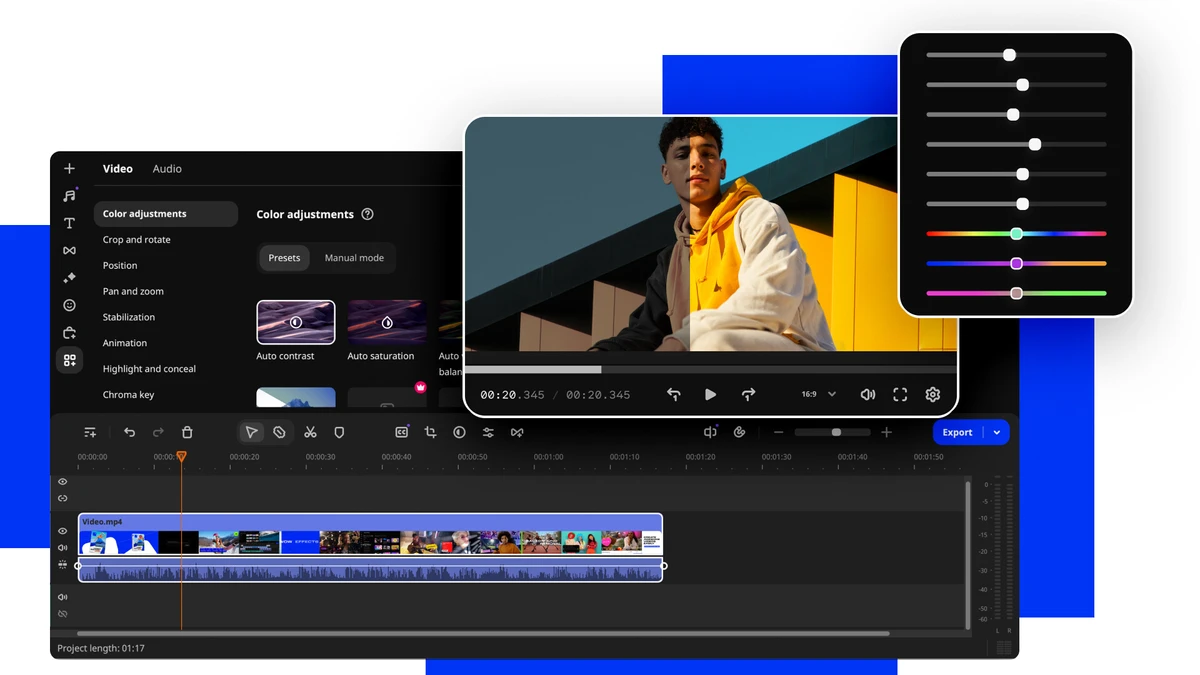
Movavi Video Editor focuses on simplifying the video production process while still offering a wide range of creative tools. Users can cut, crop, adjust colors, add transitions, and apply effects through an intuitive timeline-based interface. The software includes AI-powered features such as automatic subtitles, background removal, and motion tracking, which help automate time-consuming editing tasks. Combined with a large library of effects, titles, and templates, Movavi makes it easy to produce professional-looking videos for social media, presentations, or personal projects. Its streamlined workflow and visual editing approach make it especially appealing to users who prefer simplicity over the complexity of professional editing suites.

Features of Movavi Video Editor

  • One-click AI automatic subtitle generation
  • Drag-and-drop video editing timeline
  • Ready-made templates for quick video creation
  • Hundreds of filters, transitions, titles, and overlays
  • Frame-precise cutting tools
  • AI motion tracking for dynamic overlays
  • AI background removal without green screen
  • AI noise reduction for cleaner audio
  • Pro-level color correction tools
  • Blending modes for creative visual effects
  • Mouse-over preview for effects and transitions
  • Revamped, simplified editing timeline
  • Built-in cinematic and animated overlays
  • Speed control and video adjustment tools

User Experience

Movavi Video Editor provides a smooth and accessible editing experience designed for users who want quick results without technical complexity. The interface is clean and visually guided, making it easy to navigate even for first-time editors. Editing tasks such as trimming clips, adding transitions, or applying filters can be done with simple drag-and-drop actions. The timeline is responsive and clearly structured, helping users organize their projects efficiently.

AI tools significantly reduce editing time. Automatic subtitle generation works well for speech-based content, while background removal and motion tracking allow users to create dynamic effects without advanced skills. The effects library is extensive, and preview-on-hover functionality makes it easier to choose the right visual style before applying it to a project. Overall, the software prioritizes speed and simplicity, making it ideal for content creators who want polished results without a steep learning curve.

Who Should Use Movavi Video Editor?

  • Beginners learning video editing
  • YouTube and social media creators
  • Educators and presenters
  • Small business marketers
  • Users creating personal or family videos
  • Anyone wanting quick AI-assisted editing

Conclusion

Movavi Video Editor is an accessible and feature-rich video editing tool that makes content creation fast and simple. With AI-powered features, templates, and an intuitive interface, it is ideal for users who want professional-looking videos without complex editing workflows.

Pros & Cons

Pros

  • Beginner-friendly interface
  • Strong AI-powered editing features
  • Large library of effects and templates
  • Fast and simple video creation workflow
  • Good balance of automation and manual control
  • Useful tools for social media content creation

Cons

  • Limited advanced professional editing features
  • Subscription required for full effects library
  • Less suitable for complex film production workflows

Frequently Asked Questions

What is Movavi Video Editor used for?

It is used to create and edit videos with tools for cutting, effects, transitions, and AI-powered enhancements.

Does Movavi Video Editor support AI features?

Yes. It includes AI subtitles, background removal, motion tracking, and noise reduction.

Is Movavi Video Editor easy to use?

Yes. It is designed for beginners with a simple drag-and-drop interface.

Can I add subtitles automatically?

Yes. It includes one-click AI subtitle generation.

Does it support professional editing?

It offers some advanced tools, but it is mainly designed for beginner and intermediate users.

Is Movavi Video Editor good for YouTube?

Yes. It is widely used for creating YouTube and social media videos.

Recommended apps [Freeware]:
  • Trillian 6.6 Build 16 Trillian logo all-in-one chat software designed to simplify online communication
  • HWMonitor 1.64 HWMonitor logo a free system tool that monitors CPU, GPU, voltages, temperatures, and fan speeds in real time.
  • DriversCloud 12.1.6 DriversCloud logo scan system hardware, update drivers, monitor performance, and analyze blue screen errors (BSODs) on Windows.
  • Recuva 1.55.133 Recuva logo recover deleted files from PCs, USB drives, memory cards, and damaged or formatted disks
  • MSI Center 2.0.71.0 MSI Center logo a system utility for MSI devices that manages performance, gaming modes, monitoring, RGB, and hardware optimization tools
  • EaseUS Partition Master 20.3.0 EaseUS Partition Master logo a disk management tool for resizing, cloning, converting, and recovering partitions safely
Recommended apps [Shareware]:
  • DBConvert Studio 4.3.1 DBConvert Studio logo simplifies database migration and synchronization across multiple database platforms.
  • HyperSnap 10.1.2 HyperSnap logo captures screenshots, scrolling windows, OCR text and video with advanced editing tools on Windows.
  • Remote Desktop Manager 2026.2.9.0 Remote Desktop Manager logo manage RDP, SSH, VNC, and virtual machines from one secure centralized platform
  • Photo Supreme 2026.3.0.9285 Photo Supreme logo Organize, search, and manage thousands of photos with Photo Supreme's powerful cataloging features
  • VovSoft Batch Audio Converter 2.0 VovSoft Batch Audio Converter logo a Windows tool for fast bulk audio conversion with drag-and-drop simplicity and format flexibility
  • Digimizer 6.5.4 Digimizer logo image analysis tool for precise measurements, object detection, and scientific image processing