


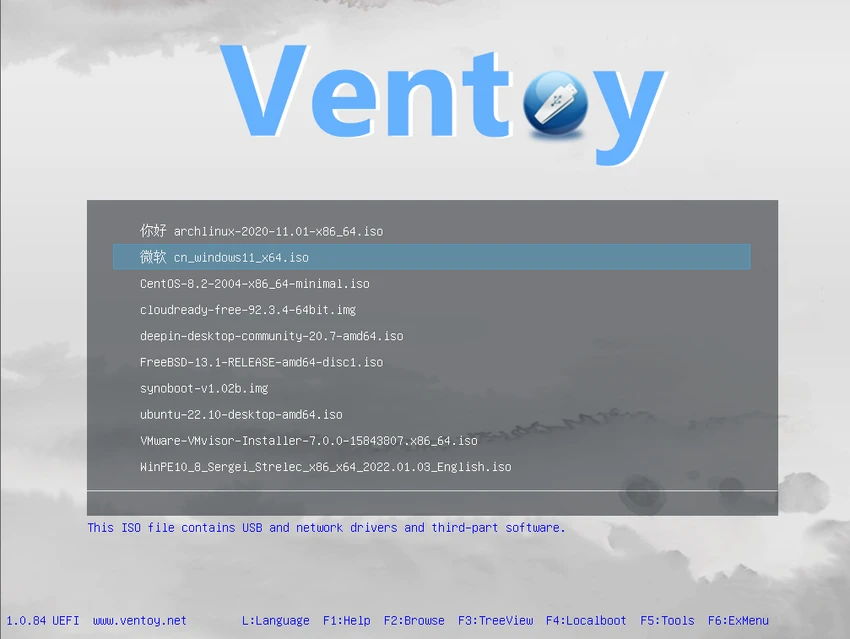

Ventoy is a lightweight utility designed to simplify the process of creating bootable USB drives. Unlike traditional bootable USB creation tools that require formatting and extracting ISO contents, Ventoy allows users to copy ISO files directly to a USB drive and boot from them without additional preparation. The software supports both Legacy BIOS and UEFI environments, including Secure Boot, making it a flexible solution for operating system installation, system recovery, and troubleshooting tasks.
Features of Ventoy
- Create bootable USB drives using ISO files
- Boot directly from ISO files without extraction
- Support for multiple ISO files on a single USB drive
- Automatic boot menu for selecting available ISO images
- Supports ISO files larger than 4 GB
- Compatible with both Legacy BIOS and UEFI systems
- UEFI Secure Boot support
- Supports a wide range of operating systems
- Designed to handle complete operating system installation processes
- Plugin framework for extended functionality
- Read-only access to the USB drive during boot
- USB drive remains usable for normal file storage
- Non-destructive version upgrades
- No need to update Ventoy when new Linux distributions are released
User Experience
During my experience with Ventoy, the software stood out for its simplicity and efficiency. The traditional process of formatting a USB drive and recreating bootable media every time a new ISO is needed can be time-consuming. Ventoy removes this inconvenience by allowing ISO files to be copied directly onto the USB drive.
One of the most useful aspects is the ability to store multiple ISO images on a single USB device. Upon startup, Ventoy presents a boot menu where users can select the desired operating system or utility. This approach is particularly valuable for IT professionals, system administrators, and enthusiasts who frequently work with different operating systems.
Support for large ISO files, UEFI, Legacy BIOS, and Secure Boot further enhances compatibility across modern and older hardware platforms. The fact that the USB drive remains usable for regular file storage is another practical advantage that separates Ventoy from many traditional bootable USB solutions. The non-destructive upgrade process also helps reduce maintenance, allowing users to update Ventoy without affecting the data already stored on the drive.
Who Should Use Ventoy
- IT professionals and system administrators
- PC technicians and support specialists
- Users who frequently install operating systems
- Linux enthusiasts testing multiple distributions
- Users creating recovery and diagnostic USB drives
- Anyone seeking a faster alternative to traditional bootable USB tools
Conclusion
Ventoy modernizes the bootable USB creation process by eliminating the need to repeatedly format drives and extract ISO contents. Its support for multiple ISO files, broad hardware compatibility, and direct boot functionality make it an excellent choice for system deployment and maintenance tasks.


