


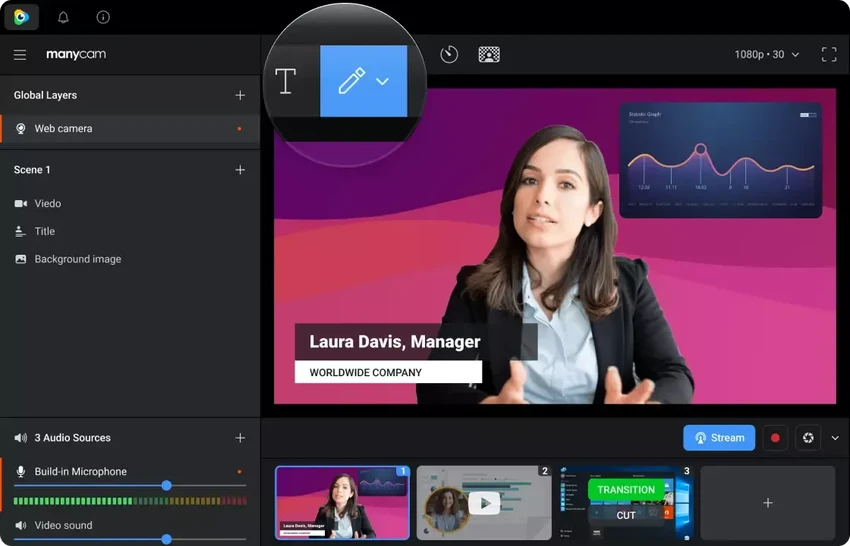

ManyCam is a webcam enhancement and live streaming application designed for users who want more control over their video content, whether for online meetings, live broadcasts, tutorials, or casual video chats. The software combines a virtual webcam, live studio features, screen recording, and video effects into a single platform, allowing users to create more engaging presentations without relying on multiple separate tools.
One of ManyCam's biggest strengths is its ability to work with multiple video chat and streaming applications simultaneously. Instead of limiting your webcam to a single program, it enables you to share the same camera feed across compatible applications such as Skype, YouTube, and other supported platforms. This makes it especially useful for content creators, educators, remote workers, and streamers who need flexible webcam management.
Beyond webcam sharing, ManyCam includes a wide selection of visual effects, custom graphics, backgrounds, picture-in-picture layouts, desktop screencasting, and live drawing tools. It also offers audio enhancements, including a built-in voice changer and microphone effects that can improve audio quality or create entertaining voice modifications during live broadcasts. Together, these features make ManyCam a versatile solution for users looking to produce more professional and interactive video content while simplifying their streaming workflow.
Features of ManyCam
- Free live studio and webcam effects software
- Use one webcam across multiple chat and streaming applications
- High-quality live video broadcasting
- Live streaming to multiple platforms simultaneously
- Screen recording and desktop screencasting
- Record videos and presentations
- Picture-in-picture video layouts
- Chroma Key support for custom backgrounds
- Thousands of webcam effects and custom graphics
- Draw directly over the video during broadcasts
- Live audio effects and built-in voice changer
- Microphone audio enhancement tools
- Overlay names, locations, annotations, and other broadcast information
- Create custom webcam effects and graphics
- Stream or record PC and console gameplay with webcam overlays
- Custom watermark support during live streams and video chats
Interface and Usability
After using ManyCam, I found its interface to be organized around live production tasks rather than traditional webcam settings. The main workspace keeps video sources, effects, overlays, and streaming controls within easy reach, making it straightforward to switch between different layouts during a broadcast.
Adding webcam effects, backgrounds, or picture-in-picture scenes is a simple process, and the software makes it easy to preview changes before going live. Screen recording and desktop sharing are integrated into the same workflow, which reduces the need to switch between different applications.
Users who only need basic webcam enhancements can quickly apply effects and start video calls, while those creating live presentations or streams will appreciate having multiple production tools available in one application. Although the number of available features may require some exploration for first-time users, the overall workflow remains logical once the main controls become familiar.
Who Should Use ManyCam?
- Content creators producing live streams
- Online educators recording lessons or tutorials
- Remote workers who want enhanced video meetings
- Streamers broadcasting gameplay with webcam overlays
- Users who enjoy creative webcam effects
- Presenters who need screen sharing alongside webcam video
- Anyone looking to use a single webcam across multiple compatible applications
Conclusion
ManyCam delivers a comprehensive set of webcam and live production tools in a single application. Instead of focusing only on webcam effects, it combines virtual webcam capabilities, screen recording, desktop broadcasting, voice effects, overlays, and multi-platform streaming into one workflow. The ability to use a webcam with multiple compatible applications simultaneously is particularly valuable for streamers, educators, and professionals who regularly create live video content.


