WinTools.one logo

WinTools.one 26.7.1

  • User Rating:
    ★★★★★
    ★★★★★
    0.0 ★ 0Votes
  • Requirements:
    Windows
  • Version: 26.7.1
  • Latest updated: 2 weeks ago
  • License: Free Trial  
  • Publisher: WinTools Software Engineering
  • Size: 1 MB
× app stores

WinTools.one is a comprehensive Windows system maintenance and optimization suite designed to help users diagnose, clean, and improve their computer performance. The software combines multiple tools for managing files, folders, registry entries, startup items, and system settings in one centralized application. The program focuses on identifying unnecessary data, invalid system entries, and areas where Windows performance can be improved. It analyzes different parts of the system, including temporary files, Windows logs, web caches, drivers, registry items, and startup components, then provides tools to help users perform maintenance tasks.

WinTools.one is designed for both everyday users and more advanced Windows users through two available editions: Home and Professional. The Professional edition includes all Home edition features while adding additional tools such as duplicate file management and expanded options within the System Tweaker section.

The software includes a wide selection of maintenance utilities, including application removal, file scanning, registry cleanup, startup management, file encryption, secure deletion, and system customization. By bringing these functions together, WinTools.one provides users with a single solution for regular PC maintenance and Windows optimization.

Features of WinTools.one

  • Clean Uninstaller: Safely removes unwanted applications from the system.
  • Scan Folders: Finds unnecessary files, empty folders, and other unwanted data.
  • Scan Files: Helps identify files that may no longer be needed.
  • Scan Shortcuts: Detects and manages invalid shortcuts.
  • Scan Registry: Analyzes registry entries and helps clean unnecessary items.
  • Objects Eraser: Removes selected system traces and objects.
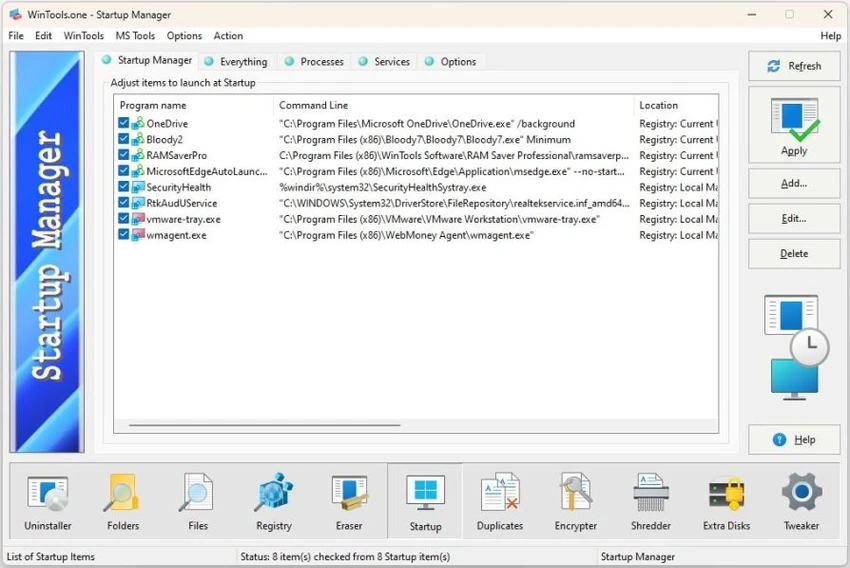
  • Startup Manager: Controls startup items to help improve boot performance.
  • Duplicate Files Manager: Finds duplicate files to help organize storage (Professional edition).
  • File Encryptor: Provides file encryption functionality.
  • File Shredder: Securely deletes files to make recovery more difficult.
  • Extra Disks: Provides additional disk-related management tools.
  • System Tweaker: Offers various Windows settings adjustments, fixes, and customization options.

Interface and Usability

WinTools.one features a centralized interface that brings its diagnostic and maintenance tools together in one location. The main dashboard performs a system analysis by checking areas such as files, folders, registry entries, and startup items, then provides suggestions based on the results. The workflow is designed to be straightforward: users can start an analysis, review detected issues, and access the available maintenance tools to address them. This approach makes it easier to manage several aspects of Windows performance without switching between different applications.

The software offers different levels of control depending on the edition. The Home edition provides essential maintenance tools for regular users, while the Professional edition adds more advanced functions for users who need deeper system management options. Because it includes many diagnostic and customization features, beginners may need some time to understand the purpose of each tool, especially within the System Tweaker section.

Who Should Use WinTools.one?

  • Users who want a complete Windows maintenance toolkit
  • People looking to clean unnecessary files and optimize system organization
  • Advanced users who want additional control over Windows settings
  • Users who need tools for startup management, registry maintenance, and file handling
  • Professionals who prefer a broader set of system utilities in one application

Conclusion

WinTools.one is a feature-rich Windows maintenance suite that combines cleanup, diagnostics, optimization, and system management tools in a single package. Its wide range of utilities makes it useful for users who want more control over their PC maintenance routine without installing multiple separate programs.

Pros & Cons

✓

Pros

  • Combines many Windows maintenance tools into one application
  • Includes system diagnostics and cleanup features
  • Offers separate editions for different user needs
  • Provides advanced tweaking options for experienced users
  • Includes file management, startup control, and optimization utilities
✕

Cons

  • Some advanced features may be difficult for casual users to understand
  • Professional tools are limited to the higher edition
  • Large feature set may feel overwhelming for users looking for a simple cleanup tool

Frequently Asked Questions

What is WinTools.one used for?

WinTools.one is used for maintaining and optimizing Windows computers. It provides tools for cleaning unnecessary files, managing startup items, scanning system areas, and adjusting Windows settings.

What tools are included in WinTools.one?

WinTools.one includes tools such as Clean Uninstaller, Scan Folders, Scan Files, Scan Shortcuts, Scan Registry, Objects Eraser, Startup Manager, File Encryptor, File Shredder, Extra Disks, and System Tweaker.

What is the difference between WinTools.one Home and Professional editions?

The Professional edition includes all features available in the Home edition and adds extra tools such as duplicate file management and more options in the System Tweaker section.

Can WinTools.one help improve Windows startup speed?

WinTools.one includes a Startup Manager that allows users to manage startup items, which can help optimize the programs that load when Windows starts.

Does WinTools.one include a registry cleaner?

Yes. WinTools.one includes a Scan Registry tool designed to analyze registry entries and help clean unnecessary or invalid registry data.

Is WinTools.one suitable for beginners?

WinTools.one can be used by everyday users, especially for basic cleanup and maintenance tasks. However, some advanced features, particularly system tweaking options, are better suited for users with more technical experience.

Recommended apps [Freeware]:
  • Red Burner 19.7 Red Burner logo a portable disc burning tool for CD, DVD, and Blu-ray with fast ISO handling and a simple interface
  • ExpanDrive 2026.06.11 ExpanDrive logo mounts cloud storage and remote servers as local drives for seamless file access in Windows Explorer
  • ShotCut 26.6.25 ShotCut logo free video editor for Windows with multi-format support, timeline editing, filters, and advanced video/audio tools
  • DesktopOK 12.61 DesktopOK logo a free Windows utility that saves and restores desktop icon layouts across screen resolution changes
  • VirtualDJ 2026 Build 9482 VirtualDJ logo mix music, video, and karaoke with AI stems, controllers, streaming, and pro DJ tools
  • Foxit Reader 2026.1.2.36540 Foxit Reader logo Read, annotate, fill forms, and print PDF files with Foxit Reader, a lightweight and feature-rich PDF tool for Windows
Recommended apps [Shareware]:
  • iPubsoft Android Desktop Manager 3.7.22 iPubsoft Android Desktop Manager logo transfer files, manage Android data, back up and restore devices, and organize contacts and SMS from your PC
  • Ant Download Manager 2.17.6 Ant Download Manager logo a Windows tool that speeds up downloads, captures streaming media, supports torrents, and integrates with browsers
  • Adobe Bridge 2026 Adobe Bridge logo digital asset manager for organizing, previewing, and batch processing creative files in Adobe workflows
  • Adlice Protect 16.7.0.0 Adlice Protect logo Detect and remove stubborn malware with Adlice Protect, an advanced anti-malware tool using signature and heuristic analysis
  • PDQ Inventory 20.0.20.0 PDQ Inventory logo Monitor Windows hardware, software, and system configurations with PDQ Inventory for efficient IT asset management
  • WinSnap 6.2.4 WinSnap logo Capture and edit screenshots quickly with advanced shadows, transparency support, image effects, and flexible saving options.