


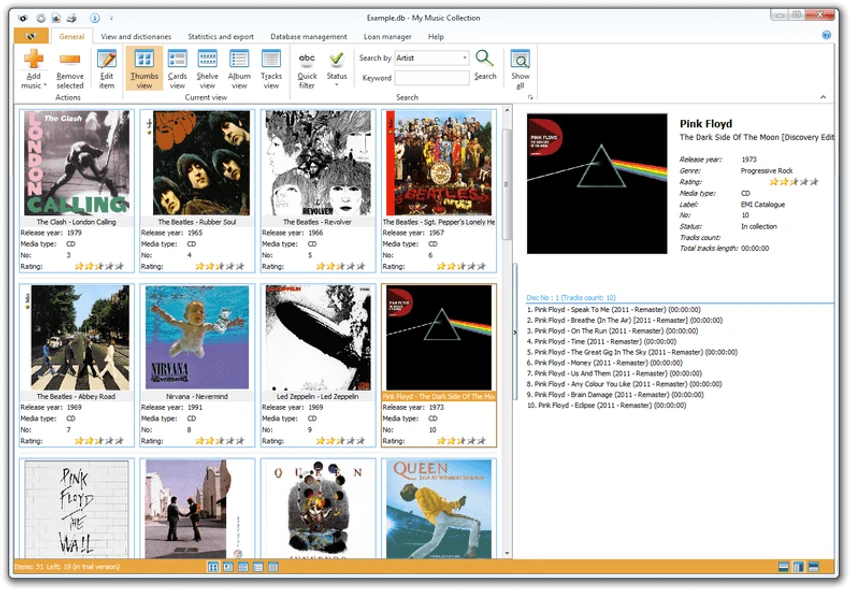

My Music Collection is a music cataloging and organization tool designed to help users manage large and diverse music libraries. It supports CDs, MP3 files, vinyl records, cassettes, and other media types, allowing users to build a structured database of their entire collection. The software focuses on making music organization easier by automatically fetching album data from online sources and offering tools for tracking, searching, and exporting music information.
Overview
My Music Collection functions as a centralized music database where users can store detailed information about albums, tracks, and physical media. Instead of manually maintaining spreadsheets or paper lists, users can build a searchable digital catalog. The software can retrieve album metadata such as artist names, track lists, release dates, and cover artwork from online databases like MusicBrainz, Amazon, and Discogs. It also includes features for managing borrowed items, making it useful for collectors who frequently share physical media. Its flexibility supports both physical and digital music formats, making it suitable for collectors with mixed libraries.
Features of My Music Collection
- Supports CDs, vinyl records, MP3 files, cassettes, and mini discs
- Automatic album information retrieval from the internet
- Metadata sources include MusicBrainz, Amazon, and Discogs
- Barcode scanning for quick album addition
- Manual entry for physical or rare media items
- Borrowing tracker for loaned albums
- Wish list feature for albums you want to purchase
- Advanced search by keyword and metadata fields
- Sorting and filtering by artist, year, genre, or media type
- Collection statistics with tables and visual reports
- Export options: HTML, Excel, PDF, text, and XML
- Printable reports for offline use
- Customizable interface and layout settings
- Grouping and filtering tools for better organization
User Experience
My Music Collection is designed with ease of navigation in mind. Adding albums is straightforward, whether through CD insertion, barcode scanning, or manual entry. The automatic metadata fetching feature significantly reduces the effort required to build a detailed music library. Users can quickly populate their collection with accurate album data and cover art. The interface is structured for browsing and filtering, making it easy to locate specific albums even in large collections. While feature-rich, it remains accessible to general users, especially those familiar with media cataloging tools.
System Requirements
- Windows NT / 2000 / XP / Vista / 7 / 8 / 8.1 / 10 / 11
Who Should Use My Music Collection?
- Music collectors managing large physical and digital libraries
- Users who collect CDs, vinyl records, or cassettes
- People who want to track borrowed or shared music items
- Archivists organizing media collections with metadata
- Users who prefer structured cataloging over manual spreadsheets
Conclusion
My Music Collection is a powerful and practical tool for organizing diverse music libraries. Its ability to automatically retrieve album data, track borrowed items, and export detailed reports makes it especially valuable for collectors and archivists.


