Wondershare AllMyTube logo

Wondershare AllMyTube 7.4.9.2

  • User Rating:
    ★★★★★
    ★★★★★
    0.0 0Votes
  • Requirements:
    Windows
  • Version: 7.4.9.2
  • Latest updated: 1 week ago
  • License: Free Trial  
  • Publisher: Wondershare
  • Size: 1 MB
×

Wondershare AllMyTube is a Windows-based video downloader and converter designed to help users save online videos from YouTube and more than 100 other video-sharing platforms. It also includes built-in conversion tools that optimize videos for mobile devices and different media formats.

Overview

Wondershare AllMyTube combines video downloading, format conversion, and basic media management into a single application. It allows users to download videos from popular platforms such as YouTube, Facebook, Vimeo, Dailymotion, and many others using a one-click process.

Beyond downloading, the software also focuses heavily on conversion capabilities. Users can convert videos into various formats like MP4, AVI, MKV, MOV, and more, or extract audio in formats such as MP3 and WAV. The tool also includes a video library for organizing downloaded content and basic sharing options for social media platforms.

Key Features of Wondershare AllMyTube

  • Download videos from YouTube and 100+ video-sharing websites
  • One-click download via browser integration (Chrome, Firefox, IE)
  • Copy-and-paste URL download support
  • Built-in video recorder for streaming content
  • Convert videos into 150+ formats including MP4, AVI, MKV, MOV
  • Extract audio from videos into MP3, AAC, WAV, and more
  • Optimize videos for mobile devices (iPhone, Android, PSP, etc.)
  • Download acceleration with multi-thread technology
  • Task scheduling options (sleep, shutdown, exit after completion)
  • Built-in video library for organizing downloads
  • Basic sharing to Facebook and Twitter

User Experience

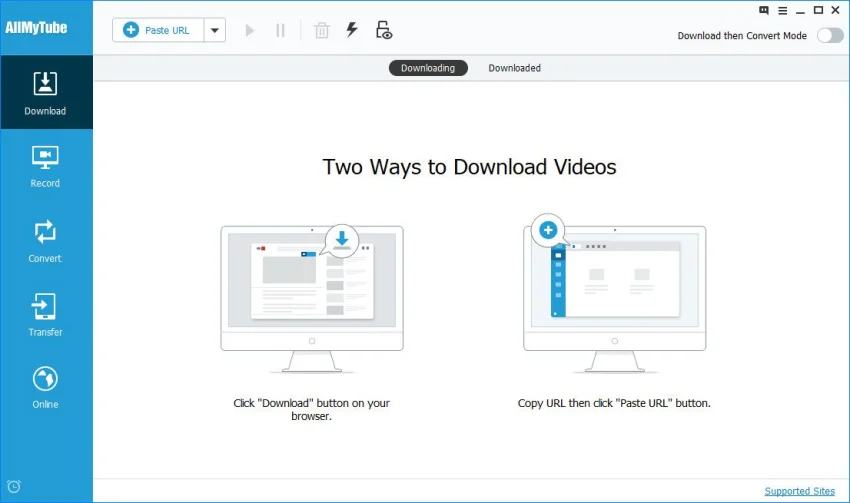
Wondershare AllMyTube offers a straightforward interface that focuses on ease of use. Users can either click the download button detected in the browser or paste a video URL directly into the application. Downloads start quickly, and the built-in acceleration helps reduce waiting time for larger files.

The conversion feature is integrated into the workflow, allowing users to prepare videos for specific devices without needing a separate tool. The built-in library helps keep downloaded content organized, although the interface may feel slightly dated compared to modern streaming download tools.

Who Should Use Wondershare AllMyTube?

  • Users who frequently download online videos
  • Content consumers who want offline access to streaming videos
  • Users who need video format conversion for mobile devices
  • People managing media libraries across multiple formats

Conclusion

Wondershare AllMyTube is a practical all-in-one solution for downloading and converting online videos. With support for hundreds of websites and a wide range of output formats, it remains a useful tool for offline media consumption and device compatibility.

Pros & Cons

Pros

    • Supports downloads from 100+ websites
    • Easy one-click downloading process
    • Wide range of conversion formats
    • Built-in audio extraction feature
    • Fast download acceleration technology
    • Includes video management library

Cons

    • Interface feels outdated compared to newer tools
    • Advanced features may be unnecessary for casual users

Frequently Asked Questions

Is Wondershare AllMyTube free?

The software typically offers a trial version, but full features require a paid license.

Which websites are supported?

It supports YouTube and more than 100 video-sharing platforms including Facebook, Vimeo, and Dailymotion.

Can I convert videos to MP3?

Yes, the software can extract audio and convert videos into MP3 and other audio formats.

Does it support Windows 11?

Yes, it supports Windows Vista through Windows 11, including 32-bit and 64-bit systems.

Can it download streaming videos?

Yes, it includes a recording feature for capturing streaming content from platforms like Netflix or Hulu (as described in the provided data).

Recommended apps [Freeware]:
  • IObit Driver Booster 13.4.0.234 IObit Driver Booster logo updates outdated drivers automatically to boost system stability and gaming performance.
  • EarthTime 6.33.4 EarthTime logo displays world clocks, weather, and local times for 120,000+ cities with customizable alarms and maps.
  • WinScan2PDF 9.77 WinScan2PDF logo scan documents and save them as PDFs or JPEGs with minimal setup and low CPU usage.
  • All in One Runtimes 2.5.0 All in One Runtimes logo Package essential Windows runtime environment packages to improve software compatibility and system stability.
  • UltraSearch 4.9.2.1208 UltraSearch logo locates files and folders on local NTFS drives in seconds without building an index. Fast, precise, and lightweight.
  • iTop Easy Desktop 4.3.0.342 iTop Easy Desktop logo declutter, organize, and manage Windows desktop items efficiently and quickly
Recommended apps [Shareware]:
  • Audio Transcoder 2.12.24 Audio Transcoder logo all-in-one audio converter and CD ripper supporting MP3, FLAC, AAC, WMA, and more
  • Amazing Laptop Cooling Wizard 1.1.5.8 Amazing Laptop Cooling Wizard logo Reduce laptop overheating by optimizing CPU and fan cooling performance on Windows.
  • Adobe Illustrator 2026 Adobe Illustrator logo professional vector graphic editor for creating logos, illustrations, and scalable designs.
  • Adobe Acrobat Pro DC 2026 Adobe Acrobat Pro DC logo create, edit, and secure PDFs easily. Professional PDF solution for individuals and businesses.
  • EF Commander 26.06 EF Commander logo a feature-rich Windows file manager with FTP, media tools, archiving, and advanced file control
  • DBConvert Studio 4.3.1 DBConvert Studio logo simplifies database migration and synchronization across multiple database platforms.