



WinCatalog is a disk and file cataloging software designed to help users organize and locate data spread across multiple storage devices. Instead of manually searching through drives, folders, CDs, DVDs, or external media, the software builds a structured index that makes files searchable from a single place.
It is particularly useful for users with large or fragmented collections of data, where tracking down specific files can become time-consuming. By scanning selected disks, folders, or individual files, WinCatalog creates a detailed catalog that preserves important information such as file paths, sizes, and timestamps.
Beyond standard file management, the software also supports non-file items, allowing users to include personal collections like books or media items in the same catalog. This makes it more flexible than a traditional file explorer.
Features of WinCatalog
- Catalogs disks, folders, files, and removable storage devices
- Supports cataloging individual folders or entire drives
- Builds a searchable index for fast file retrieval
- Preserves folder hierarchy and file attributes (path, size, dates)
- Supports virtual folders and custom items
- Built-in search with filters for name, size, date, tags, and location
- Supports advanced search operators like AND, OR, NOT, and wildcards
- Tagging system for better organization and search accuracy
- Detects duplicate files within the catalog
- Supports export to HTML and CSV formats
- Generates reports for cataloged data
- Multi-tab search support for handling multiple queries
- Allows viewing items in grid or thumbnail mode
- Supports cataloging non-file items such as books or coins
- Imports and exports parts of collections and contact lists
- Maintains previously added comments and keywords during updates
Interface and Usability
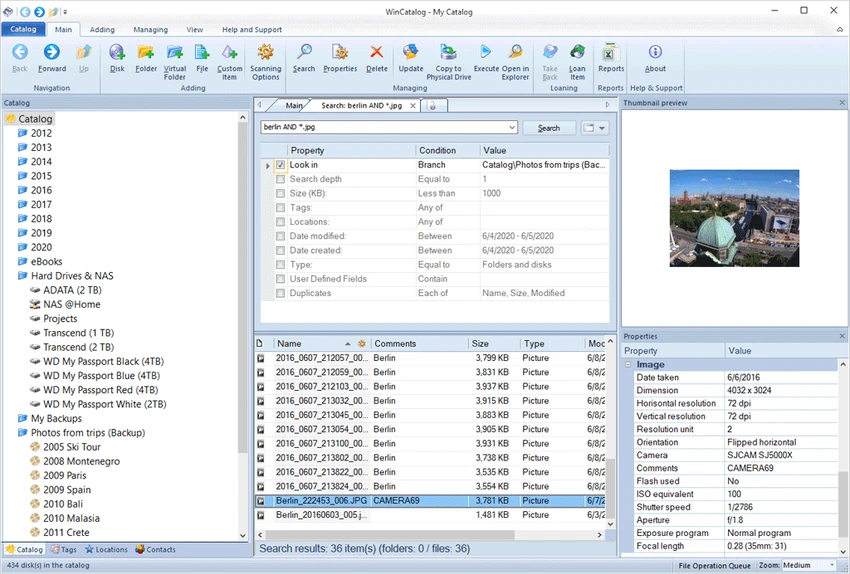
WinCatalog uses a structured interface centered around catalogs and indexed collections. Adding new data sources like drives or folders is done through straightforward selection options. Search and navigation are handled through a built-in search system that supports filters and advanced operators. The layout supports both grid and thumbnail views, making it easier to browse large collections visually or in list form.
While drag-and-drop support is not included, organizing items through virtual folders and catalog tools remains manageable once the structure is set up.
Who Should Use WinCatalog?
- Manage large collections of files across multiple drives or discs
- Need a structured way to organize and search archived data
- Work with external storage like CDs, DVDs, or removable drives
- Want to catalog non-file collections such as media or personal items
- Prefer indexed search over manual browsing through folders
Conclusion
WinCatalog offers a practical way to organize and search through large amounts of data stored across different devices. By building a structured catalog and searchable index, it reduces the need to manually locate files across multiple storage sources.


