Any video Converter logo

Any video Converter 9.2.3

  • User Rating:
    ★★★★★
    ★★★★★
    0.0 0Votes
  • Requirements:
    Windows
  • Version: 9.2.3
  • Latest updated: 1 day ago
  • License: Freemium  
  • Publisher: AVC
  • Size: 7.4 MB
×

Any Video Converter is a multimedia utility designed to convert video files between a wide range of formats quickly and efficiently. It supports popular formats such as AVI, MPG, MOV, MKV, MP4, WMV, and more, making it a versatile tool for users who need compatibility across different devices and platforms. Beyond simple conversion, the software also includes basic video editing functions such as merging, splitting, trimming, and previewing video files before exporting them. It is designed to help users prepare videos for playback on devices like smartphones, portable media players, and gaming consoles.

Features of Any Video Converter

  • Convert videos between multiple formats (AVI, MP4, WMV, MOV, MKV, and more)
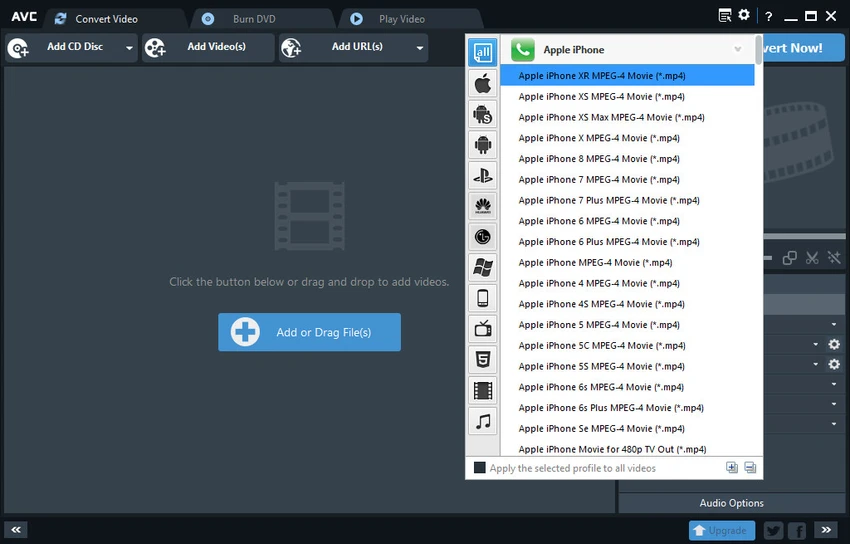
  • Support for device-specific output formats (iPhone, iPod, PSP, Zune, and others)
  • Batch video conversion for multiple files at once
  • Basic video editing tools including merge, split, and trim functions
  • Real-time video preview before conversion
  • Custom video and audio settings (bitrate, resolution, sample rate, etc.)
  • Support for AVI and Xvid encoding
  • Ability to add subtitles to video files
  • Optimized output for mobile devices and media players
  • User-friendly graphical interface

User Experience

Using Any Video Converter feels straightforward, especially for users who need quick format conversion without complex editing workflows. The interface is simple, with clear options for selecting input files, choosing output formats, and starting the conversion process. One of the most practical features is batch conversion, which allows multiple files to be processed at once. This is particularly useful for users working with large video libraries or preparing content for different devices.

The software also provides a preview function, which helps users check edits or settings before committing to the final conversion. This reduces the chance of errors and ensures better control over output quality.

Conclusion

Any Video Converter is a practical and user-friendly tool for handling video format conversion and simple editing tasks. Its broad format support and batch processing capabilities make it a useful utility for everyday users working with video files.

Pros & Cons

Pros

    • Supports a wide range of video formats
    • Easy-to-use interface suitable for beginners
    • Batch conversion saves time
    • Includes basic editing tools (trim, merge, split)
    • Device-ready output profiles for mobile and media players
    • Real-time preview before conversion
    • Customizable audio and video settings

Cons

    • Limited advanced video editing capabilities
    • Focus is primarily on conversion rather than creative editing
    • Interface feels basic compared to modern video editors
    • Some features may be redundant for casual users

Frequently Asked Questions

What is Any Video Converter used for?

Any Video Converter is used to convert video files between different formats and perform basic editing tasks like trimming and merging.

Does Any Video Converter support MP4 conversion?

Yes. It supports converting videos to and from MP4 along with many other formats.

Can I edit videos with Any Video Converter?

Yes, but only basic editing features such as trimming, splitting, and merging are available.

Does Any Video Converter support batch conversion?

Yes. You can convert multiple video files at the same time.

Can I convert videos for mobile devices?

Yes. The software includes presets for smartphones and portable media devices.

Recommended apps [Freeware]:
  • EarthView 7.16.4 EarthView logo dynamic wallpapers and screensavers with day, night, and weather effects
  • All in One Runtimes 2.5.0 All in One Runtimes logo Package essential Windows runtime environment packages to improve software compatibility and system stability.
  • HWMonitor 1.64 HWMonitor logo a free system tool that monitors CPU, GPU, voltages, temperatures, and fan speeds in real time.
  • Winhance 26.06.12 Winhance logo Windows optimization tool to debloat apps, tweak settings, and customize Windows 10/11
  • Glow 26.9 Glow logo advanced Windows system analysis tool offering deep hardware insights, diagnostics, benchmarks, and system optimization utilities
  • OCCT 16.1.11.99 OCCT logo hardware monitoring and stress testing tool for CPU, GPU, memory, and power supply performance analysis.
Recommended apps [Shareware]:
  • Audio Transcoder 2.12.24 Audio Transcoder logo all-in-one audio converter and CD ripper supporting MP3, FLAC, AAC, WMA, and more
  • Amazing Laptop Cooling Wizard 1.1.5.8 Amazing Laptop Cooling Wizard logo Reduce laptop overheating by optimizing CPU and fan cooling performance on Windows.
  • Quick Heal AntiVirus Pro 26.1.0.2 Quick Heal AntiVirus Pro logo real-time malware protection, ransomware defense, and email security
  • Adobe Illustrator 2026 Adobe Illustrator logo professional vector graphic editor for creating logos, illustrations, and scalable designs.
  • WinRAR 7.22 WinRAR logo Windows tool for compressing, decompressing, and managing RAR, ZIP, and many other archive formats.
  • Remote Desktop Manager 2026.2.9.0 Remote Desktop Manager logo manage RDP, SSH, VNC, and virtual machines from one secure centralized platform