DBF Viewer 2000 logo

DBF Viewer 2000 9.24

  • User Rating:
    ★★★★★
    ★★★★★
    0.0 ★ 0Votes
  • Requirements:
    Windows
  • Version: 9.24
  • Latest updated: 3 weeks ago
  • License: Free Trial  
  • Publisher: HiBase Group
  • Size: 4 MB
× app stores

DBF Viewer 2000 is a Windows utility designed to open, view, and edit DBF files used by database systems such as dBase, FoxPro, Visual FoxPro, and similar platforms. It provides a straightforward way to access database records without requiring a full database management system. From a user perspective, the software focuses on speed and simplicity. It allows users to browse DBF files directly from folders, make quick edits, apply filters, and manage records efficiently. It also supports exporting data into multiple formats, making it useful for basic database handling tasks and data migration workflows.

Features of DBF Viewer 2000

  • View and edit DBF files from dBase, FoxPro, and related formats
  • Browse files easily using an integrated file browser
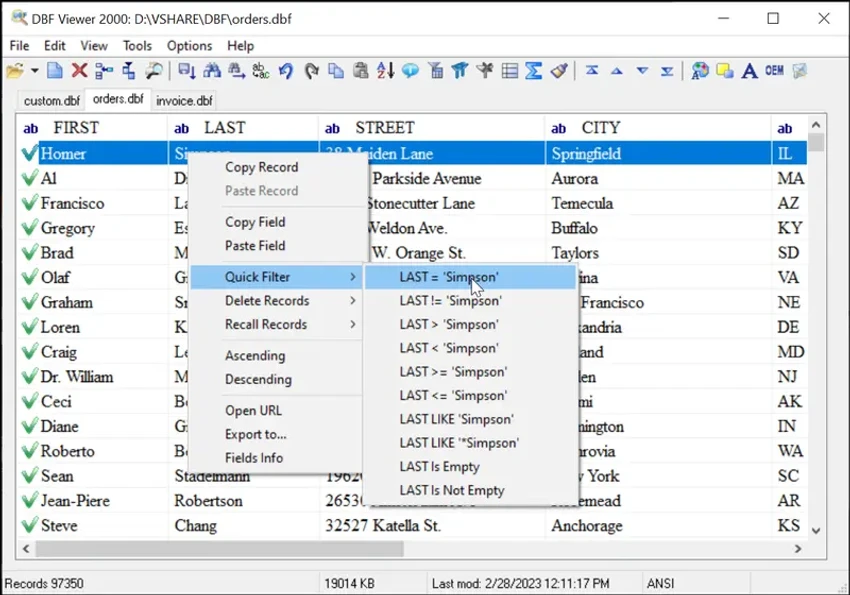
  • Copy, paste, and edit database records and fields via context menus
  • Sort records in ascending or descending order
  • Apply filters for quick data navigation
  • Search, replace, and fill field values
  • Insert new records or duplicate existing ones
  • Jump directly to specific records
  • Export DBF data to formats such as DBF, TXT, HTM, XLS, and XML
  • View field structure and save field information separately
  • Convert character encoding between OEM and ANSI
  • Basic interface customization (colors, fonts, toolbar, language, startup mode)
  • Command line automation support for repetitive tasks
  • Lightweight performance with low CPU and memory usage

Interface and Usability

DBF Viewer 2000 uses a practical, data-focused interface that prioritizes functionality over modern design elements. Navigation is handled through a file browser, making it easy to locate and open DBF files quickly. Once a file is opened, users can interact with data using context menus for editing, copying, and record management. Filtering and sorting tools are readily accessible, which helps streamline working with large datasets.

The software is described as responsive and stable during usage, with low system resource consumption. This makes it suitable for long sessions or handling larger DBF files without noticeable slowdowns.

Who Should Use DBF Viewer 2000?

  • Database administrators handling DBF-based systems
  • Developers maintaining older dBase or FoxPro applications
  • Analysts working with exported legacy data files
  • Users needing quick DBF viewing without full database software
  • Anyone requiring lightweight DBF editing and export tools

Conclusion

DBF Viewer 2000 is a focused and efficient utility for managing DBF files on Windows systems. It provides a wide range of editing, filtering, and exporting tools while maintaining a lightweight footprint.

Pros & Cons

✓

Pros

  • Lightweight and fast performance
  • Supports multiple DBF formats (dBase, FoxPro, etc.)
  • Multiple export options (XLS, XML, TXT, HTML, DBF)
  • Built-in search, filter, and record editing tools
  • Command line automation support
  • Stable and low system resource usage
✕

Cons

  • Limited to DBF-based workflows only
  • Interface is functional but not modern

Frequently Asked Questions

What is DBF Viewer 2000 used for?

DBF Viewer 2000 is designed to open, view, and edit DBF database files used in systems such as dBase, FoxPro, and Visual FoxPro. It helps users manage legacy database data without needing a full database management system.

Can I edit records inside DBF Viewer 2000?

Yes. The software allows you to edit existing records, insert new entries, duplicate records, and modify field values directly within DBF files.

Does DBF Viewer 2000 support exporting data?

Yes, it supports exporting DBF data into several formats including TXT, HTML, XLS, XML, and DBF, making it useful for data conversion and reporting tasks.

Is DBF Viewer 2000 suitable for large DBF files?

The application is optimized for performance and is described as lightweight and responsive, allowing it to handle large DBF files efficiently in most cases.

Do I need a database engine to use DBF Viewer 2000?

No. DBF Viewer 2000 works independently and does not require any external database engines, drivers, or management systems.

Which Windows versions are supported?

DBF Viewer 2000 supports Windows 11, Windows 10, Windows 8, and Windows 7.

Recommended apps [Freeware]:
  • K-Lite Codec Pack Full 19.8.2 K-Lite Codec Pack Full logo Play all audio and video formats on Windows with K-Lite Codec Pack Full, a lightweight and reliable codec package
  • MSI Center 2.0.71.0 MSI Center logo a system utility for MSI devices that manages performance, gaming modes, monitoring, RGB, and hardware optimization tools
  • Vektorrazor 2.2 Vektorrazor logo converts logos and image sources into clean, CAD-friendly vector contours for technical workflows
  • Logyx Pack 25.401 Logyx Pack logo a portable collection of 155 logic, puzzle, board, and brain-training games for players of all ages
  • VLC Media Player 3.0.23 VLC Media Player logo a free, open-source multimedia player supporting nearly all video formats, streaming, and playback features across platforms.
  • UltraCopier 3.1.0.0 UltraCopier logo Speed up file transfers with UltraCopier. Enjoy advanced copy management, error handling, speed control, and customization
Recommended apps [Shareware]:
  • Foxit PDF Editor 2026.1.2 Foxit PDF Editor logo complete PDF solution for businesses, offering advanced editing, collaboration, and document security features.
  • DP Animation Maker 3.5.51 DP Animation Maker logo a simple Windows tool for creating animated images, GIFs, and videos with effects, objects, and music.
  • PingPlotter 5.27.10 PingPlotter logo network monitoring tool for tracking latency, packet loss, and remote host performance in real time
  • iTop Data Recovery 6.3.0.955 iTop Data Recovery logo Recover deleted files from drives, SSDs, USB devices, and memory cards with a simple Windows data recovery tool.
  • Perplexity 1.7.0 Perplexity logo Get AI-powered answers, summaries, and research help with source links using this modern search and productivity tool.
  • SecureCRT 9.7.3 Build 3916 SecureCRT logo Secure remote connections with SSH, Telnet, scripting, session management, and secure file transfer tools for professionals.