WeBuilder logo

WeBuilder 2025 v18.7.0.277

  • User Rating:
    ★★★★★
    ★★★★★
    0.0 ★ 0Votes
  • Requirements:
    Windows
  • Version: 2025 v18.7.0.277
  • Latest updated: 2 weeks ago
  • License: Free Trial  
  • Publisher: Blumentals
  • Size: 120 MB
× app stores

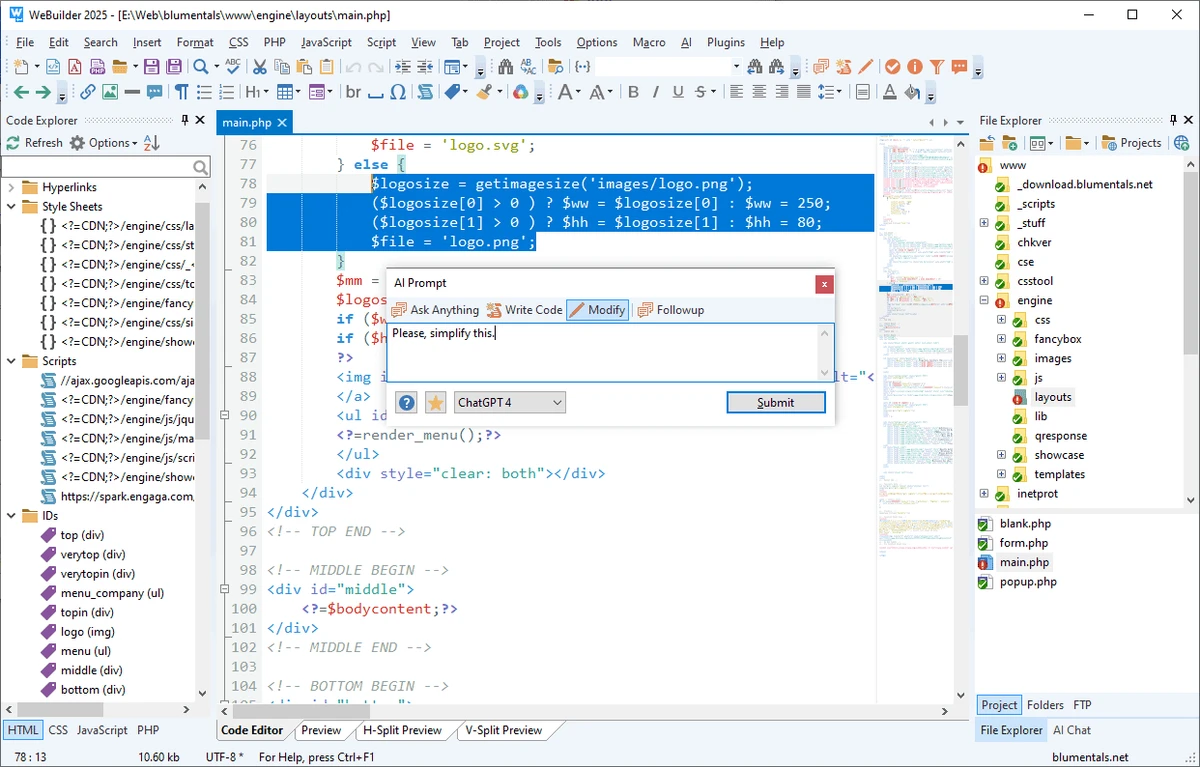
WeBuilder is a lightweight web code editor designed to simplify the creation, editing, and management of web development projects from a single application. It supports a broad range of programming and markup languages, including HTML, CSS, JavaScript, PHP, ASP, Ruby, XML, SQL, and Perl, making it suitable for both front-end and back-end development. The editor combines fast performance with a customizable workspace, advanced code editing tools, syntax highlighting, auto-completion, and project management features. Integrated FTP and SFTP connectivity allows developers to edit and publish files directly to remote servers, while built-in editors for HTML, CSS, JavaScript, and PHP help streamline coding tasks. Additional capabilities such as code snippets, templates, regular expression search, database connectivity, PHP debugging with Xdebug, and support for popular frameworks make WeBuilder a comprehensive solution for developers and learners seeking an efficient environment for web application development on Windows.

Features of WeBuilder

  • Supports HTML, CSS, JavaScript, PHP, ASP, Ruby, Perl, XML, SQL, VBScript, and more
  • Fast startup and lightweight performance
  • Fully customizable text editor, menus, toolbars, and keyboard shortcuts
  • Syntax highlighting for numerous programming languages
  • HTML5 and CSS3 support
  • UTF-8 and UTF-16 Unicode compatibility
  • Auto-completion and advanced HTML editing tools
  • Built-in editors for HTML, CSS, JavaScript, PHP, and Ruby
  • PHP debugging with Xdebug support
  • Real-time PHP syntax checking
  • Code snippet library and reusable templates
  • Open, edit, and save files directly through FTP and SFTP
  • Project management and FTP/SFTP publishing
  • Search and replace with regular expression support
  • Search and replace across multiple files
  • SQL database connectivity for MySQL, PostgreSQL, Firebird, and InterBase
  • Spell checker for HTML and text files
  • Code folding and matching tag highlighting
  • Supports jQuery, Prado, CodeIgniter, Yii, Symfony, and Smarty
  • Multi-item clipboard
  • SVN integration through TortoiseSVN
  • Compatible with Windows 10 and Windows 11

Interface and Usability

WeBuilder features a clean, familiar interface that emphasizes productivity without unnecessary complexity. The editor is highly customizable, allowing users to tailor menus, toolbars, keyboard shortcuts, and editing behavior to their preferences. Frequently used development tools such as syntax highlighting, code completion, project management, FTP access, and code snippets are integrated into the workspace, reducing the need to switch between multiple applications. Its lightweight design also contributes to quick startup and responsive performance, making it suitable for both small edits and larger web development projects.

Who Should Use WeBuilder?

  • Front-end web developers
  • Full-stack developers
  • PHP developers
  • HTML and CSS designers
  • JavaScript programmers
  • Students learning web development
  • Freelance web developers
  • Website maintenance professionals

Conclusion

WeBuilder offers a comprehensive set of web development tools in a lightweight and responsive code editor. By combining support for multiple programming languages, customizable editing features, integrated FTP/SFTP connectivity, project management, PHP debugging, and framework compatibility, it provides an efficient workspace for creating and maintaining websites and web applications. Whether you are building new projects, updating existing websites, or learning web technologies, WeBuilder delivers a focused coding environment that helps streamline everyday development tasks on Windows.

Pros & Cons

✓

Pros

  • Supports numerous web programming languages
  • Lightweight with fast startup performance
  • Highly customizable editing environment
  • Built-in FTP and SFTP support
  • Advanced editing tools with syntax highlighting and auto-completion
  • PHP debugging and syntax checking included
  • Project management and reusable code snippets
  • Supports several popular web development frameworks
✕

Cons

  • SVN integration depends on TortoiseSVN

Frequently Asked Questions

What programming languages does WeBuilder support?

WeBuilder supports a wide range of languages, including HTML, CSS, JavaScript, PHP, ASP, Ruby, Perl, XML, SQL, VBScript, WML, and several .NET-related syntaxes through syntax highlighting.

Can WeBuilder upload files directly to a web server?

Yes. The editor includes built-in FTP and SFTP functionality, allowing users to open, edit, save, and publish files directly to remote servers.

Does WeBuilder support PHP development?

Yes. WeBuilder includes advanced PHP editing features, real-time PHP syntax checking, and debugging support through Xdebug.

Is WeBuilder suitable for beginners?

Yes. The software provides HTML and CSS wizards, templates, and reusable code snippets that can help new users learn web development while working within the editor.

Does WeBuilder support modern web standards?

Yes. It supports HTML5, CSS3, Unicode encoding (UTF-8 and UTF-16), and includes editing tools designed for contemporary web development.

What operating systems does WeBuilder support?

According to the provided system requirements, WeBuilder is compatible with Windows 10 and Windows 11.

Recommended apps [Freeware]:
  • Visual Studio Code 1.129.1 Visual Studio Code logo Free and powerful code editor from Microsoft with extensions, debugging, Git support, and multi-language development
  • Sandboxie-Plus 1.18.0 Sandboxie-Plus logo a Windows sandboxing tool that isolates programs to prevent system changes and improve security.
  • HeidiSQL 12.20 HeidiSQL logo manage MySQL, MSSQL, and databases, run queries, edit tables, and export data on Windows
  • MuPDF 1.28.0 MuPDF logo a lightweight, no-frills PDF and XPS viewer designed for fast document viewing with minimal system usage
  • Intel Wireless Bluetooth Driver 24.50.0 Intel Wireless Bluetooth Driver logo Intel Wireless Bluetooth Driver for Windows 10/11 delivers stable Bluetooth connectivity for supported Intel adapters
  • Advanced Trigonometry Calculator 2.1.7 Advanced Trigonometry Calculator logo Solve advanced trigonometry, scientific notation, complex numbers, and equations with Advanced Trigonometry Calculator
Recommended apps [Shareware]:
  • NTFS Permissions Auditor 26.6.27 NTFS Permissions Auditor logo analyze Windows folder permissions, audit NTFS access rights, and export detailed security reports
  • CleverPrint 9.3.73976 CleverPrint logo virtual printing utility that optimizes print jobs, saves paper and ink, adds watermarks, and exports documents to PDF or images
  • BeerSmith 4.0.22 BeerSmith logo brewing software for designing beer, mead, wine, and cider recipes with style matching, mash calculations, and ingredient management
  • pdfMachine merge 2.0.9628.25372 pdfMachine merge logo merge automates personalized PDF email campaigns using Word, Excel, PowerPoint, and HTML templates
  • Comfort Keys Pro 9.6.2.0 Comfort Keys Pro logo Boost productivity with Comfort Keys Pro. Automate typing, manage hotkeys, clipboard history, macros, and text templates.
  • CrawlRhino SEO Monitor 1.1.17.0 CrawlRhino SEO Monitor logo Monitor website uptime, response times, SEO changes, and HTTP status codes with a lightweight desktop monitoring solution for Windows.