R-Photo logo

R-Photo 2.0.180048

  • User Rating:
    ★★★★★
    ★★★★★
    0.0 0Votes
  • Requirements:
    Windows
  • Version: 2.0.180048
  • Latest updated: 4 days ago
  • License: Freeware  
  • Publisher: R-tools Technology Inc
  • Size: 69 MB
× app stores

R-Photo is a free photo and video recovery tool for Windows that helps users restore deleted or lost media files from a wide range of storage devices. Powered by the same recovery engine used in R-Studio, it combines advanced scanning technology with an easy-to-use interface, making media recovery accessible to both beginners and experienced users.

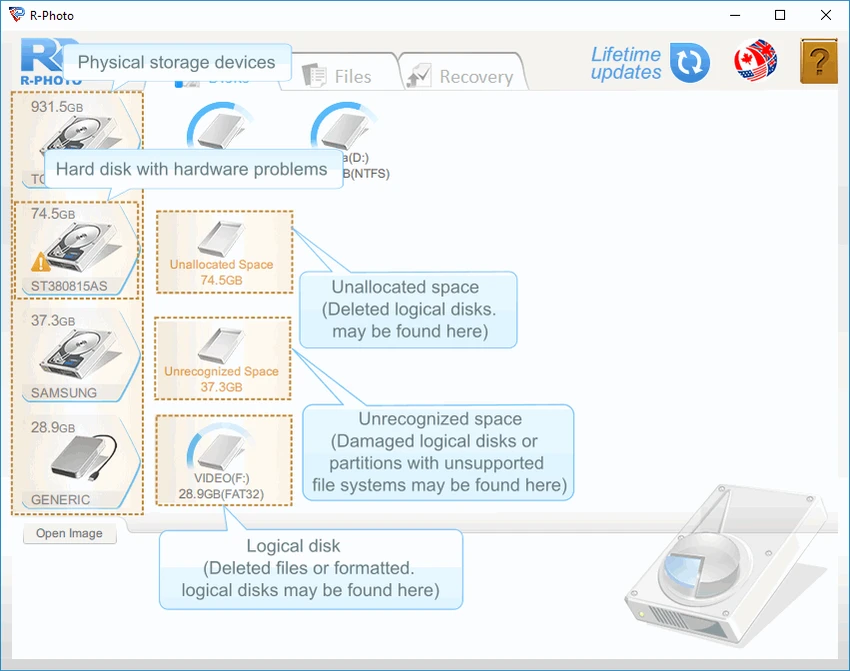
Designed for non-commercial use, R-Photo supports common Windows file systems and works with everything from USB flash drives and SD cards to SSDs, RAID arrays, and Windows Storage Spaces.

Features of R-Photo

  • Free for non-commercial photo and video recovery
  • Recovers deleted and lost photos and videos
  • Supports FAT, exFAT, NTFS, and ReFS file systems
  • Recover data from HDDs, SSDs, NVMe drives, USB flash drives, SD cards, and external storage
  • Supports virtual disks, Windows Storage Spaces, and intact RAID configurations
  • Standard file system scan and advanced raw signature recovery
  • Advanced recovery for damaged or corrupted file systems
  • Filter scan results using multiple criteria, including date and time
  • Displays recovery probability, file size, and modification date
  • Organizes recovered files by media type
  • Built-in secure file shredder for permanently deleting files

User Experience

R-Photo offers a clean and intuitive interface that keeps the recovery process straightforward. After selecting a storage device, scanning begins quickly, and the tab-based layout makes navigating the results simple. One feature I found particularly useful is the filtering system. Large recovery scans can return hundreds or even thousands of files, but filtering by date or other criteria makes locating specific photos much faster.

The software also provides helpful recovery information for each file, including its recovery likelihood and modification date. This makes it easier to decide which files are worth restoring before beginning the recovery process. When dealing with damaged storage devices, the raw file recovery mode proves especially valuable. By searching for known file signatures instead of relying solely on the file system, R-Photo can recover media even when partitions are corrupted or no longer recognized correctly. Another welcome addition is the built-in file shredder, which permanently deletes previously removed files to prevent future recovery.

Who Should Use R-Photo?

  • Home users recovering accidentally deleted photos
  • Photographers restoring images from SD cards
  • Users recovering videos from USB drives or external disks
  • Anyone needing free media recovery software
  • Windows users looking for an easy-to-use recovery solution

Conclusion

R-Photo combines professional-grade recovery technology with a beginner-friendly interface, making photo and video recovery both simple and reliable. Whether you're restoring images from an SD card, recovering videos from an external drive, or retrieving media after accidental deletion, it provides powerful recovery tools without any cost for personal use.

Pros & Cons

Pros

  • Completely free for non-commercial use
  • Fast and easy-to-use interface
  • Powerful recovery engine derived from R-Studio
  • Supports many storage devices and Windows file systems
  • Advanced raw recovery for damaged file systems
  • Helpful filtering and recovery probability indicators
  • Includes secure file shredding

Cons

  • Limited to photo and video recovery
  • Free license is intended for non-commercial use
  • File shredder only works with previously deleted files

Frequently Asked Questions

Is R-Photo free?

Yes. R-Photo is free for non-commercial use.

What file types can R-Photo recover?

R-Photo is designed to recover deleted and lost photo and video files.

Which storage devices are supported?

It supports HDDs, SSDs, NVMe drives, USB flash drives, SD cards, external drives, virtual disks, Windows Storage Spaces, and intact RAID arrays recognized by Windows.

Can R-Photo recover files from damaged file systems?

Yes. Its advanced raw recovery mode searches for file signatures, allowing recovery even when the file system is damaged or unrecognized.

Does R-Photo permanently delete files?

Yes. It includes a built-in file shredder that securely removes previously deleted files to prevent future recovery.

Recommended apps [Freeware]:
  • Digital Clock 5.2.2 Digital Clock logo customizable desktop clock app with skins, alarms, opacity control, and system tray support
  • AB Download Manager 1.9.2 AB Download Manager logo Download files with features such as queue management, scheduling, speed control, and browser integration.
  • Executor 2.3.8 Executor logo a customizable Windows launcher with hotkeys, keyword commands, automation tools, notes, and workflow enhancements
  • Claude Desktop 1.15962.1 Claude Desktop logo Anthropic's AI assistant to Windows and macOS for writing, coding, research, and file analysis
  • Norton 360 Remover 26.6.11050.2580 Norton 360 Remover logo a utility that completely uninstalls Norton 360 security software, removing leftover files and settings
  • Opera GX 132.0.5905.110 Opera GX logo Chromium-based gaming browser featuring CPU, RAM, and network limiters, built-in VPN, ad blocker, and gaming integrations.
Recommended apps [Shareware]:
  • Sidify Spotify Music Converter 2026 Sidify Spotify Music Converter logo convert Spotify songs, playlists, and podcasts to MP3, AAC, FLAC, and WAV formats.
  • DBF Converter 7.85 DBF Converter logo convert DBF files to CSV, Excel, SQL and text with fast batch processing and filtering
  • GiliSoft Private Disk 11.8 GiliSoft Private Disk logo Protect sensitive files with AES 256-bit encryption, hidden disk images, and portable encrypted storage
  • MailWasher Pro 8.0.119 MailWasher Pro logo blocks spam, scams, and unwanted emails before download with advanced filtering tools
  • DaVinci Resolve 21.0.1 DaVinci Resolve logo a professional video editor with advanced color grading, AI tools, and high-end post-production features.
  • EventSentry Light 6.0.1.68 EventSentry Light logo Monitor servers, logs, and network devices, get real-time alerts and centralized system monitoring for IT environments.