


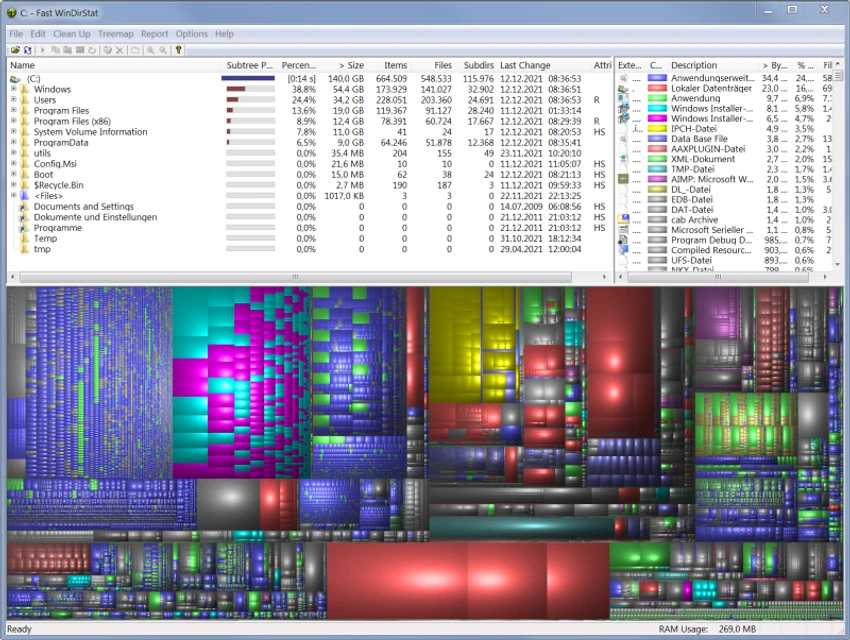

WinDirStat is a free and open-source disk usage analyzer designed for Windows. After using it, I found it to be one of the most practical utilities for understanding exactly how storage space is being used. Instead of guessing which folders are consuming your SSD or hard drive, WinDirStat scans your selected drive and presents the results in a clear visual format.
The software combines a detailed directory tree, an extension statistics list, and its signature colorful treemap, making it easy to identify large files and folders within seconds. Whether you're preparing for a disk cleanup or simply monitoring storage usage, WinDirStat offers an efficient way to locate space-hungry files without unnecessary complexity.
A portable version is also available, making it convenient for technicians or users who prefer running utilities directly from a USB drive.
Features of WinDirStat
- Free and open-source disk usage analyzer for Windows.
- Displays a directory tree sorted by disk space usage.
- Interactive treemap visualizes files and folders by size.
- Color-coded file types for easier identification.
- File extension statistics show which file formats consume the most storage.
- Helps quickly locate large or unnecessary files before cleanup.
- Portable version available for use without installation.
Interface and Usability
WinDirStat focuses on functionality rather than appearance, and that approach works well. After scanning a drive, the interface is divided into three complementary sections: the directory tree, the treemap visualization, and the file extension list. The treemap is the standout feature. Every file appears as a colored rectangle, with larger files occupying more space on the screen. As I explored different folders, it became much easier to identify oversized videos, archived files, or large application folders that would have taken much longer to find manually.
Navigation feels straightforward, especially for users already familiar with Windows Explorer. The only noticeable drawback is scan time on very large drives, which can require some patience before the visual report becomes available.
Who Should Use WinDirStat?
- Windows users running out of storage space.
- Home users looking to identify large files before deleting them.
- IT professionals and system administrators managing multiple computers.
- Users maintaining shared PCs or network storage.
- Anyone who wants a visual overview of disk usage instead of manually browsing folders.
Conclusion
WinDirStat remains one of the most effective free disk analysis tools available for Windows. Rather than overwhelming users with unnecessary features, it focuses on helping you understand where your storage space is going through an intuitive visual interface.


