FileLegit Windows Office & Productivity PDF Tools PDFsam -PDF Split and Merge
PDFsam -PDF Split and Merge logo

PDFsam -PDF Split and Merge 6.0.4

  • User Rating:
    ★★★★★
    ★★★★★
    0.0 ★ 0Votes
  • Requirements:
    Windows
  • Version: 6.0.4
  • Latest updated: 2 weeks ago
  • License: Freeware  
  • Publisher: Andrea Vacondio
  • Size: 97 MB
× app stores

PDFsam (PDF Split and Merge) is a free PDF management application designed to help users organize and modify PDF documents through a collection of practical tools. The software allows users to split large PDF files into smaller documents, merge multiple PDFs into a single file, extract selected pages, and rotate document pages with ease.

The application is especially useful for users who regularly work with PDF documents and need more control over file structure without relying on complex editing software. PDFsam can merge PDF files while allowing users to select specific pages, making it easier to combine only the content they need. It can also preserve bookmarks and interactive forms during merging operations. For splitting documents, PDFsam provides options based on page numbers, bookmarks, or file size. This flexibility allows users to separate reports, chapters, or sections according to their specific requirements. The extraction feature makes it possible to remove selected pages from a PDF and create new documents from existing files.

PDFsam also includes features such as alternate mixing, which combines two PDF files together, and configuration options for output files. With support for drag-and-drop operations and a focus on efficient PDF handling, PDFsam provides a straightforward solution for users who need reliable PDF splitting and merging tools.

Features of PDFsam

  • Split PDF files into separate documents
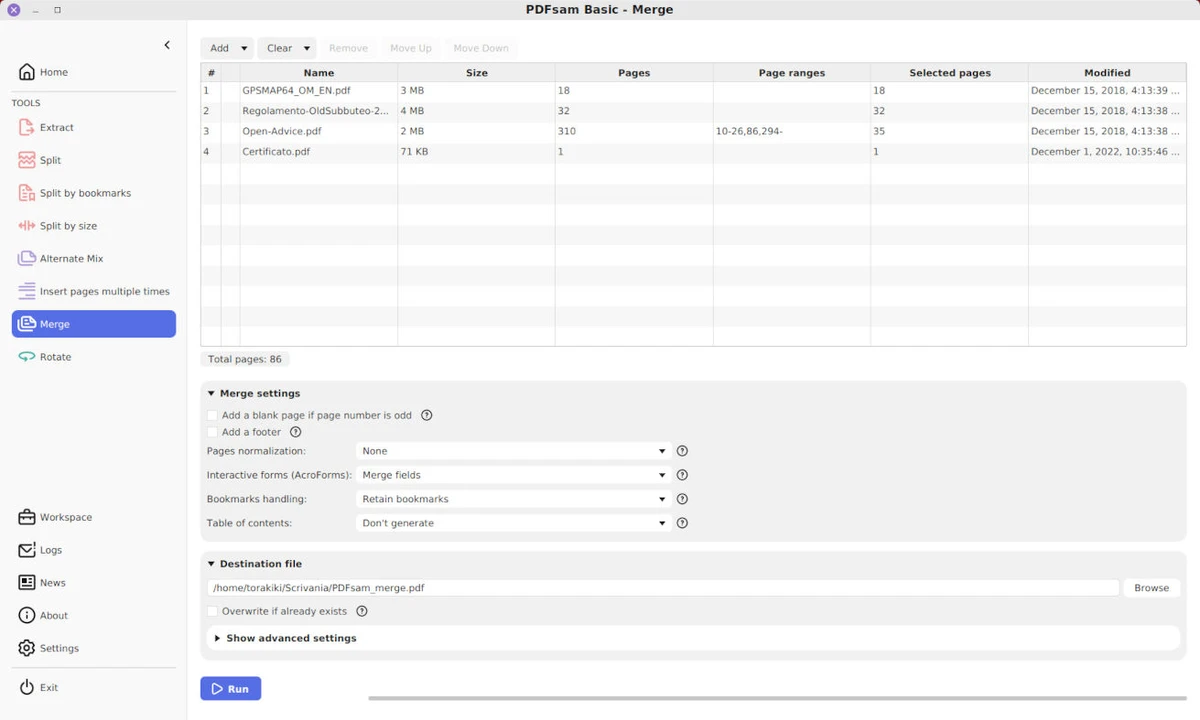
  • Merge multiple PDF files into one document
  • Extract selected pages from PDF files
  • Rotate all or specific pages in PDF documents
  • Split PDFs by page numbers, bookmarks, or file size
  • Alternate Mix feature for combining two PDF files
  • Preserve bookmarks and interactive forms when merging
  • Customize output settings
  • Support drag-and-drop workflow
  • Open-source PDF management tool
  • Fast PDF processing

Interface and Usability

PDFsam provides a practical interface focused on common PDF management tasks. The software organizes its tools around specific actions such as splitting, merging, rotating, and extracting pages, making it easy for users to choose the operation they need.

The workflow is straightforward, with options for selecting files, configuring output settings, and processing documents. Features like drag-and-drop support help simplify adding PDF files, while bookmark-based splitting provides additional flexibility for larger documents. Although PDFsam focuses on document organization rather than full PDF editing, its dedicated tools make common PDF tasks simple and efficient.

Who Should Use PDFsam?

  • Students managing PDF assignments and documents
  • Office users handling reports and files
  • Professionals organizing large PDF documents
  • Users who need to merge or split PDFs regularly
  • Anyone looking for a free PDF management tool

Conclusion

PDFsam is a reliable tool for users who frequently work with PDF documents and need simple ways to split, merge, extract, and reorganize files. Its focused feature set makes common PDF management tasks faster without requiring expensive document software.

Pros & Cons

✓

Pros

  • Free PDF splitting and merging tools
  • Supports page extraction and rotation
  • Allows merging of selected pages
  • Handles bookmarks and interactive forms
  • Supports multiple PDF organization tasks
  • Open-source software
  • Simple drag-and-drop workflow
✕

Cons

  • Focused on PDF organization rather than full document editing
  • Advanced PDF editing features are not included
  • Requires Java-based components depending on version

Frequently Asked Questions

What is PDFsam used for?

PDFsam is used to manage PDF documents by splitting, merging, extracting, rotating, and reorganizing PDF files.

Can PDFsam merge multiple PDF files?

Yes. PDFsam can combine multiple PDF documents into a single PDF file and allows users to select specific pages when merging.

Can PDFsam split a PDF into separate files?

Yes. PDFsam can split PDF documents based on page numbers, bookmarks, or file size.

Does PDFsam allow page extraction?

Yes. The extraction feature allows users to select pages from a PDF file and create a new document containing only those pages.

Can PDFsam rotate PDF pages?

Yes. PDFsam includes a rotate feature that allows users to rotate all pages or selected parts of a PDF document.

Is PDFsam free to use?

Yes. PDFsam Basic is a free and open-source PDF management application designed for splitting and merging PDF files.

Recommended apps [Freeware]:
  • Adobe Camera Raw 18.4 Adobe Camera Raw logo Edit, process, and convert RAW photos in Photoshop with Adobe Camera Raw's powerful image workflow tools
  • Czkawka 12.0.0 Czkawka logo open-source file cleanup tool that finds duplicates, empty folders, similar images, and large files across your system
  • QOwnNotes 26.7.6 QOwnNotes logo plain-text file notepad and todo-list manager with Markdown support and Nextcloud / ownCloud integration
  • Catalyst Browse 2026.1.1 Catalyst Browse logo a media viewing and logging tool for Pro formats, offering playback, metadata editing, and workflow management.
  • Black Menu for Google 31.6.2 Black Menu for Google logo Access popular Google services quickly from your browser with a customizable menu extension for search, Gmail, Maps, Drive, and more.
  • Universal Media Server 15.6.0 Universal Media Server logo Stream videos, music, and images across devices with a flexible DLNA server supporting multiple platforms and formats.
Recommended apps [Shareware]:
  • Topaz Photo 1.6.1 Topaz Photo logo advanced AI to sharpen photos, remove noise, and enhance image quality with ease
  • TunnelBear 4.3.0 TunnelBear logo Secure your internet connection with TunnelBear VPN, featuring encrypted browsing, IP masking, and easy server selection
  • Adlice Protect 16.7.0.0 Adlice Protect logo Detect and remove stubborn malware with Adlice Protect, an advanced anti-malware tool using signature and heuristic analysis
  • Coolmuster Mobile Transfer 4.1.18 Coolmuster Mobile Transfer logo Transfer contacts, photos, messages, and more between Android and iOS devices with Coolmuster Mobile Transfer for Windows
  • GiliSoft AI Toolkit 10.9 GiliSoft AI Toolkit logo combines chatbot, OCR, TTS, ASR, and image tools to streamline AI-powered workflow automation.
  • TextPad 9.9.7 TextPad logo Edit large text files efficiently with a powerful Windows editor featuring macros, regular expressions, spell checking, file comparison, and more.