FileLegit Windows Utilities System Tools Windows 10 Debloater
Windows 10 Debloater logo

Windows 10 Debloater 3.0.3

  • User Rating:
    ★★★★★
    ★★★★★
    0.0 0Votes
  • Requirements:
    Windows
  • Version: 3.0.3
  • Latest updated: 1 week ago
  • License: Freeware  
  • Publisher: FreeTimeTech
  • Size: 2 MB
× app stores

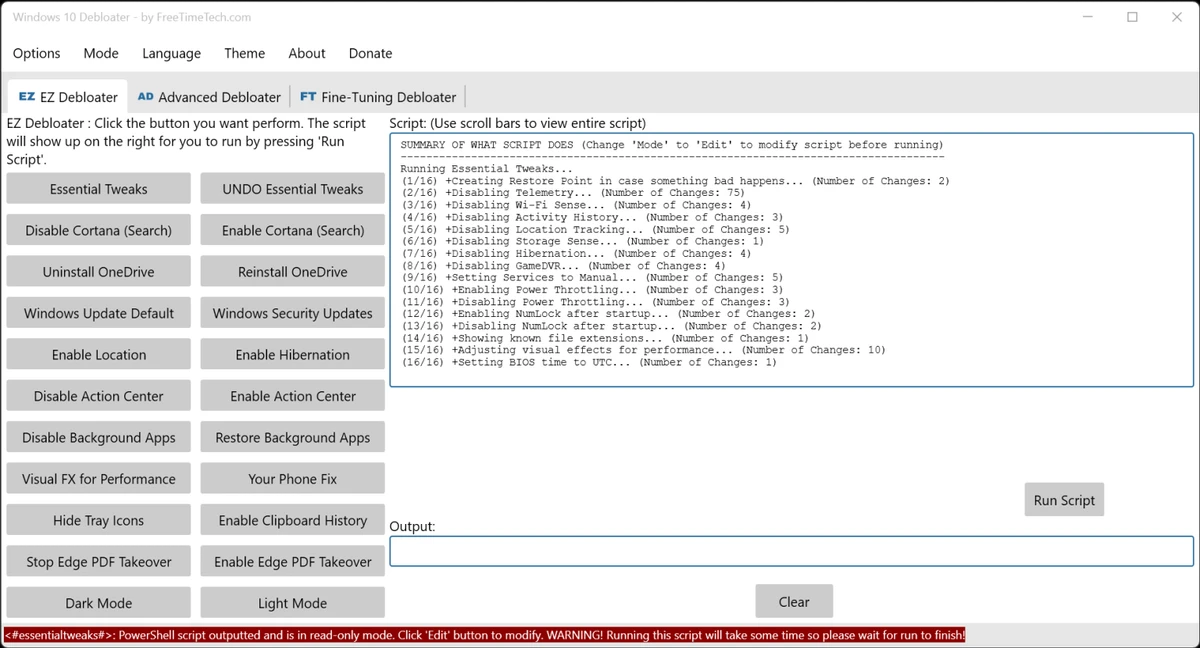
Windows 10 Debloater is a portable utility that enables users to customize and streamline Windows 10 through PowerShell scripts. Designed primarily for advanced users, it allows you to disable unnecessary features, adjust privacy settings, and create custom presets for repeated deployments. During my experience with it, I found that its tab-based interface simplifies access to a large number of system tweaks while still providing flexibility for more experienced users.

Features of Windows 10 Debloater

  • Portable application with no installation required
  • Tab-based interface for quick access to different settings
  • Generates and runs PowerShell scripts
  • EZ Debloater mode for simplified customization
  • Debloat Preset options for predefined configurations
  • Create custom presets using radio buttons
  • Disable unnecessary Windows features
  • Disable Cortana background apps
  • Prevent Microsoft Edge from being the default PDF application
  • Customize multiple Windows 10 machines efficiently
  • Allows users to select only the desired tweaks
  • Designed specifically for Windows 10

User Experience

After launching Windows 10 Debloater, I found the interface straightforward despite the number of available options. The tab-based layout organizes settings logically, making it easier to navigate than manually editing system policies or registry entries. The EZ Debloater section is particularly useful for quickly selecting common tweaks. I appreciated the ability to create presets, which can save time when configuring multiple Windows 10 systems. Instead of repeating the same process on every machine, custom settings can be reused through generated PowerShell scripts.

The software also allows scripts to be executed directly from within the application, adding convenience for users who are familiar with PowerShell. Features such as disabling Cortana background apps and changing Microsoft Edge's default PDF behavior can be configured without manually hunting through Windows settings. Although easy to navigate, Windows 10 Debloater is intended for users who understand the impact of system-level modifications. Creating a restore point before applying changes remains a sensible precaution.

Who Should Use Windows 10 Debloater?

  • Advanced Windows users
  • System administrators managing multiple PCs
  • Users looking to remove unnecessary Windows features
  • Privacy-conscious users
  • Enthusiasts who prefer custom system configurations
  • Users comfortable working with PowerShell scripts

Conclusion

Windows 10 Debloater is a capable customization tool for users who want more control over Windows 10. Its combination of script generation, preset support, and a user-friendly interface makes it particularly valuable for enthusiasts and administrators configuring multiple PCs. If you're comfortable making system-level changes and want to streamline your Windows 10 setup, Windows 10 Debloater is worth considering—just remember to create a restore point before applying any modifications.

Pros & Cons

Pros

  • Portable and lightweight
  • Convenient tab-based interface
  • Supports custom presets
  • Generates PowerShell scripts
  • Useful for managing multiple computers
  • Allows selective customization
  • Includes EZ Debloater for quicker setup

Cons

  • Designed primarily for experienced users
  • Incorrect settings may affect system behavior
  • Requires understanding of PowerShell-based tweaks
  • Limited to Windows 10

Frequently Asked Questions

What is Windows 10 Debloater used for?

Windows 10 Debloater is used to disable unwanted Windows features and customize the operating system using PowerShell scripts.

Does Windows 10 Debloater require installation?

No. It is a portable application that can be run directly without installation.

Can I create custom presets?

Yes. The software allows users to create their own presets and generate PowerShell scripts for repeated use.

Does it include predefined debloat options?

Yes. The Debloat Preset feature provides predefined configurations for easier setup.

Can I run PowerShell scripts directly from the application?

Yes. Generated scripts can be executed directly through the program.

Is Windows 10 Debloater suitable for beginners?

It has an easy-to-use interface, but it is primarily intended for advanced users because it modifies Windows system settings.

Which operating system does it support?

Windows 10 Debloater is designed specifically for Windows 10.

Recommended apps [Freeware]:
  • DriversCloud 12.1.6 DriversCloud logo scan system hardware, update drivers, monitor performance, and analyze blue screen errors (BSODs) on Windows.
  • O&O ShutUp10++ 3.1.1104 O&O ShutUp10++ logo control Windows privacy, telemetry, updates, and system settings with a simple portable interface
  • TickTick 8.1.0.1 TickTick logo Organize tasks, manage schedules, and stay focused with TickTick's calendar, Pomodoro timer, and collaboration tools
  • Adobe Camera Raw 18.4 Adobe Camera Raw logo Edit, process, and convert RAW photos in Photoshop with Adobe Camera Raw's powerful image workflow tools
  • RustDesk 1.4.8 RustDesk logo open-source remote desktop solution with self-hosting, cross-platform support, and customizable remote access tools
  • StaticDesktopRuler 1.04 StaticDesktopRuler logo Windows utility that adds customizable on-screen rulers to improve alignment, navigation, and productivity on large monitors
Recommended apps [Shareware]:
  • VMware InstallBuilder Enterprise 26.5.1 VMware InstallBuilder Enterprise logo It helps developers quickly create professional installers, RPM packages, and software bundles for multiple platforms.
  • Total PDF Converter 6.5.0.171 Total PDF Converter logo converts PDF to DOC, XLS, images, TXT, PDF/A and more with batch processing and advanced tools.
  • Smart MindMap 11.6.3 Smart MindMap logo AI-powered Windows tool for mind maps, UML, flowcharts, and professional diagram creation
  • HTML Compiler 2026.7 HTML Compiler logo convert HTML apps into secure Windows executables using Chromium-based runtime
  • Macro Commander Pro 2.8.7 Macro Commander Pro logo Automate repetitive tasks using macros, scripting, scheduling, and powerful data entry tools
  • CleverPrint 9.3.73976 CleverPrint logo virtual printing utility that optimizes print jobs, saves paper and ink, adds watermarks, and exports documents to PDF or images