


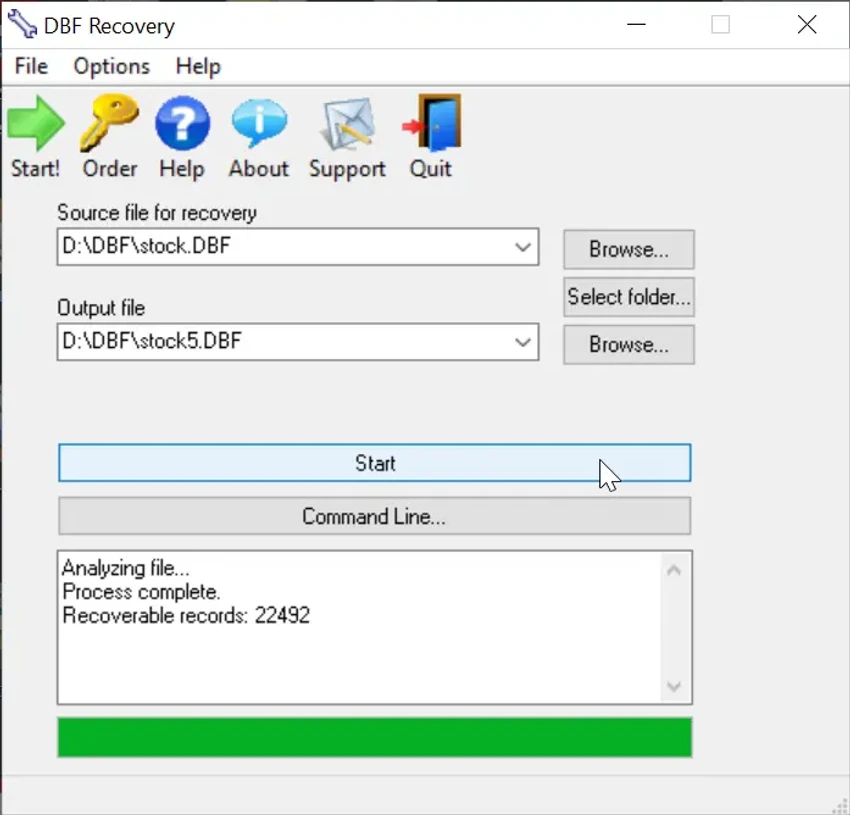

DBF Recovery is a specialized Windows utility designed to repair and restore damaged DBF database files. It supports popular database formats used in applications such as dBASE, FoxBase, FoxPro, and Visual FoxPro. The software focuses on simplifying database recovery for users who may not have advanced technical knowledge, offering an automated process to restore corrupted data and structures with minimal user interaction.
Key Features of DBF Recovery
- Repairs corrupted DBF database files automatically
- Supports dBASE, FoxBase, FoxPro, and Visual FoxPro formats
- Restores damaged database headers and data structures
- Option to recover deleted records
- Simple two-step recovery process (select file and output folder)
- Fully automated repair workflow
- AI-based detection of DBF format type
- Multilingual support (English, German, Italian, Spanish, French)
- Works with a wide range of DBF database versions
- Lightweight and straightforward interface
User Experience
During my experience with DBF Recovery, the software proved to be highly focused and straightforward. The interface is minimal, presenting only the essential options required to perform a database repair. Users simply select the damaged DBF file and choose an output location before starting the recovery process. Once initiated, the tool automatically analyzes the file structure and attempts to reconstruct corrupted database headers and data entries. This automated approach removes the need for manual configuration or technical database knowledge.
The option to recover deleted records adds additional value, especially in cases where data loss is partial rather than complete corruption. The process is largely hands-off, making it suitable for users who need a quick recovery solution without deep technical involvement. While the tool is specialized, it performs its intended function with a strong focus on simplicity and automation rather than advanced customization.
Who Should Use DBF Recovery?
- Database administrators working with legacy DBF systems
- Users recovering corrupted FoxPro or dBASE files
- Small businesses relying on DBF databases
- IT technicians handling database recovery tasks
- Users needing quick, automated DBF repair
Conclusion
DBF Recovery provides a simple and effective solution for restoring corrupted DBF database files. Its automated workflow and format support make it a practical tool for users who need fast recovery without complex procedures.


