ProfiCAD logo

ProfiCAD 13.5.8

  • User Rating:
    ★★★★★
    ★★★★★
    0.0 ★ 0Votes
  • Requirements:
    Windows
  • Version: 13.5.8
  • Latest updated: 3 weeks ago
  • License: Freemium  
  • Publisher: ProfiCAD
  • Size: 20 MB
× app stores

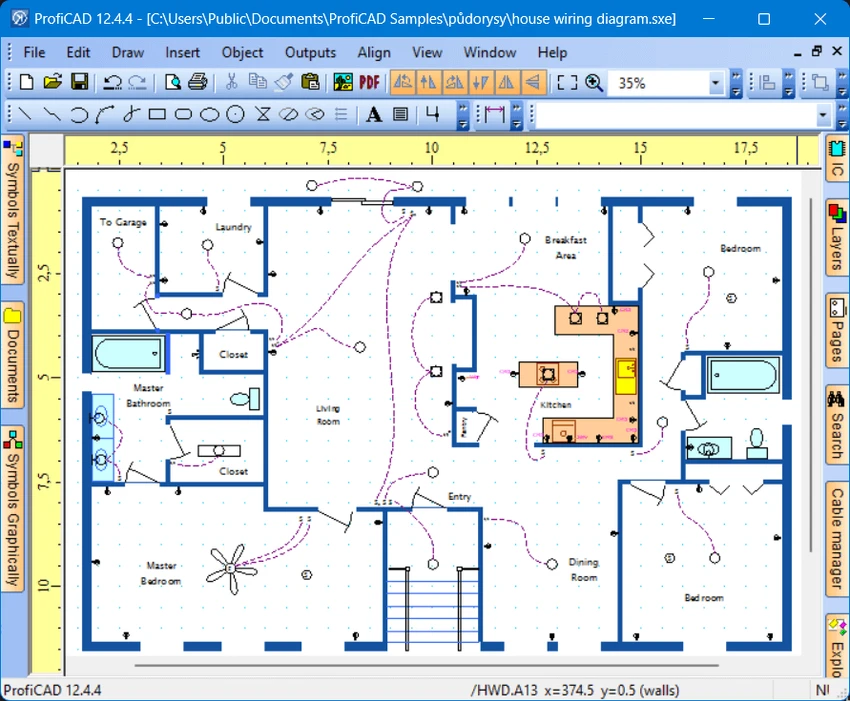
ProfiCAD is a lightweight CAD application designed for creating electrical and electronic diagrams, circuit schematics, control circuit drawings, and other technical diagrams. The software focuses on simplicity and ease of use, allowing users to create designs by placing electrical symbols and connecting them with wires. In addition to electrical schematics, ProfiCAD can also be used for pneumatic and hydraulic diagrams. The program includes more than one thousand symbols and provides tools for creating custom symbols, automatically numbering components, generating wire lists, creating bills of materials, and managing cross references. With its straightforward workflow and support for Windows 10 and Windows 11, ProfiCAD is designed for users who need an accessible solution for technical drawing tasks.

Features of ProfiCAD

  • Electrical and electronic diagram design: Create circuit diagrams, schematics, and control circuit drawings using a simple CAD workflow.
  • Large symbol library: Includes more than one thousand electrical symbols for different types of technical drawings.
  • Custom symbol creation: Create personal symbols using the built-in symbols editor or add customized elements to projects.
  • Automatic symbol numbering: Automatically assign numbers to components placed in drawings.
  • Wire and material lists: Generate netlists, wire lists, and bills of material for easier project management.
  • Cross-reference support: Manage connections between wires and related symbols belonging to the same component.
  • Multi-page diagrams: Create complex circuits across multiple pages while maintaining linked references.
  • Low resource usage: Designed to use low amounts of CPU, memory, and storage resources.

Interface and Usability

ProfiCAD focuses on making technical drawing accessible through a simple and practical interface. Instead of requiring complicated CAD operations, users can create diagrams by selecting symbols, placing them on the workspace, and connecting components with wires. The software’s workflow is centered around efficiency, making it easier to build electrical diagrams without unnecessary complexity. The included symbol library helps speed up the design process, while tools such as automatic numbering and reference links help users manage larger and more detailed projects.

For users who need a straightforward electrical CAD solution rather than a general-purpose design platform, ProfiCAD provides a focused environment for creating technical schematics.

Who Should Use ProfiCAD?

ProfiCAD is suitable for electrical engineers, technicians, students, and professionals who need to create electrical or technical diagrams. It can be useful for designing circuit schematics, control systems, pneumatic diagrams, hydraulic diagrams, and other structured technical drawings. Users who prefer a simple CAD application with dedicated electrical drawing features may find ProfiCAD a practical alternative to more complex engineering software.

Conclusion

ProfiCAD is a focused and easy-to-use CAD tool for creating electrical, electronic, and technical diagrams. Its simple symbol-based workflow, documentation features, and support for multiple diagram types make it a useful option for users who need to create clear and organized schematics.

Pros & Cons

✓

Pros

  • Simple workflow focused on electrical diagram creation
  • Includes more than one thousand built-in symbols
  • Supports custom symbol creation
  • Provides automatic numbering and documentation tools
  • Supports cross references between components and wires
  • Works with multi-page technical diagrams
  • Uses relatively low system resources
✕

Cons

  • Designed specifically for technical diagrams rather than general CAD projects

Frequently Asked Questions

What is ProfiCAD?

ProfiCAD is CAD software designed for creating electrical and electronic diagrams, control circuit drawings, and technical schematics. It can also be used for pneumatic and hydraulic diagrams.

What types of diagrams can be created with ProfiCAD?

ProfiCAD can be used to create electrical circuits, electronic schematics, control circuit diagrams, pneumatic diagrams, hydraulic diagrams, and other technical drawings.

Does ProfiCAD include electrical symbols?

Yes. ProfiCAD comes with more than one thousand symbols that can be used in technical drawings. Users can also create their own symbols using the symbols editor.

Can ProfiCAD automatically number components?

Yes. ProfiCAD supports automatic numbering of symbols placed in drawings, helping users organize components more efficiently.

Does ProfiCAD support large or complex diagrams?

Yes. ProfiCAD supports multi-page drawings and cross references, allowing users to manage complex circuits that extend across different pages.

What operating systems does ProfiCAD support?

According to the available system requirements, ProfiCAD supports Windows 10 and Windows 11.

Recommended apps [Freeware]:
  • StaticDesktopRuler 1.04 StaticDesktopRuler logo Windows utility that adds customizable on-screen rulers to improve alignment, navigation, and productivity on large monitors
  • Xreveal 2.9.6 Xreveal logo a lightweight disc decryption tool that removes supported Blu-ray, UHD, DVD, and CD protections for compatible media
  • PHP 8.5.8 PHP logo Develop dynamic websites with PHP, the free open-source scripting language for modern server-side web development
  • Dism++ 10.1.1002.2 Dism++ logo a lightweight Windows optimization tool for cleaning system files, managing startup items, updates, and system images
  • NWinfo 1.6.5 NWinfo logo View detailed Windows hardware and system information with NWinfo, a portable open-source diagnostic utility
  • SciTE (SCIntilla) 5.6.4 SciTE (SCIntilla) logo A lightweight text editor with syntax highlighting, search tools, and programming support for developers working with multiple languages.
Recommended apps [Shareware]:
  • Adobe Photoshop 2026 Adobe Photoshop logo powerful image editing and graphic design tool for creating, enhancing, and transforming photos, illustrations
  • Automatic PDF Processor 2.5.6 Automatic PDF Processor logo Automate PDF processing, renaming, printing, data extraction, and document organization on Windows.
  • DiskBoss 17.0.14 DiskBoss logo powerful Windows file management tool for disk analysis, duplicate cleanup, file synchronization, and data migration
  • Glary Malware Hunter 1.218.0.860 Glary Malware Hunter logo Windows security tool that scans, detects, and removes malware while offering system cleanup and performance optimization features
  • GlassWire 3.9.1102 GlassWire logo monitors network activity, alerts you to suspicious internet behavior, tracks bandwidth usage, and helps protect your privacy and security
  • PDF Architect 9.1.133.23134 PDF Architect logo Windows PDF editor for creating, editing, converting, and securing PDF documents efficiently.