Vovsoft IP Scanner logo

Vovsoft IP Scanner 1.1

  • User Rating:
    ★★★★★
    ★★★★★
    0.0 ★ 0Votes
  • Requirements:
    Windows
  • Version: 1.1
  • Latest updated: 2 weeks ago
  • License: Freeware  
  • Publisher: Vovsoft
  • Size: 4 MB
× app stores

Vovsoft IP Scanner is a network administration utility designed to help users discover devices, analyze IP addresses, and inspect available ports across local and external networks. Built for IT professionals, network administrators, and advanced users, the software provides a straightforward way to audit network environments, identify connected devices, and gather information about active services.

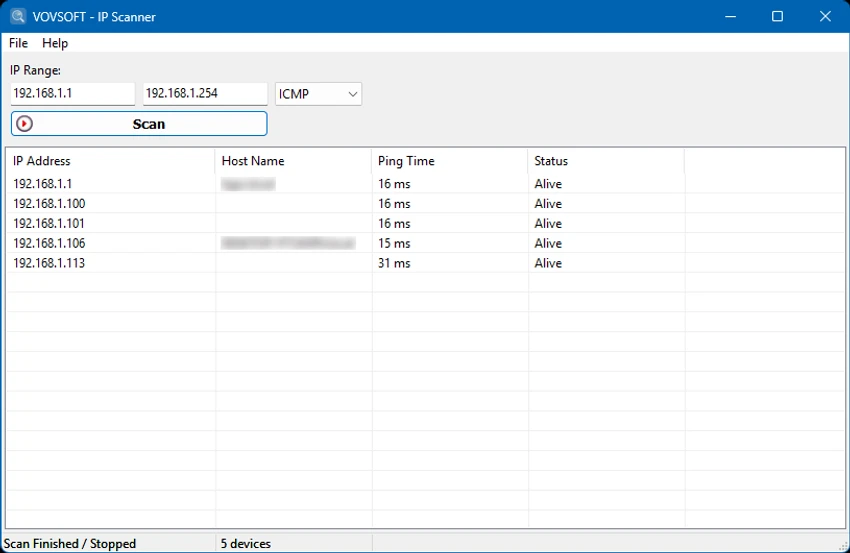
The application uses a multi-threaded scanning engine to improve performance by processing multiple IP addresses simultaneously instead of scanning them individually. This approach allows users to quickly analyze large subnets while maintaining efficient resource usage. Whether performing routine LAN checks or scanning external IP ranges, Vovsoft IP Scanner is designed to deliver fast and detailed network discovery. To improve device detection accuracy, the software supports three scanning methods: ICMP, ARP, and TCP. ICMP checks device availability through ping requests, ARP helps identify devices on local networks by matching IP addresses with MAC addresses, and TCP verifies connectivity when other methods may be restricted.

In addition to device discovery, Vovsoft IP Scanner includes a TCP-based port scanning feature. Users can define custom TCP port ranges to check whether services are open, closed, or filtered. This makes the tool useful for network troubleshooting, security audits, and understanding the structure of connected systems. Available in both installer and portable formats, Vovsoft IP Scanner provides a flexible solution for efficient network analysis.

Features of Vovsoft IP Scanner

  • Fast multi-threaded IP address scanning
  • Discover devices on LAN and WAN networks
  • Supports ICMP, ARP, and TCP detection methods
  • Identifies reachable network devices
  • Maps IP addresses to MAC addresses on local networks
  • Customizable TCP port scanning ranges
  • Detects open, closed, and filtered ports
  • Helps analyze network structures and active services
  • Suitable for network troubleshooting and audits
  • Available as an installer and portable application

Interface and Usability

Vovsoft IP Scanner focuses on providing a simple and efficient workflow for network discovery. Users can scan IP ranges and review detected devices and ports without needing complicated configuration steps. The application’s straightforward design makes it accessible for both experienced network administrators and users performing basic network checks.

The multi-threaded scanning engine improves responsiveness by handling multiple scan operations at the same time. The ability to choose between different detection methods and customize TCP port ranges gives advanced users more control over how network analysis is performed. With both portable and installed versions available, the software also provides flexibility for users who need a lightweight network utility they can run in different environments.

Who Should Use Vovsoft IP Scanner?

  • Network administrators managing LAN environments
  • IT professionals performing device discovery
  • Security teams conducting network audits
  • Technical users troubleshooting connectivity issues
  • Users who need a lightweight IP and port scanning tool

Conclusion

Vovsoft IP Scanner is a practical network analysis tool that combines fast device discovery with flexible port scanning capabilities. Its multi-threaded engine, support for ICMP, ARP, and TCP scanning, and customizable port checks make it useful for diagnosing networks and identifying active services.

Pros & Cons

✓

Pros

  • Fast multi-threaded scanning performance
  • Supports multiple discovery methods
  • Includes TCP port scanning
  • Works with LAN and WAN IP ranges
  • Portable version available
  • Simple interface suitable for quick network checks
✕

Cons

  • Designed mainly for technical users
  • Focuses on scanning rather than full network management
  • Advanced network knowledge may be required to interpret results

Frequently Asked Questions

What is Vovsoft IP Scanner used for?

Vovsoft IP Scanner is used to discover network devices, scan IP ranges, and analyze available ports on LAN and WAN networks. It helps users understand connected devices and active services.

Which scanning methods does Vovsoft IP Scanner support?

The software supports ICMP, ARP, and TCP scanning methods. These methods help identify reachable devices and improve detection accuracy in different network conditions.

Can Vovsoft IP Scanner scan open ports?

Yes. The application includes a TCP port scanner that can check whether selected ports are open, closed, or filtered.

Is Vovsoft IP Scanner suitable for home networks?

Yes. It can be used for basic home network discovery as well as professional network administration tasks.

Does Vovsoft IP Scanner support large network ranges?

Yes. Its multi-threaded scanning engine allows it to process multiple IP addresses at the same time, making it suitable for scanning larger subnets.

Is there a portable version of Vovsoft IP Scanner?

Yes. Vovsoft IP Scanner is available in both installer and portable formats, allowing users to choose the version that best fits their workflow.

Recommended apps [Freeware]:
  • InstallerClean 2.0.1 InstallerClean logo removes unnecessary Windows installer leftovers safely to free disk space with a simple cleanup process
  • SoundVolumeView 2.53 SoundVolumeView logo displays, manages, saves, and restores Windows audio settings with powerful profile and command-line support
  • Google Chrome 150.0.7871.125 Google Chrome logo fast, secure, and stable web browser with sandboxing, tab isolation, and a minimal interface for modern web applications
  • R-Photo 2.0.180048 R-Photo logo Restore media from HDDs, SSDs, SD cards, USB drives, RAID, and more
  • SQLite 3.53.3 SQLite logo compact, reliable embedded SQL database engine with zero configuration and serverless design
  • VeraCrypt 1.26.29 VeraCrypt logo Protect sensitive data with advanced disk and partition encryption, customizable algorithms, and strong password-based security.
Recommended apps [Shareware]:
  • Adobe After Effects 2026 Adobe After Effects logo advanced motion graphics, visual effects, compositing, and animation tools for creators.
  • Total Excel Converter 7.1.0.138 Total Excel Converter logo convert Excel, ODS, CSV, DBF, and more into PDF, DOC, HTML, SQL, and other formats on Windows.
  • VueScan 9.8.56 VueScan logo Enhance scanner functionality with advanced tools for scanning documents, photos, videos, and slides.
  • XL-Connector 3.7.18.0 XL-Connector logo Excel plugin for Salesforce data export, import, bulk updates, and metadata management.
  • JWIZARD Cleaner 1.11.2.3 JWIZARD Cleaner logo Clean junk files, browser data, and temporary files with JWIZARD Cleaner to free up disk space and optimize Windows performance
  • PanoramaStudio 4.2.0 PanoramaStudio logo Create seamless panoramic images with automatic photo stitching, editing tools, and export options for web, print, and presentations.