


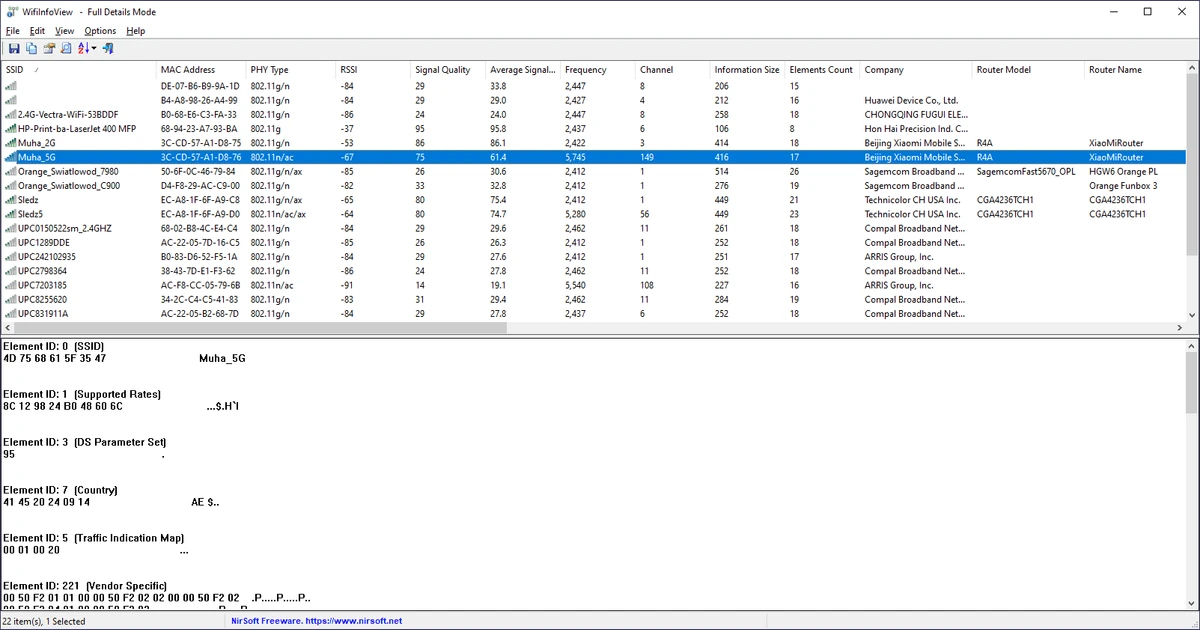

WifiInfoView is a lightweight network utility designed to scan and analyze wireless networks in your area. It provides detailed technical information about each detected Wi-Fi network, helping users understand signal strength, frequency usage, and router details. During my experience with it, I found it to be a fast and practical tool for basic Wi-Fi diagnostics without unnecessary complexity.
Features of WifiInfoView
- Scans all nearby wireless networks automatically
- Displays SSID (Network Name) and MAC Address
- Shows PHY type (802.11g, 802.11n, etc.)
- Provides RSSI and signal quality metrics
- Displays frequency and channel information
- Shows maximum connection speed of networks
- Identifies router manufacturer (company name)
- Displays router model and router name (when available)
- Hexadecimal view of Wi-Fi information elements
- Summary mode for grouping networks by:
- Channel number
- Router manufacturer
- PHY type
- Maximum speed
- Option to keep selected network always visible
- Compatible with Windows 11, Windows 10, Windows 8, and Windows 7
User Experience
After launching WifiInfoView, the tool immediately begins scanning for nearby wireless networks and lists them in a clear table format. Each network entry includes essential details such as signal strength, channel number, and frequency, making it easy to compare networks at a glance. Selecting a network reveals deeper technical information in the lower pane, which is particularly useful for advanced users who want to inspect raw Wi-Fi data. While this level of detail may not be necessary for everyday users, it provides valuable insight for troubleshooting or optimizing wireless performance.
The summary mode is a useful addition, allowing networks to be grouped based on channel usage or router manufacturer. This makes it easier to identify crowded channels or analyze network distribution in your area. Despite its technical nature, the interface remains lightweight and responsive, with real-time updates that reflect changes in network availability.
Who Should Use WifiInfoView?
- Users troubleshooting Wi-Fi connection issues
- Network administrators analyzing wireless environments
- Users checking signal strength and channel congestion
- IT technicians performing network diagnostics
- Advanced users interested in Wi-Fi technical details
- Anyone optimizing home or office wireless setup
Conclusion
WifiInfoView is a practical and efficient Wi-Fi network analyzer for Windows users who need detailed insight into nearby wireless networks. While it is more technical than consumer-focused Wi-Fi apps, it excels in providing accurate and real-time diagnostic data. If you want a lightweight tool to analyze Wi-Fi environments and troubleshoot connectivity issues, WifiInfoView is a strong choice.


