


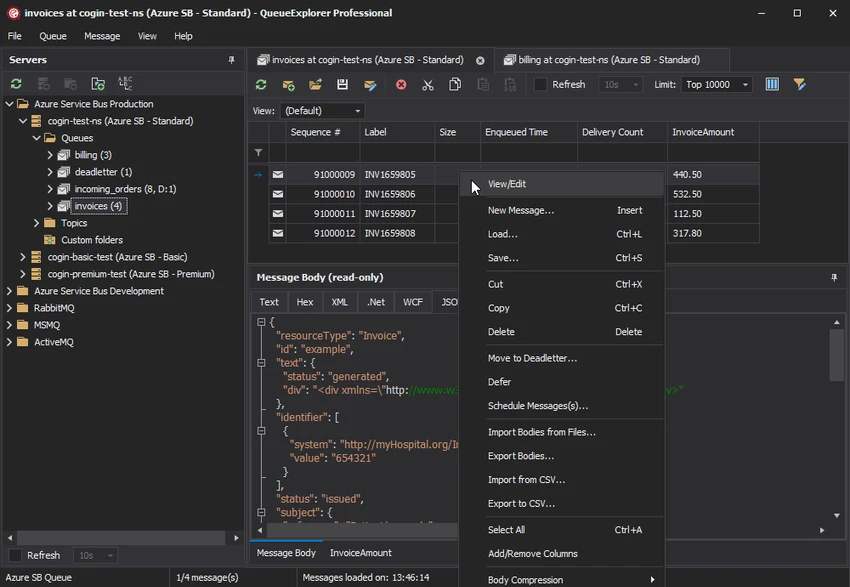

QueueExplorer is a specialized queue management and troubleshooting tool designed for developers, administrators, and support teams working with message-based systems. It provides a centralized interface for managing, inspecting, testing, and monitoring message queues across multiple messaging platforms.
Unlike built-in queue management consoles, QueueExplorer offers advanced capabilities for viewing message contents, troubleshooting failed messages, testing producers and consumers, backing up queue data, and monitoring system health in real time. One of its strongest advantages is support for multiple messaging systems from a single installation, including MSMQ, Azure Service Bus, RabbitMQ, and ActiveMQ.
Features of QueueExplorer
Multi-System Queue Support
- Supports MSMQ
- Supports Azure Service Bus
- Supports RabbitMQ
- Supports ActiveMQ
- Manage multiple messaging systems from a single interface
Message Inspection & Analysis
- View full message contents
- Edit message bodies
- Copy, move, and delete messages
- Save and load messages
- Analyze message headers and properties
- Support for XML message viewing
- Support for JSON message viewing
- Support for WCF message viewing
- Hex viewer support
- Text viewer with multiple encodings
Development & Testing Tools
- Create test messages
- Edit and resend messages
- Simulate third-party messaging scenarios
- Test producers and consumers independently
- Bulk message sending
- Performance and load testing
- Send thousands of messages for stress testing
Administration & Troubleshooting
- Investigate failed or poison messages
- Manage dead-letter queues
- Resend problematic messages
- Real-time queue monitoring
- Automatic refresh functionality
- Queue growth monitoring
- Status visibility across messaging systems
Search, Filter & Data Analysis
- Filter messages quickly
- Sort messages efficiently
- Extract business data using XPath
- Extract business data using JSON queries
- Extract business data using Regex
- Identify critical message content rapidly
Backup & Migration
- Backup messages to files
- Restore messages from backups
- Copy messages between queues
- Move messages between queues
- Compare queues and schemas
- Synchronize queue configurations
- Migrate queues between environments
- Backup schema configurations
- Duplicate queue configurations (Professional edition)
User Experience
QueueExplorer is designed for users who need more visibility and control over messaging systems than standard management tools typically provide. From the moment a queue connection is established, the software makes it easy to inspect messages, identify issues, and perform administrative tasks without relying on command-line utilities or platform-specific consoles.
For developers, the ability to view messages in multiple formats—including JSON, XML, WCF, text, and hexadecimal views—greatly simplifies debugging and validation. Being able to create, edit, and resend messages directly from the interface helps accelerate testing workflows and isolate integration issues. System administrators will appreciate the monitoring and troubleshooting capabilities. Dead-letter queues, failed messages, and queue growth can be monitored from a single dashboard, allowing faster diagnosis of production problems.
The software also proves valuable during migrations and deployments. Queue comparison, synchronization, backup, and restore features help ensure consistency between development, staging, and production environments. Perhaps the biggest usability advantage is its unified support for multiple message brokers. Teams managing different messaging technologies can work within a consistent interface rather than learning separate management tools for each platform.
Who Should Use QueueExplorer?
- Software developers
- Integration engineers
- System administrators
- DevOps teams
- Middleware specialists
- Enterprise support teams
- Organizations using message brokers and service buses
- Teams managing RabbitMQ, MSMQ, Azure Service Bus, or ActiveMQ environments
Conclusion
QueueExplorer goes far beyond traditional queue management tools by combining message inspection, troubleshooting, testing, monitoring, migration, and backup capabilities into a single application. Its support for multiple messaging platforms makes it especially valuable for organizations operating hybrid or evolving messaging infrastructures.


