


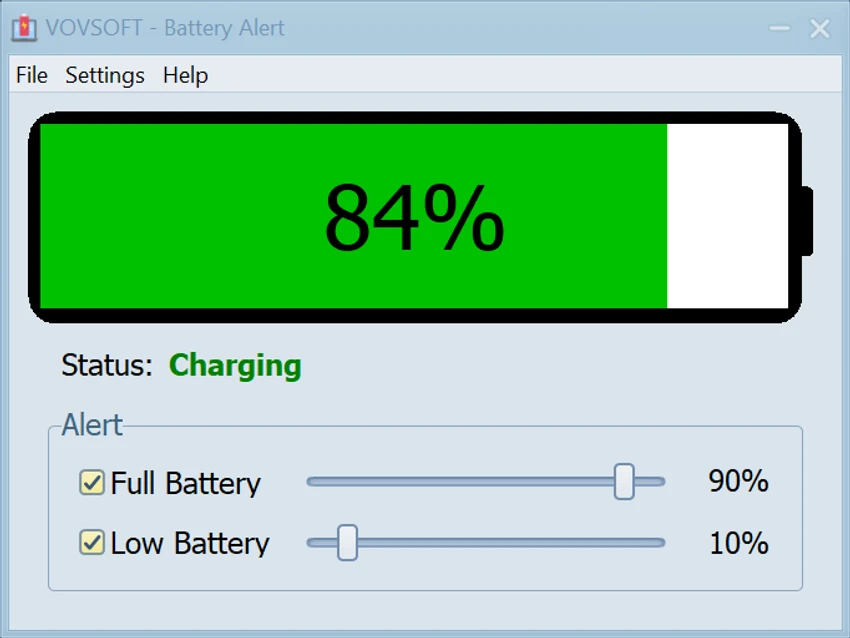

VOVSOFT Battery Alert is a lightweight Windows utility that helps users monitor their laptop's battery level and develop healthier charging habits. By notifying you when your battery reaches user-defined charge limits or falls below a specified percentage, the software aims to reduce unnecessary battery wear and help extend the lifespan of lithium-ion batteries. Its straightforward interface, real-time monitoring, and customizable alert thresholds make it an easy solution for anyone who wants better control over their laptop's charging routine.
Features of VOVSOFT Battery Alert
- Monitor battery percentage in real time.
- Display current power status, including Charging, Discharging, Fully Charged, and AC Power.
- Set a custom maximum battery charge level for charging alerts.
- Set a custom low battery threshold.
- Receive notifications when battery levels reach configured limits.
- Minimize to the system tray for background monitoring.
- Simple slider controls for adjusting alert percentages.
- Lightweight design with minimal system impact.
- Easy-to-use interface with virtually no learning curve.
User Experience
VOVSOFT Battery Alert focuses on doing one job well: helping users monitor their laptop battery and receive timely charging reminders. Installation is quick, and the interface is immediately understandable, displaying the current battery percentage along with the charging status. Setting up alert thresholds is particularly simple thanks to the intuitive slider controls. I found it easy to choose both a preferred maximum charge level—such as 80% or 90%—and a low battery warning that provides enough time to save work before the battery becomes critically low.
The application runs quietly in the system tray after setup, allowing it to monitor battery status without interrupting normal work. When an alert is triggered, it serves as a helpful reminder to either unplug the charger or connect it, depending on the battery level. One limitation is the lack of notification customization. While the alerts themselves are useful, users cannot currently choose different notification styles or behaviors. Additional customization options would make the experience even more flexible. Despite that limitation, the application remains lightweight, reliable, and easy to integrate into a daily charging routine.
Who Should Use VOVSOFT Battery Alert?
- Laptop users who want to preserve battery health.
- Students and professionals who work on battery power frequently.
- Users who prefer charging only to a specific battery percentage.
- Anyone looking for a lightweight battery monitoring utility.
- Windows users seeking simple battery notifications without unnecessary complexity.
Conclusion
VOVSOFT Battery Alert is a straightforward utility that makes it easier to monitor battery levels and maintain healthier charging practices. By providing timely reminders when your battery reaches user-defined charge limits, it encourages habits that may help reduce long-term battery wear.


