


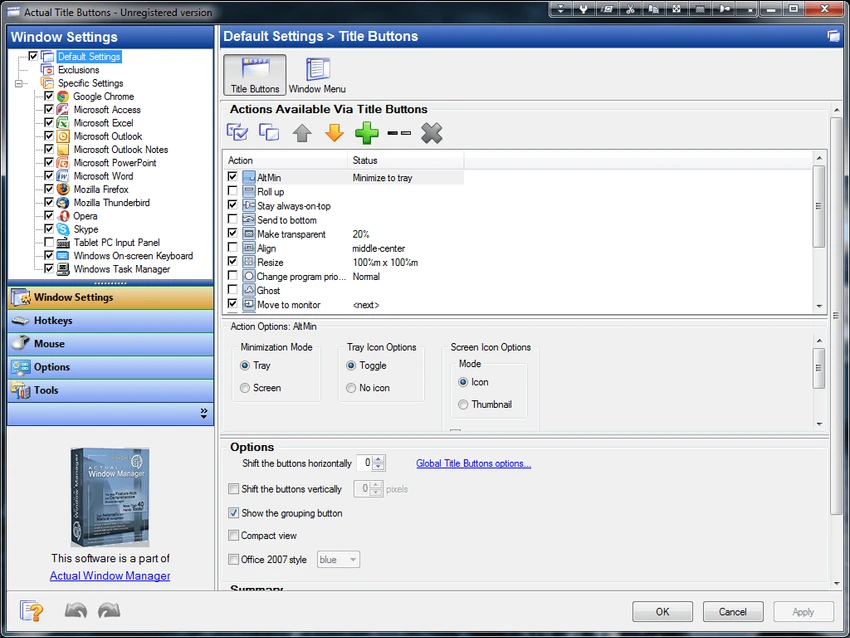

Actual Title Buttons is a Windows utility designed to extend the standard window control system by adding additional buttons directly into the title bar of any application. Instead of relying only on the default minimize, maximize, and close options, this tool introduces a set of advanced controls that improve how users interact with windows.
The software enhances productivity by giving users quick access to hidden or less commonly used Windows features. These controls appear as native-looking buttons and can be customized per application or globally across all windows. It is especially useful for users who frequently manage multiple applications and need faster access to window-level actions.
Features of Actual Title Buttons
- Add extra control buttons to any window title bar
- Make windows semi-transparent for better multitasking
- Roll up windows to show only the title bar
- Minimize windows directly to the system tray
- Set any window to always stay on top
- Resize windows to optimal or predefined sizes quickly
- Move windows to specific screen positions instantly
- Change application priority in real time
- Enable “ghost mode” to allow clicks to pass through windows
- Move windows between monitors in multi-display setups
- Copy window content directly to clipboard
- Paste clipboard content into selected windows
- Customize which buttons appear for each application
- Apply different button sets per program
- Native integration with Windows themes for a consistent look
Interface and Usability
Actual Title Buttons integrates directly into the Windows interface by adding new icons to each window’s caption bar. These buttons blend with standard Windows controls, making them easy to recognize and use. Users can configure which buttons appear globally or assign specific behaviors to individual applications. This flexibility allows for tailored workflows depending on the type of software being used. Although the feature set is powerful, the interface remains lightweight and unobtrusive. Most actions are performed directly from window title bars, minimizing the need for additional menus or settings panels.
Who Should Use Actual Title Buttons?
- Users who manage multiple applications at once
- Office professionals working with documents and browsers
- Developers and technical users
- Designers handling multiple tools and windows
- Multi-monitor users who need quick window control
- Anyone looking to improve desktop efficiency
Conclusion
Actual Title Buttons is a practical and powerful enhancement tool for Windows users who want faster and more flexible window control. By extending standard title bar functionality with advanced features like transparency, always-on-top, and system tray minimization, it significantly improves multitasking efficiency.


