Shortcut Virus Removal Tool logo

Shortcut Virus Removal Tool 2.2.0

  • User Rating:
    ★★★★★
    ★★★★★
    0.0 0Votes
  • Requirements:
    Windows
  • Version: 2.2.0
  • Latest updated: 2 weeks ago
  • License: Open Source  
  • Publisher: Emir Alp Koçak
  • Size: 0.2 MB
× app stores

Shortcut Virus Removal Tool (SVRT) is a portable security utility designed to remove shortcut virus infections from USB flash drives, external hard drives, SSDs, and Windows computers. Shortcut viruses commonly hide original files and replace them with malicious shortcuts, making it appear as though data has disappeared. SVRT helps restore access to hidden files while removing the malware responsible for the infection.

The application is designed for simplicity, allowing users to clean infected USB drives with just a few clicks. After selecting the target drive, users can start the cleaning process, which removes malicious shortcuts, suspicious files, and scripts associated with shortcut virus infections. The software can also delete autorun malware commonly found on removable storage devices.

Beyond malware removal, SVRT includes repair features that help reverse unwanted system changes caused by infections. It can restore hidden files, repair Windows Registry settings, and undo modifications made by malware that interfere with normal system behavior.

As a portable application, Shortcut Virus Removal Tool can be run without a traditional installation, making it convenient for technicians and users who regularly clean removable storage devices. The software supports multiple languages and is compatible with Windows XP and later, requiring Microsoft .NET Framework 4.0.

Features of Shortcut Virus Removal Tool (SVRT)

  • Remove shortcut virus infections
  • Clean USB flash drives and external storage devices
  • Recover files hidden by malware
  • Delete malicious shortcut files
  • Remove suspicious files and scripts
  • Delete autorun viruses
  • Repair Windows Registry changes caused by malware
  • Undo unwanted system modifications
  • Portable application
  • Simple one-click cleaning process
  • Supports multiple languages
  • Compatible with Windows XP and later
  • Requires .NET Framework 4.0

Interface and Usability

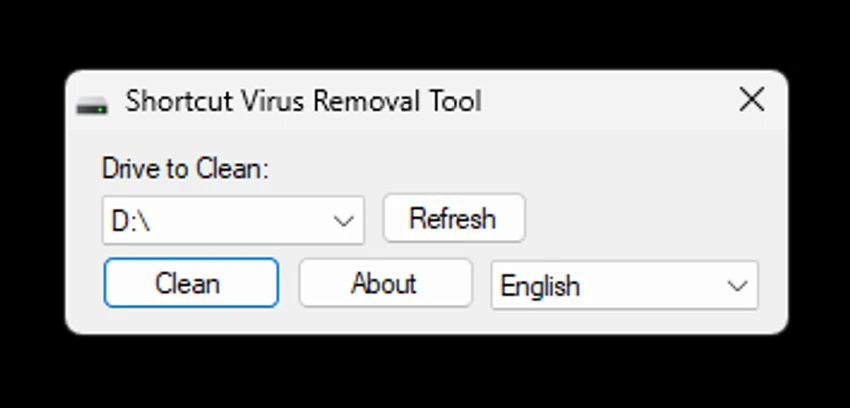
Shortcut Virus Removal Tool features a simple interface designed for quick malware removal. Users only need to select the affected USB drive or storage device and click the Clean button to begin the repair process.

The straightforward workflow makes the tool accessible even for users with limited technical experience. If additional system permissions are required, the application can be run with administrator privileges to improve compatibility with certain cleaning operations. Because the program is portable, it is also convenient for technicians who need to clean multiple computers or removable drives without installing additional software.

Who Should Use Shortcut Virus Removal Tool?

  • Users with infected USB flash drives
  • People recovering hidden files after malware infections
  • IT technicians cleaning removable storage devices
  • Windows users dealing with shortcut virus infections
  • Anyone needing a portable USB malware removal tool

Conclusion

Shortcut Virus Removal Tool provides a focused solution for one of the most common USB malware problems: shortcut virus infections. Its ability to restore hidden files, remove malicious shortcuts, delete autorun threats, and repair Windows settings makes it a useful recovery tool for infected removable drives. While it is not intended to replace a full antivirus application, SVRT is an effective utility for cleaning shortcut virus infections and recovering affected USB storage devices. If you frequently work with removable media or need a portable USB cleaning tool, Shortcut Virus Removal Tool is worth keeping in your toolkit.

Pros & Cons

Pros

  • Removes shortcut virus infections
  • Restores hidden files
  • Deletes autorun malware
  • Repairs registry changes caused by malware
  • Portable and lightweight
  • Simple one-click operation
  • Supports multiple languages

Cons

  • Designed specifically for shortcut virus infections
  • Requires .NET Framework 4.0
  • Some cleaning operations may require administrator privileges

Frequently Asked Questions

What is Shortcut Virus Removal Tool used for?

Shortcut Virus Removal Tool is used to remove shortcut virus infections from USB drives and Windows computers while restoring hidden files and repairing system changes caused by malware.

Can SVRT recover files hidden by a shortcut virus?

Yes. The tool can restore files that were hidden by shortcut virus infections, allowing users to access their original data again.

Does Shortcut Virus Removal Tool remove autorun viruses?

Yes. The application can detect and delete autorun malware found on USB storage devices.

Does SVRT require installation?

No. Shortcut Virus Removal Tool is a portable application and can be run without a traditional installation.

Why should I run Shortcut Virus Removal Tool as Administrator?

Some malware removal and registry repair operations require elevated Windows permissions. Running the program as Administrator may improve its ability to clean infected systems.

Can Shortcut Virus Removal Tool replace an antivirus program?

No. SVRT is designed specifically to remove shortcut virus infections and repair related issues. For broader protection against other types of malware, a full antivirus or anti-malware solution is still recommended.

Recommended apps [Freeware]:
  • darktable 5.6.0 darktable logo a free open-source RAW photo editor and photography workflow tool for professional image management
  • PointerStick 7.17 PointerStick logo a virtual pointer to Windows desktops, helping presenters highlight mouse movements on large screens
  • Claude Desktop 1.21459.0 Claude Desktop logo Anthropic's AI assistant to Windows and macOS for writing, coding, research, and file analysis
  • Kali Linux 2026.2 Kali Linux logo a powerful penetration testing OS with tools for cybersecurity, digital forensics, and ethical hacking
  • GetPixelColor 3.55 GetPixelColor logo Identify exact pixel colors on Windows with GetPixelColor, a lightweight tool supporting RGB, RGBA, and HLS color values
  • HWiNFO 8.50 HWiNFO logo Analyze hardware components, monitor system sensors, generate detailed reports, and evaluate PC performance with a free diagnostic tool.
Recommended apps [Shareware]:
  • Topaz Photo 1.6.1 Topaz Photo logo advanced AI to sharpen photos, remove noise, and enhance image quality with ease
  • Syncovery 12.3.4 Syncovery logo fast backup and file synchronization tool with real-time sync, versioning, and advanced automation features
  • Total Image Converter 8.5.0.322 Total Image Converter logo Windows tool for converting, resizing, and editing images in bulk with support for RAW, TIFF, PSD, and more
  • Smart Game Booster 6.0.0.1164 Smart Game Booster logo Optimize Windows, monitor FPS and temperatures, and reduce lag with one click
  • Argente Registry Cleaner 4.0.8.7 Argente Registry Cleaner logo Clean invalid registry entries safely with backup protection, multiple scan modes, and an easy-to-use Windows maintenance tool.
  • ManyCam 9.3.0.11 ManyCam logo Enhance video calls and live streams with webcam effects, screen recording, voice changing, and multi-platform broadcasting tools.